
Real-time bookkeeping is defined as the continuous, automated recording of financial transactions as they occur, giving you an always-current view of your business finances. The industry term for this practice is real-time accounting, and it replaces the traditional batch bookkeeping model that typically lags 30–60 days behind actual activity. That delay is not just inconvenient. It means you are making decisions based on financial data that is already out of date. Cloud-based platforms, automated bank feeds, and API-driven integrations now make continuous bookkeeping accessible to businesses of every size, not just large enterprises with dedicated finance teams.
What is real-time bookkeeping and how does it differ from traditional methods?
Real-time bookkeeping updates your ledger the moment a transaction happens, whether that is a card payment, a supplier invoice, or a payroll run. Traditional batch bookkeeping collects transactions over a period and then processes them all at once, usually at month end. The result is a financial picture that is always weeks behind reality.
The practical difference is significant. With batch bookkeeping, a cash shortfall might not appear in your records until three or four weeks after it began. With real-time accounting, that shortfall surfaces immediately, giving you time to act. Automation reduces errors from manual data entry and can detect cash shortfalls weeks earlier than traditional methods allow.
The shift is not just technical. It changes what bookkeeping is for. Financial records stop being a historical archive and start becoming a live management tool.

How does real-time bookkeeping work in practice?
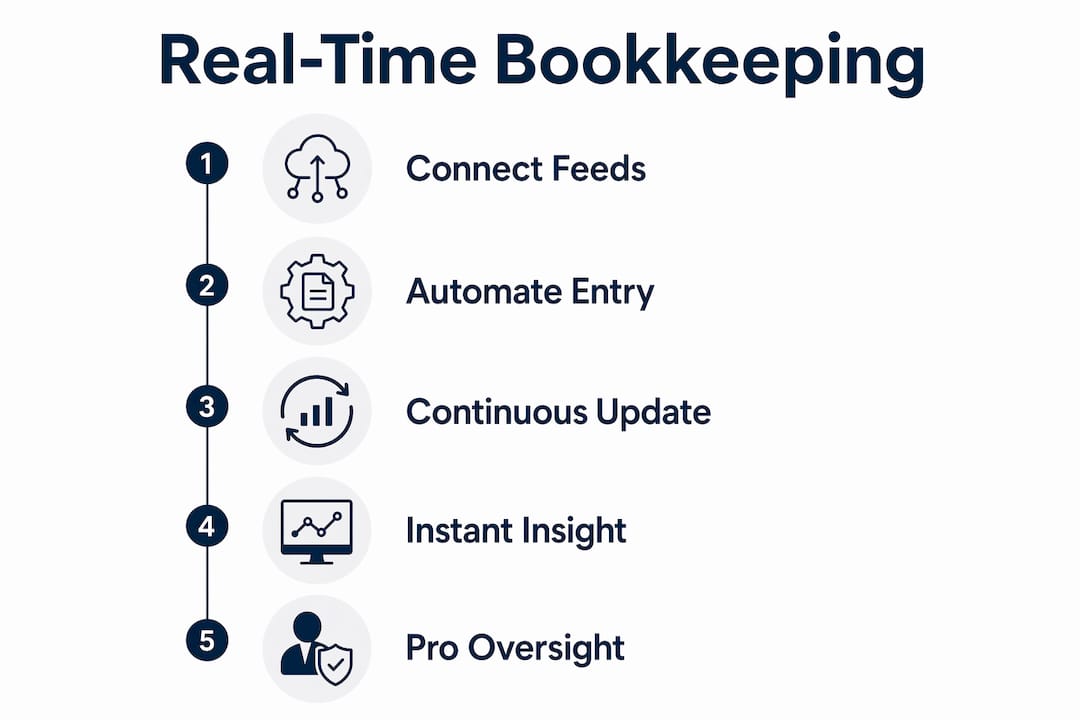
The mechanics rely on connecting your core financial systems so that data flows automatically into your accounting ledger. The key components are:
- Bank feeds: Your bank account syncs directly with your accounting software, pulling in transactions daily or in near real time.
- Point-of-sale integration: Sales data from your till or e-commerce platform posts directly to your ledger as each sale completes.
- Payroll and invoicing: Payroll runs and issued invoices trigger ledger entries automatically via API connections.
- Automated categorisation rules: The software applies pre-set rules to classify transactions, so a payment to a known supplier is coded to the correct expense account without manual input.
- Continuous reconciliation: Rather than a month-end sprint, bank reconciliation becomes a daily task that can take as little as two minutes because transactions are matched as they arrive.
The underlying architecture triggers sub-ledger to general ledger reconciliations immediately upon each transactional event, rather than waiting for period-end calculations. That means your profit and loss account, balance sheet, and cash flow statement all reflect current reality at any given moment.
Pro Tip: Set up automated categorisation rules for your top 20 recurring transactions first. Getting those right covers the majority of your daily volume and reduces the manual review workload significantly.
Professional oversight remains non-negotiable even with full automation. Automated rules misclassify transactions, duplicates slip through, and bank feed connections occasionally drop. A bookkeeper or accountant reviewing the live data regularly catches these issues before they compound.
What are the main benefits of real-time bookkeeping for small businesses?
The advantages of live bookkeeping go well beyond having tidy records. For small business owners, the practical gains are immediate and measurable.
Instant financial visibility. You can check your cash position, outstanding invoices, and current profit margin at any point in the month, not just after the books are closed. This matters when you are deciding whether to take on a new contract, hire a member of staff, or delay a supplier payment.
Earlier warning on cash flow. Automated categorisation allows cash shortfalls to be identified weeks in advance rather than discovered at month end. For a small business, that extra time is often the difference between managing a shortfall and missing payroll.
Fewer manual errors. Removing the need to key transactions in by hand cuts the error rate substantially. Fewer errors mean less time correcting the books and more reliable data for decisions.
Time reallocation. Companies adopting real-time accounting report a very short payback period because the hours saved on manual tasks are redirected to higher-value work such as planning, pricing analysis, and client development.
Better forecasting. Live data produces more accurate cash flow forecasts. When your actuals update continuously, your projections start from a reliable base rather than a figure that is already weeks old.
The cumulative effect is a shift in how you relate to your finances. Adopting real-time bookkeeping gives small business owners a competitive advantage through timely, accurate information that was previously available only to businesses with large finance departments.
What are the practical steps to implement real-time bookkeeping?
Moving from batch to continuous bookkeeping does not require a complete overhaul overnight. A phased approach works well for most small businesses.
-
Audit your current setup. List every system that touches your finances: your bank accounts, payment processors, invoicing tools, payroll software, and expense management apps. Identify which already offer integrations or API connections.
-
Choose cloud-based accounting software. Select a platform that supports live bank feeds, open API integrations, and automated categorisation rules. The software is the hub that all other systems connect to.
-
Connect your bank feeds first. Bank feeds are the highest-impact integration. Once your transactions flow in automatically, you have the foundation for everything else.
-
Add integrations progressively. Connect your invoicing platform, then payroll, then your point-of-sale system. Prioritising key integrations in stages eases the transition and reduces the risk of configuration errors compounding.
-
Configure automated rules. Build categorisation rules for recurring transactions. Review and refine these rules monthly for the first three months until the automation is reliable.
-
Assign professional oversight. Designate a bookkeeper or accountant to review the live data at least weekly. Automation handles volume; human review handles accuracy and compliance.
Pro Tip: Do not migrate historical data and set up live feeds simultaneously. Get your live feeds running cleanly first, then import historical records. Mixing the two creates reconciliation headaches that take far longer to untangle than the time you saved.
What common challenges should small business owners be aware of?
Real-time bookkeeping is not a set-and-forget solution. Several practical challenges catch business owners off guard.
- Automation is not error-free. Automated workflows reduce errors but do not eliminate them. Misclassifications, duplicate imports, and broken feed connections all require human review to catch. Treating the dashboard as infallible is the most common mistake.
- Not every business needs full real-time setup immediately. Gradual adoption is practical and effective. A sole trader with low transaction volume may gain more from connecting a single bank feed than from building a complex multi-system integration from day one.
- Integration complexity varies. Older accounting systems and some industry-specific software do not support open APIs. You may need middleware tools or manual import processes for certain data sources until you migrate to a more connected platform.
- Dashboard dependency without data literacy. A live dashboard showing a healthy cash balance can mask underlying issues such as outstanding VAT liabilities or unreconciled receipts. Understanding what the numbers represent matters as much as having access to them.
- Change management takes time. Staff accustomed to month-end routines need training to work with continuously updated records. The process change is often harder than the technical setup.
Periodic review remains necessary even with continuous updating. A weekly check of categorisations and a monthly reconciliation review keep the data trustworthy over time.
Key takeaways
Real-time bookkeeping transforms financial records from a historical archive into a live management tool, giving small business owners the visibility to act on current data rather than last month's figures.
| Point | Details |
|---|---|
| Core definition | Real-time bookkeeping records transactions continuously, replacing batch processes that lag 30–60 days. |
| How it works | Bank feeds, API integrations, and automated categorisation rules post ledger entries as transactions occur. |
| Primary benefit | Cash shortfalls surface weeks earlier, giving owners time to respond before a problem becomes critical. |
| Implementation approach | Connect bank feeds first, then add integrations progressively, with professional oversight from the start. |
| Key limitation | Automation reduces errors but does not eliminate them. Regular human review is required to maintain accuracy. |
Real-time bookkeeping changed how I think about financial data
The most underrated shift that comes with real-time accounting is not the time saving. It is the change in mindset. When your books are always current, you stop treating financial data as something you check once a month and start treating it as something you manage actively.
I have seen small business owners go from dreading their monthly accounts to checking their cash position before making a hiring decision or signing a supplier contract. That is not a technology story. It is a confidence story. Live financial data transforms financial information from a historical record into a tool for confident, data-driven leadership.
The advice I give most often is to resist the urge to automate everything at once. Pick the one integration that causes you the most pain, usually the bank feed, and get that working reliably before adding complexity. Most of the value comes from that first connection. The rest is refinement.
What I find genuinely exciting is how accessible this has become. The Ailedger directory covers tools across every price point, from entry-level cloud platforms suited to sole traders to full-featured systems for growing firms. The gap between what a small business owner can access and what a large finance team uses has narrowed considerably. That is worth paying attention to.
— aaron
Ailedger helps you find the right real-time bookkeeping tools
Choosing the right software is where most small business owners get stuck. The options are wide, the feature lists overlap, and the pricing structures are rarely straightforward.
Ailedger's software finder tool cuts through that noise. It matches your practice size, transaction volume, and integration requirements to the platforms most likely to fit, without you having to read through a dozen comparison pages. Whether you are connecting your first bank feed or migrating a multi-system setup, the finder gives you a shortlist grounded in real-world use. If you want deeper guidance on AI-powered bookkeeping workflows, Ailedger Pro covers the tools and automations that accounting professionals are actually using right now.
FAQ
What is the difference between real-time bookkeeping and traditional bookkeeping?
Traditional bookkeeping collects and processes transactions in batches, typically at month end, creating a 30–60 day lag. Real-time bookkeeping records each transaction as it occurs, so your financial data is always current.
How does real-time bookkeeping work for a small business?
Cloud accounting software connects to your bank feeds, invoicing tools, and payroll system via APIs. Transactions post to your ledger automatically as they happen, with categorisation rules handling routine coding.
Does real-time bookkeeping still require an accountant?
Yes. Automation reduces manual entry but does not replace professional judgement. An accountant or bookkeeper is needed to review categorisations, catch errors, and ensure compliance.
How long does it take to set up real-time bookkeeping?
Basic setup, connecting a bank feed and configuring core categorisation rules, typically takes a few hours. Full multi-system integration with payroll and invoicing can take several weeks depending on the complexity of your existing tools.
Is real-time bookkeeping suitable for very small businesses?
Yes. Gradual adoption means even a sole trader benefits from connecting a single bank feed. You do not need a complex setup to gain meaningful visibility over your cash position.