Accounts payable automation is software that digitises the invoice-to-pay process, from the moment an invoice lands to the moment it's paid and reconciled in the ledger. It replaces manual data entry, paper trails and email approval chains with structured workflows that capture, match and route invoices automatically.
The one-line verdict: adopt it once your team processes more than roughly 200 to 300 invoices a month, or when late payments and manual matching errors are already costing you supplier goodwill and staff hours. Below that volume, the ROI case still exists but takes longer to prove out.
What finance teams notice first:
- Speed: invoices move from inbox to payment in days rather than weeks.
- Fewer errors: automated three-way matching catches discrepancies before they become disputes.
- Visibility: every invoice has a status, an owner and an audit trail, so nobody has to ask "where is this one?"
Key Takeaways
Accounts payable automation works best when integration depth and approver usability outrank feature volume in the buying decision.
| Point | Details |
|---|---|
| Define your adoption trigger | Consider automation seriously once monthly invoice volume passes roughly 200 to 300. |
| Track four core KPIs | Monitor cycle time, touchless rate, cost per invoice and exception rate from day one. |
| Prioritise integration over features | A tool with deep ERP integration beats a feature-heavy tool that sits outside your finance stack. |
| Pilot before you scale | Run a technical pilot then a small finance pilot before any full department rollout. |
| Keep AI on a human-in-the-loop leash | Set confidence thresholds and audit AI-suggested coding rather than trusting it blindly. |
| Use The AI Ledger to shortlist | The AI Ledger's directory, comparisons and 30 second tool finder narrow 100+ AI tools to a workable shortlist. |
Table of Contents
- What are the benefits of accounts payable automation?
- How does the invoice-to-pay workflow actually work?
- Which features actually matter versus nice-to-haves?
- How do you evaluate and choose the right AP automation software?
- What does a realistic implementation plan look like?
- Where does AI actually help in accounts payable, and where does it fail?
- Why trust this guide on AP automation?
- What most buyers get wrong about AP automation
- Find the right AP automation tool without the guesswork
- Where to read more on AP automation and compliance
- Sources
What are the benefits of accounts payable automation?
The headline benefits fall into three buckets: lower cost per invoice, faster processing, and better supplier relationships. Suppliers get paid on time more consistently, which reduces the awkward chasing calls and, over time, tends to improve the terms they're willing to offer.
Vendors selling AP automation software often claim dramatic percentage improvements in processing time and error rates. Treat those figures as directional rather than guaranteed. Every finance function starts from a different baseline, and the only number that matters is the one you measure in your own environment before and after rollout.
Pro Tip: Run a two-week manual audit before you automate anything. Time how long it actually takes staff to key in, match and approve a typical invoice. Without that baseline, you can't prove ROI to your CFO later.
The KPIs worth tracking from day one:
- Cycle time: days from invoice receipt to approval and payment.
- Touchless rate: the percentage of invoices that need zero human intervention.
- Cost per invoice: total AP department cost divided by invoice volume.
- Exception rate: the share of invoices flagged for mismatches, missing POs or coding queries.
Most teams see meaningful movement on cycle time and touchless rate within three to six months of a properly configured rollout. Exception rates often rise briefly during the first month as the system flags issues manual processing used to quietly absorb, then fall as supplier data and coding rules get cleaned up.
How does the invoice-to-pay workflow actually work?
Automation touches every stage of the invoice-to-pay chain, and understanding where each piece fits makes vendor comparisons far easier.
- Intake: invoices arrive by email, supplier portal upload, EDI feed, or increasingly through e-invoicing standards, where structured data replaces PDF scanning entirely. UK policy has been moving in this direction for some time; the government's own consultation on e-invoicing adoption signals continued momentum towards structured formats across UK businesses and the public sector.
- Data capture: optical character recognition (OCR) or template-free AI extraction pulls out supplier name, invoice number, line items, VAT and totals. Template-free extraction handles new supplier formats without manual configuration, which is the difference between a tool that scales and one that needs constant babysitting.
- Matching: two-way matching checks invoice against purchase order; three-way matching adds the goods receipt note. Mismatches get routed to an exception queue rather than blocking the whole batch.
- Approval routing: workflow rules send invoices to the right approver based on amount, cost centre or department, with automatic escalation if someone sits on it too long.
- Payment execution: approved invoices batch into payment runs, whether by BACS, Faster Payments or card, with remittance advice generated automatically.
- Reconciliation and posting: paid invoices post back to the general ledger, closing the loop without a second manual entry.
The critical point most buyers underestimate is step six. A tool that captures and matches beautifully but posts messily into your ERP just moves the manual work downstream instead of removing it. The AI Ledger's guide to finance automation workflow types breaks down which workflow patterns suit different invoice volumes and ERP setups, which is worth reading before you shortlist anything.
Which features actually matter versus nice-to-haves?
Not every feature on a vendor's brochure earns its place in your stack. Split the list into what you genuinely need and what's a bonus.
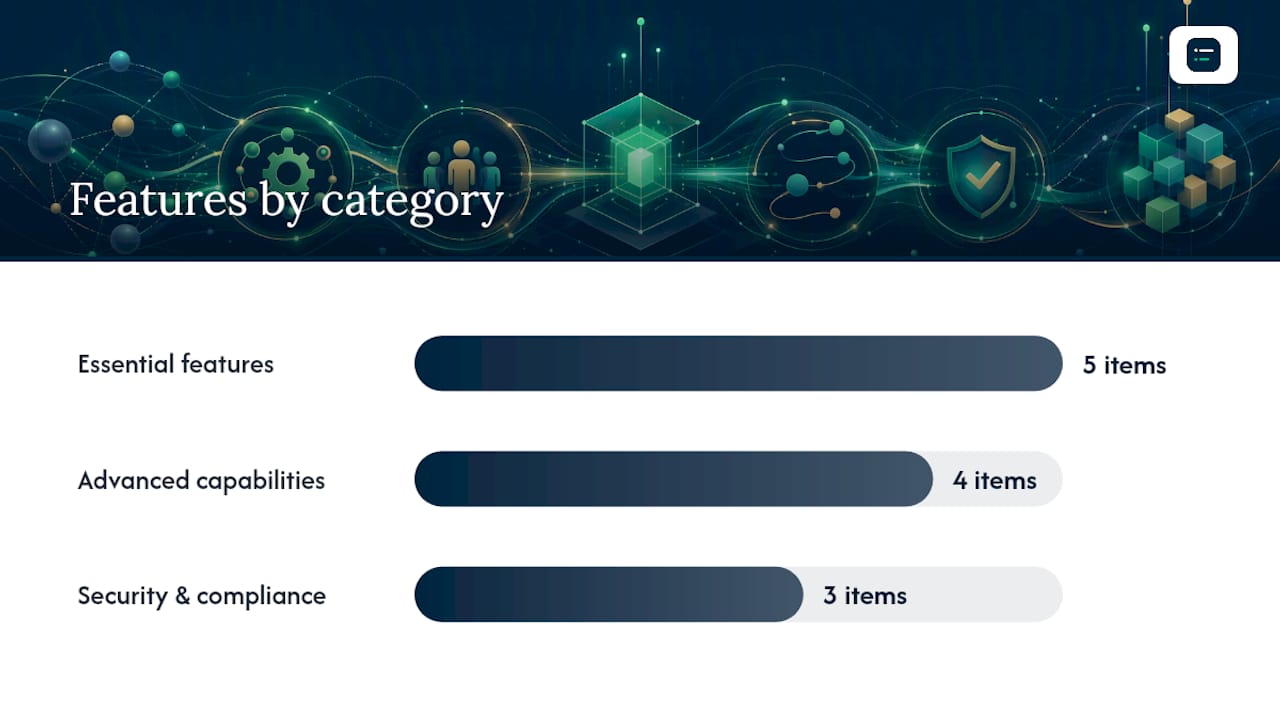
Essential features every credible AP automation platform should offer:
- Invoice capture with OCR or AI extraction across PDF, email and paper formats.
- Validation rules that check VAT numbers, duplicate invoice numbers and supplier bank details.
- Configurable approval workflows with escalation and delegation.
- A supplier portal for invoice status queries and self-service updates.
- A complete audit trail showing who approved what, and when.
Advanced capabilities that separate mature platforms from basic tools:
- AI-driven coding that learns your chart of accounts and suggests GL codes automatically.
- Duplicate and fraud detection that flags suspicious payment requests before they reach the bank.
- Automated payment execution with multi-currency and multi-entity support.
- Analytics dashboards tracking cycle time, touchless rate and spend by category in real time.
Security and compliance deserve their own checklist item, not an afterthought. Verify encryption at rest and in transit, role-based access control, and immutable audit logs that satisfy your external auditors. If a vendor can't answer these questions clearly in a demo, that's a signal worth noting before you sign anything.
How do you evaluate and choose the right AP automation software?
Feature lists are the easy part of vendor comparison. The decision that actually determines whether your rollout succeeds comes down to two things: integration depth and usability. Analysts at SAP Concur have made the same point repeatedly. A tool with fifty features that sits outside your finance stack, forcing manual exports and reconciliation, delivers less value than a simpler tool that talks natively to your ERP.
A prioritised checklist for evaluation:
- Integration depth first: confirm native connections to your accounting system (Xero, QuickBooks, Sage, NetSuite or similar) with two-way data sync, not just a one-off CSV export. The AI Ledger's guide to connecting ERP systems explains what proper integration should look like versus a bolt-on export tool.
- Usability for approvers: the people approving invoices are rarely AP specialists. If the mobile approval flow takes more than thirty seconds to understand, adoption will stall.
- Implementation timeline and vendor responsibilities: ask exactly who configures matching rules, who maps your chart of accounts, and how long a realistic go-live takes for your invoice volume.
- Licensing model and total cost of ownership: per-invoice pricing suits low-volume teams; per-user or flat platform fees suit high-volume ones. Factor in implementation fees, not just the monthly subscription.
- Security certifications and data residency: ask where invoice data is stored, whether it satisfies your data protection obligations, and what happens to your data if you leave.
Questions worth putting directly to a vendor during a demo: What happens when an invoice doesn't match any PO? How does the system handle a supplier that sends invoices in three different formats? Can we export a full audit trail to our auditors without a support ticket? Vague answers to any of these are a red flag worth taking seriously.
What does a realistic implementation plan look like?
Rushing a full rollout across every supplier and cost centre is the most common way AP automation projects underdeliver. A phased approach works better.
- Record your baseline first: cycle time, cost per invoice, touchless rate and exception rate, measured over at least a month of normal operation.
- Run a technical pilot: connect the tool to a test environment in your ERP and confirm data flows both ways cleanly before touching live invoices.
- Run a small finance pilot: pick one department or supplier group, process live invoices for four to six weeks, and track exceptions closely.
- Engage approvers and suppliers early: send suppliers a short notice about any change to invoice submission, and give approvers a five-minute walkthrough rather than a manual nobody reads.
- Expand in phases: roll out by department or entity, using pilot data to refine matching rules before each new phase.
- Build a KPI dashboard: track the same four metrics from your baseline against live performance monthly, not just at go-live.
Calculating ROI means comparing your baseline cost per invoice against the fully loaded cost with automation, including software fees, implementation cost and any reduced headcount need. Include soft savings too, like fewer late payment penalties and less time chasing suppliers, but keep them separate from hard cost figures so your business case stays credible. The AI Ledger's guide to accounting automation ROI walks through which savings categories hold up under scrutiny and which tend to get challenged by finance directors.
Where does AI actually help in accounts payable, and where does it fail?
AI earns its keep in three specific places: extraction accuracy on messy invoice formats, auto-coding based on historical patterns, and anomaly detection that flags a payment request that looks off before it goes out. These are genuinely useful, not marketing fluff.
Where AI still struggles: invoices with highly irregular layouts, complex multi-PO matching scenarios, and ambiguous coding decisions that depend on context a model can't see (a judgement call only your controller would make). Treat any AI-suggested coding below a confidence threshold as a human review item, not an automatic action.
Governance matters more than the AI itself:
- Set a human-in-the-loop threshold for high-value payments regardless of how confident the system is.
- Keep audit trails on every AI-suggested match or code, showing what the system proposed versus what a human approved.
- Review AI performance quarterly rather than assuming accuracy holds steady as supplier mix changes.
- Vet vendors on data protection practices before any invoice data leaves your systems.
Why trust this guide on AP automation?
This guide comes from The AI Ledger, an independent directory tracking more than 100 AI tools built for accountants and bookkeepers. Every listing carries an editor score that's never for sale, an honest verdict, and a last verified date, so you're not relying on marketing copy dressed up as review content.
Aaron, a contributor at The AI Ledger, put this guide together drawing on the site's ongoing tracking of finance automation vendors and their actual capabilities, not just their sales decks.
Beyond this article, three tools help you shortlist faster:
- Side-by-side comparisons that put competing AP tools against each other on the metrics that matter, not just marketing claims.
- Category guides covering AP automation specifically, alongside reconciliation, month-end close and payroll tools.
- The 30 second tool finder, which matches your practice size, existing software and specific task to a shortlist worth actually demoing.
What most buyers get wrong about AP automation
The mistake we see repeatedly is buyers optimising for the longest feature list rather than the tightest integration. A platform that promises AI everything but requires manual CSV exports into your ERP every week hasn't automated anything, it's just moved the manual work somewhere less visible.
Before you sign anything, check The AI Ledger's workflow types guide against your own invoice volume and ERP setup. The right workflow pattern for a 20-person practice looks nothing like the right one for a 200-invoice-a-month multi-entity group, and vendors rarely volunteer that distinction unprompted.
— Aaron
Find the right AP automation tool without the guesswork
Reading feature comparisons is one thing. Actually narrowing a hundred-plus AI tools down to the two or three worth demoing is another problem entirely, and it's the one most finance teams get stuck on. The AI Ledger exists specifically for that step: an independent directory of AI tools for accountants and bookkeepers, with side-by-side comparisons and category guides built around real invoice volumes and ERP setups, not vendor marketing.

Every listing carries an editor score that's never for sale, plus a last verified date so you know the information hasn't gone stale since the vendor's last price change. Run your specific setup, your invoice volume, your ERP, your practice size, through the 30 second tool finder and get a shortlist worth your time. Or subscribe to the free weekly Friday newsletter for plain-English updates on AI accounting software news, new features and price changes as they happen.
Where to read more on AP automation and compliance
- Making Tax Digital for VAT sets out the live UK guidance on digital VAT record-keeping relevant to automated invoice processing.
- Promoting electronic invoicing across UK businesses and the public sector: outcome outlines government direction on e-invoicing adoption.
- The AI Ledger's guide to automated accrual accounting covers how faster AP processing feeds into month-end close.
Sources
- Promoting electronic invoicing across UK businesses and the public sector: outcome
- Making Tax Digital for VAT