The main types of data entry automation tools are iPaaS/integration platforms, intelligent document processing (IDP/OCR + AI), robotic process automation (RPA), browser automation and scraping, ETL/data-integration pipelines, and low-code or custom scripting. For document-heavy workflows, the right starting point is IDP or AI extraction first, then layer in integration or RPA only where the pipeline demands it.
Three fastest evaluation steps before you commit to anything:
- Collect 20–30 real sample files (invoices, forms, emails) and run them through a free trial to test extraction accuracy on your actual layouts.
- Check whether your existing systems (Xero, QuickBooks, Sage, your CRM) have native connectors or open APIs that the tool supports.
- Define a narrow pilot scope: one document type, one destination system, a clear accuracy target.
Key takeaways
The right starting category for most UK accounting practices is IDP/OCR + AI, because document-heavy workflows are where the grunt work is concentrated and where AI extraction delivers the fastest measurable return.
| Point | Details |
|---|---|
| Start with IDP for documents | Variable-layout documents (invoices, receipts) need AI extraction, not rule-based parsing. |
| Match tool type to input source | Use iPaaS for API-connected apps, RPA for legacy UIs, ETL for database-to-database pipelines. |
| Run a scoped pilot first | Test on 30–50 real files, one document type, one destination system, before expanding. |
| Audit trail and UK ICO compliance | Confirm data residency, UK GDPR DPA coverage, and timestamped audit logs before signing. |
| Use The AI Ledger to shortlist | The 30-second tool finder matches your stack to independently reviewed tools with editor scores. |
Table of Contents
- What data entry automation actually means (and where it falls short)
- The main types of data entry automation tools explained
- How an automated data entry pipeline works
- Common use cases and the benefits worth tracking
- Representative tools by category
- How to choose the right type of tool for your workflow
- A 30–60 day pilot plan for accountants and bookkeepers
- The pitfalls most practices walk straight into
- The AI Ledger helps you find the right tool faster
- Sources
What data entry automation actually means (and where it falls short)
Data entry automation is the process of capturing, extracting, validating, normalising, and delivering data from documents and digital sources into your target systems, without a person keying it in manually. The term covers everything from a simple rule-based parser that reads a fixed-format CSV to a full intelligent document processing (IDP) platform that uses OCR, natural language processing, and large language models to pull fields from a supplier invoice it has never seen before.
The gap between basic OCR and full IDP matters. Basic OCR converts an image of text into machine-readable characters. IDP goes further: it classifies the document type, extracts named fields (invoice number, VAT amount, due date), assigns a confidence score to each extracted value, and flags low-confidence fields for human review. That human-in-the-loop step is what makes IDP production-ready rather than a prototype.
Realistic limits to set before you start: edge-case fields on unusual layouts will need retraining, handwritten text remains genuinely hard for most platforms, very low-quality scans degrade accuracy noticeably, and the first few weeks of any AI-based tool involve supervised training on your specific document types. None of that is a reason to avoid automation. It is a reason to plan for it.
The main types of data entry automation tools explained
The six primary categories cover almost every scenario a UK accounting or bookkeeping practice will encounter. Understanding where each one sits helps you avoid buying an RPA platform when a simple integration would do the job in a fraction of the time.
iPaaS / integration platforms connect systems that already have APIs. Tools like Zapier pass structured data between apps using pre-built connectors, with no coding required. Best for: CRM lead capture, form submissions, and any workflow where both ends of the pipe expose an API. Inputs: web forms, emails, webhooks, SaaS app events. Pricing is typically subscription-based with a free tier.
Intelligent document processing (IDP / OCR + AI) reads unstructured documents using OCR, NLP, and increasingly LLMs, then pushes structured output downstream. This is the category that handles supplier invoices, receipts, bank statements, and contracts. Tools include Parseur, Docparser, Nanonets, and Mailparser. Inputs: PDFs, scanned images, email attachments. Pricing ranges from per-document to monthly seat licences, most with free trials.
Robotic process automation (RPA) mimics a human user navigating a desktop or web UI: clicking, copying, pasting, and submitting forms. It suits stable interfaces that have no API. UiPath is the enterprise standard. IDP and RPA are complementary rather than competing: IDP reads the document, RPA posts the result into a legacy system that has no modern API.
Browser automation and scraping uses headless browsers or scripted HTTP requests to extract data from web pages. Puppeteer (Node.js library) and Phantombuster (no-code cloud platform) are the representative tools. Best for: competitor price monitoring, lead enrichment, and pulling public data into a spreadsheet or CRM. Inputs: web pages, HTML. Technical skill required: moderate to high for Puppeteer; low for Phantombuster.
ETL / data-integration pipelines move and transform data between databases, data warehouses, and cloud storage at scale. AWS Glue is a serverless example that includes AI-assisted ETL authoring, schema discovery, and Spark troubleshooting. Best for: finance teams consolidating data across multiple entities or feeding a BI tool. Inputs: databases, S3, APIs, flat files. Scalability is the main advantage here.
Low-code scripting and agentic AI covers Excel Power Query, Python scripts, and emerging AI agent builders that can chain tasks across tools. Best for: bespoke transformations that do not fit a standard connector. Technical skill required: moderate to high, though AI-assisted code generation is lowering that bar quickly.
Hybrid stacks are the norm in practice. Accounts payable and HR onboarding workflows typically use IDP at the front end for extraction, then an iPaaS or RPA layer for matching, approval routing, and posting to the ERP.
| Category | Best for | Inputs | Approach | Technical skill | Integrations | Scalability | Pricing shape |
|---|---|---|---|---|---|---|---|
| iPaaS (e.g. Zapier) | API-connected SaaS workflows | Web forms, email, webhooks | Rules / connectors | Low | 7,000+ app connectors | High | Subscription / free tier |
| IDP / OCR + AI (e.g. Nanonets, Parseur) | Variable-layout documents | PDFs, images, email attachments | ML / AI extraction | Low to medium | ERP, CRM, accounting apps | Medium to high | Per-document or seat licence |
| RPA (e.g. UiPath) | Legacy UI automation, no API | Desktop / web UI screens | Bot scripts | Medium to high | Custom + pre-built | High | Enterprise licence / free community |
| Browser automation (e.g. Puppeteer, Phantombuster) | Web data extraction | Web pages, HTML | Scripted / headless browser | Medium to high (Puppeteer); Low (Phantombuster) | Custom webhooks, CSV export | Medium | Open source / SaaS subscription |
| ETL / data pipelines (e.g. AWS Glue) | Multi-system data consolidation | Databases, APIs, flat files | Serverless / code | Medium to high | Cloud-native, broad | Very high | Pay-per-use / cloud billing |
| Low-code scripting / agentic AI | Bespoke transforms, chained tasks | Any | Script / AI agent | Medium | Custom | Variable | Free to enterprise |
How an automated data entry pipeline works
Understanding the pipeline tells you where errors creep in and which stage each tool type owns. A reliable automated data entry flow follows these stages:
- Capture (ingest): Documents arrive via email inbox monitoring, folder watch, API upload, or direct scan. The system queues them for processing.
- OCR / read: The engine converts image or PDF content into machine-readable text. Deep OCR handles rotated pages, mixed fonts, and low-resolution scans better than basic engines.
- Classification: The system identifies the document type (invoice, receipt, purchase order, onboarding form) so it knows which extraction template or model to apply.
- Field extraction: AI models pull named fields: supplier name, invoice number, line items, VAT amount, due date. LLM-based extractors handle variable layouts without rigid templates.
- Confidence scoring and validation: Each extracted value gets a confidence score. Values below a set threshold are flagged for human review rather than passed downstream automatically.
- Normalisation / transform: Dates are standardised, currency symbols are stripped, codes are mapped to your chart of accounts or CRM field names.
- Routing / delivery: Structured data is pushed to the target system via API, webhook, direct database write, or file export. Enterprise platforms add governance at this stage: validation rules, source links for traceability, human review queues, and integrations to ERPs and BI tools.
Deployment models vary. Cloud-hosted SaaS is the default for most UK practices and carries the lowest setup overhead. On-premise or private-cloud deployment is available from enterprise vendors for practices with strict data residency requirements under UK ICO guidance. Serverless pipelines like AWS Glue remove infrastructure management entirely for data-warehouse use cases.
Pro Tip: Commission a simple pipeline diagram showing capture, extraction, validation, and delivery before your pilot kicks off. Mapping it on one page surfaces integration gaps and exception-handling questions that would otherwise surface mid-pilot.

Common use cases and the benefits worth tracking
The use cases that generate the most immediate ROI for accountants and bookkeepers cluster around high-volume, repetitive document types.
Supplier invoices and purchase orders are the classic entry point. Receipts and expense claims follow closely, particularly for practices running Dext or AutoEntry alongside their practice management stack. Bank statement parsing, HR onboarding forms, and contract metadata extraction are the next tier. CRM lead capture from web forms and email is where iPaaS tools earn their keep. Regulatory and compliance packs, where documents arrive in bulk from clients at year-end, are where IDP accuracy and audit trails matter most.
The principal benefits of data automation are speed, reduced manual error, headcount redeployment, scalable throughput, and auditability. Processing time per document drops from minutes of manual keying to seconds of automated extraction. Error rates from transcription fall significantly once the model is trained on your document types. Staff time shifts from data entry to exception handling and client advisory work. Throughput scales without adding headcount, which matters at month-end when volume spikes. And every extraction carries a timestamped audit trail, which satisfies both internal review and UK ICO data-handling requirements.
Accuracy varies by document complexity and training data. Fixed-format documents from known suppliers commonly achieve high accuracy after training, while variable or handwritten documents require more supervised training and human review for edge cases. Set your accuracy SLA before you sign a contract, and test it on your actual files, not vendor demo documents.
For a practical look at how these benefits play out in accounting workflow automation, the examples across AP, reconciliation, and month-end close are worth reviewing before you scope your pilot.
Representative tools by category
Here are the named tools the brief requires, organised by type, with a short card for each.
IDP and document parsing
Parseur is a mail and document parser that extracts structured data from emails, PDFs, and attachments using AI-assisted templates. Best for: email-based invoice and order processing. Integrations: Zapier, Make, direct webhooks. Free tier available; paid plans scale by document volume. It handles variable email formats well and is a common first tool for practices moving off manual inbox processing.
Docparser focuses on PDF data extraction with rule-based and AI parsing. Best for: fixed and semi-structured PDFs such as purchase orders and delivery notes. Integrations: Zapier, direct API, Google Sheets, Salesforce. Free trial available. Setup is faster than enterprise IDP platforms, making it a good fit for a 30-day proof of concept.
Mailparser specialises in extracting data from incoming emails and routing it to spreadsheets, CRMs, or databases. Best for: lead capture, order confirmations, and any workflow where data arrives consistently via email. Integrations: Zapier, Webhooks, direct API. Free trial available.
Nanonets is an AI-powered IDP platform that handles invoices, receipts, purchase orders, and custom document types. It uses deep learning models that improve with feedback, supports multipage documents, and includes a human review interface. Best for: practices processing high volumes of supplier documents. Integrations: QuickBooks, Xero, SAP, custom API. Pricing is per-page with a free trial.
iPaaS / workflow automation
Zapier connects over 7,000 apps via pre-built triggers and actions. Best for: routing structured data between SaaS tools without writing code. Integrations: essentially any cloud app with an API. Free tier covers basic workflows; paid plans unlock multistep automations and higher task volumes. It is the most common orchestration layer in a hybrid IDP-plus-integration stack for smaller practices.
RPA
UiPath is the enterprise RPA standard. It automates UI-level tasks across desktop and web applications, making it the right choice when a target system has no API and cannot be replaced. Best for: posting extracted data into legacy accounting or ERP systems. Integrations: SAP, Oracle, Microsoft stack, custom connectors. Community edition is free; enterprise licensing is significant. Technical skill required is higher than IDP or iPaaS tools.
Browser automation and scraping
Puppeteer is an open-source Node.js library that controls a headless Chrome browser programmatically. Best for: developers who need precise control over web scraping or automated form submission. No pricing (open source), but requires JavaScript knowledge. It is not a no-code tool.
Phantombuster wraps browser automation in a no-code cloud platform with pre-built "phantoms" for LinkedIn, Twitter/X, and other platforms. Best for: lead enrichment and social data extraction without writing code. Free trial available; paid plans are subscription-based. A useful starting point for CRM data population without developer resource.
Pro Tip: When comparing IDP tools, always test on your worst-case documents first: the scanned invoice from a supplier who uses a non-standard layout, or the handwritten expense receipt. If the tool handles those, it will handle everything else.
Key differences that affect your choice:
- IDP tools (Parseur, Docparser, Nanonets) handle layout variation; rule-based parsers break when layouts change.
- Zapier requires both ends to have APIs; RPA (UiPath) works where APIs do not exist.
- Puppeteer gives developers full control; Phantombuster gives non-technical users a faster start with less flexibility.
- Nanonets and UiPath are the natural pairing in a hybrid stack: Nanonets extracts from documents, UiPath posts to a legacy system.
For a broader view of automation tool categories and user-orientated feature comparisons, the aggregated reviews are a useful supplement to vendor trial notes.
How to choose the right type of tool for your workflow
The selection decision comes down to five questions answered honestly before you look at a single vendor demo.
- What is your primary input type? Variable-layout documents (invoices, receipts, contracts) point to IDP. Structured emails or form submissions point to iPaaS. Legacy desktop systems with no API point to RPA. Web data point to browser automation. Database-to-database movement points to ETL.
- What volume are you processing? Low volume (under a few hundred documents per month) suits per-document pricing on tools like Docparser or Parseur. High volume demands a platform with bulk processing, SLA guarantees, and scalable throughput.
- What are your integration endpoints? List every system the extracted data must reach: Xero, QuickBooks, Sage, your CRM, your document management system. Confirm native connectors exist before you commit.
- What is your accuracy SLA? For financial data, a single transposition error has downstream consequences. Ask vendors for accuracy benchmarks on documents similar to yours, not on their curated demo set.
- What are your security and compliance requirements? UK practices must satisfy UK ICO data-handling requirements. Ask vendors specifically about data residency (where documents are stored and processed), encryption in transit and at rest, access controls, and audit log retention.
Selection checklist:
- Deep OCR and AI/ML extraction capability confirmed on your document types.
- Native connectors to your existing accounting and practice management stack.
- Confidence scoring with configurable thresholds and a human review queue.
- Audit trail: timestamped extraction records with source document links.
- Data residency options compatible with UK ICO requirements.
- Transparent pricing with a free trial or proof-of-concept period.
- UK-based or UK-accessible support with documented SLAs.
Vendor questions worth asking directly: Where are documents stored and for how long? Can confidence thresholds be set per field type? What happens to exceptions: manual queue, email alert, or silent failure? What is the onboarding timeline for a new document type? Do you hold ISO 27001 or SOC 2 certification?
The DocuWare guidance on selection factors is worth reading alongside your vendor shortlist: it covers ease of use for non-technical staff, integration depth, and support quality in practical terms.
For procurement pathways: start with a proof of concept using 20–30 real sample files. If accuracy and integration work, run a 30–60 day pilot on one document type end-to-end. Only escalate to RPA or custom engineering if the target system genuinely has no API and no viable IDP connector.
A 30–60 day pilot plan for accountants and bookkeepers
Getting from "we should automate this" to a live, measured workflow does not require a six-month project. Here is a practical timeline.
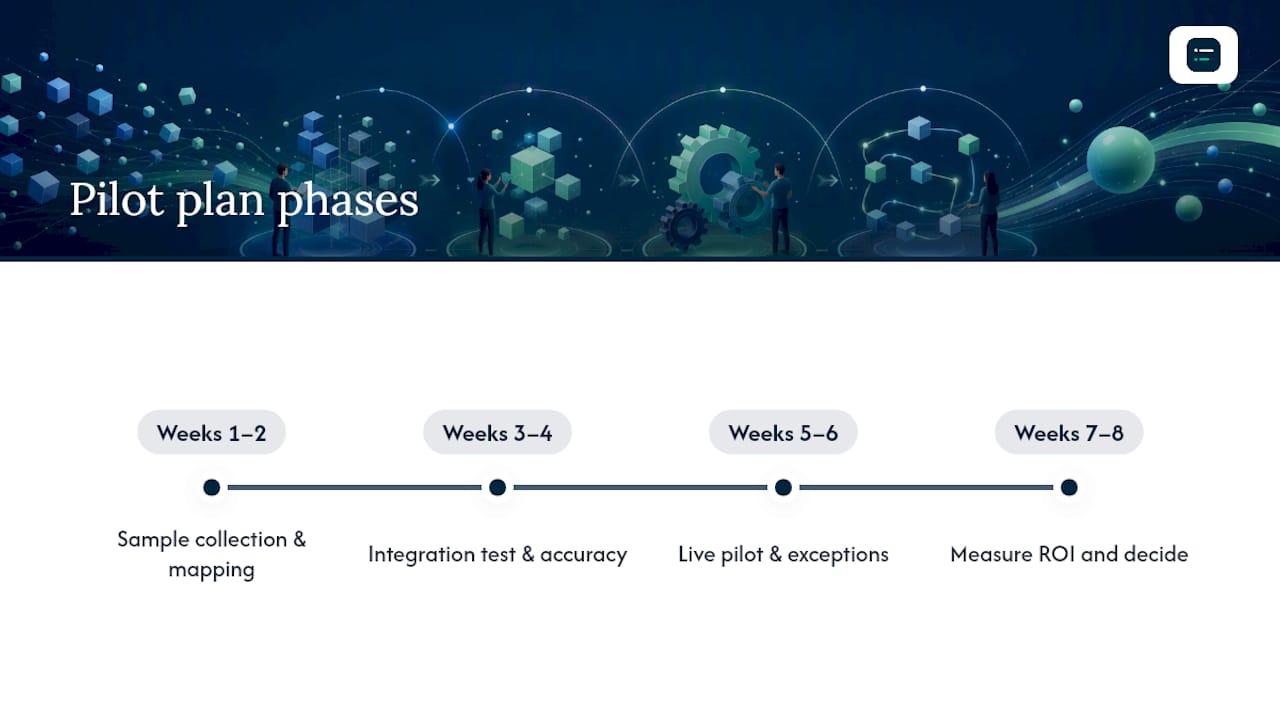
Weeks 1–2: sample collection and field mapping. Gather 30–50 real documents covering your target type. Map every field you need to extract to the destination field in your accounting system. Note any edge cases: multi-currency invoices, documents with missing fields, non-standard layouts.
Weeks 3–4: integration test. Connect the tool to your accounting system in a sandbox environment. Run your sample set through the extraction engine. Record accuracy per field, not just overall. Flag fields with low confidence scores and decide whether to retrain or route to human review.
Weeks 5–6: exception handling and live pilot. Process real incoming documents in parallel with your existing manual process. Compare outputs. Measure time saved per document and error rate versus manual keying. Document every exception and how it was resolved.
Weeks 7–8: measure and decide. Calculate ROI: time saved multiplied by your hourly rate, minus tool cost and setup time. If accuracy meets your SLA and integration is stable, expand to the next document type. If not, identify whether the gap is a training issue (more sample data) or a structural mismatch (wrong tool type).
Pro Tip: Use The AI Ledger's 30-second tool finder to match your practice's specific tasks and software stack to independently reviewed tools before you start your pilot. Every listing carries an editor score and a last verified date, so you are not relying on vendor marketing.
UK-specific factors to keep in mind: confirm data residency before processing client documents through any cloud tool. UK ICO guidance requires that personal data processed on behalf of clients is handled under a valid data processing agreement. Most enterprise IDP vendors provide standard DPA templates; check that the template covers UK GDPR, not just EU GDPR.
For practices running multi-entity accounting, the integration and scalability questions become more complex: confirm that the tool can handle multiple entity configurations and separate audit trails per entity before you commit.
Support matters more than most buyers realise at the procurement stage. A tool with a responsive UK-accessible support team and documented onboarding SLAs will save you more time than a marginally higher accuracy score from a vendor whose support queue runs to five business days.
The pitfalls most practices walk straight into
The feature list is the wrong place to start. Vendors are good at demos. What they show you is their best-case document on their best-trained model. The question to ask is: what happens when the tool sees a document it has not been trained on? How does it fail? Does it fail silently, or does it route to a review queue? Silent failures in financial data are far more expensive than a human review step.
Integration effort is consistently underestimated. A tool that extracts data perfectly but requires a custom API build to reach your accounting system is not a quick win. It is a project. Before you shortlist any tool, map the integration path end-to-end and ask your software vendors whether they have a native connector or a published API. The nodewave playbook guidance is direct on this: use iPaaS when systems have APIs, RPA for stable UIs without APIs, and IDP for variable-layout documents. That hierarchy saves a lot of wasted evaluation time.
Exception workflows are where automation projects stall. Every practice has documents that fall outside the standard pattern: a supplier who changes their invoice layout, a client who sends a photo of a receipt rather than a scan, a form with a handwritten annotation. The practices that get the most from automation are the ones that design their exception-handling process before they go live, not after the first batch of failures.
The AI in accounting guide covers confidence scoring and human-in-the-loop design in more depth if you want to go further on that point.
The AI Ledger helps you find the right tool faster
Evaluating data entry automation solutions takes time you probably do not have. The AI Ledger cuts that process down significantly.

The AI Ledger is an independent directory of 100+ AI tools for accountants and bookkeepers, with every listing carrying an editor score, an honest verdict, and a last verified date. Scores are never for sale. Side-by-side comparisons, category guides, and a free weekly Friday newsletter on AI accounting software news mean you stay current without spending hours on vendor websites. The 30-second tool finder matches your practice's tasks, software stack, and size to the tools most likely to fit. Try it at The AI Ledger tool directory and have a shortlist in under a minute.
Sources
- How to Automate Data Entry: 7 Methods + Playbooks
- AWS Glue
- Automated Data Entry Software: AI Data Entry Tool | DocuOCR
- Automated Data Entry: What It Is, How It Works and How to Get Started
- Data Entry Automation Software for Documents | TextMine