Finance automation workflows fall into three principal categories: business process automation (BPA), robotic process automation (RPA), and intelligent automation (IA), which combines AI and machine learning. Most production finance environments use a hybrid of all three, as IBM's finance automation taxonomy makes clear. Understanding which type fits which task is the practical starting point for any automation project.
Here is how the three types map to common finance workflows:
- BPA suits end-to-end, multi-step processes with defined rules and multiple system handoffs: month-end close orchestration, budget approval chains, procurement-to-pay, and financial reporting distribution.
- RPA suits rule-based, screen-level tasks that do not require judgement: copying invoice data between systems, posting journal entries, running reconciliation reports, and triggering payroll batch files.
- IA (AI-enabled automation) suits tasks requiring extraction, classification, or decision support: reading unstructured invoices via OCR and intelligent document processing (IDP), flagging anomalies in expense claims, predicting cash positions, and routing exceptions based on learned patterns.
The Institute of Finance and Management (IOFM) and HMRC's Making Tax Digital programme both reflect this layered architecture in practice: structured compliance data flows through BPA and RPA, while unstructured inputs such as supplier invoices and bank statements increasingly rely on IA to reach the ledger without manual keying.
Key takeaways
Finance automation workflows are most effective when you match the right automation type to each process: BPA for orchestration, RPA for legacy system interactions, and IA for unstructured inputs, with AP automation as the highest-readiness starting point for most UK finance teams.
| Point | Details |
|---|---|
| Three core automation types | BPA, RPA, and intelligent automation each suit different finance tasks; most production environments use all three. |
| AP is the strongest pilot candidate | AP has the highest automation maturity and the clearest ROI case; connect every stage from capture to archiving. |
| Prioritise by volume and integration readiness | Score processes on volume, manual hours, error rate, regulatory risk, complexity, and API access before committing budget. |
| Governance is non-negotiable | Configure audit trails, segregation of duties, and UK GDPR-compliant data handling before go-live, not after. |
| The AI Ledger | The independent directory of 100+ AI tools helps finance teams shortlist automation platforms with editor scores and side-by-side comparisons. |
Table of Contents
- What are the main types of finance automation workflows?
- Which finance workflows are worth automating?
- How does end-to-end AP automation actually work?
- How do you decide what to automate first?
- What technology do you need to build finance automation?
- Which KPIs should you track, and what governance do you need?
- Implementation checklist and a sample 12-week timeline
- What I would automate first if I led a UK finance team
- Find the right finance automation tools with The AI Ledger
- Sources
What are the main types of finance automation workflows?
Salesforce's finance automation overview groups automation platforms into workflow automation, RPA, and AI/ML-enabled services, and that three-part split maps almost perfectly onto what finance teams actually buy and deploy. Each type has a distinct execution model, a different tolerance for exception handling, and a different relationship with your ERP.
Business process automation (BPA)
BPA orchestrates sequences of tasks across people, systems, and time. It does not replace a human at a screen; it replaces the coordination overhead that sits between steps. A budget approval workflow is a clean example: a request is submitted, routed to the cost-centre owner, escalated if unanswered within 48 hours, approved, and posted to the planning system, all without anyone chasing by email.
In finance, BPA typically runs inside or alongside your ERP (SAP, Oracle, Microsoft Dynamics 365, Sage Intacct) or a dedicated workflow engine. The key characteristic is that every step is defined in advance, conditions are explicit, and the audit trail is automatic. Auditability is strong by design: every state change is logged with a timestamp and a user ID.
Robotic process automation (RPA)
RPA operates at the user-interface layer. A software bot mimics the keystrokes and clicks a human would make, which means it can automate tasks in legacy systems that have no API. That is its main advantage and its main fragility: if the screen layout changes, the bot breaks.
Typical finance RPA tasks include:
- Extracting bank statement data and pasting it into a reconciliation template
- Logging into a supplier portal to download remittance advice
- Posting validated journal entries into an ERP that lacks a modern API
- Running a month-end trial balance report and emailing it to a distribution list
Auditability with RPA depends on how the bot is configured. A well-built bot logs every action; a poorly built one is a black box. Segregation of duties is a real governance concern: the bot credential must be treated like a privileged user account.
Intelligent automation (IA)
IA layers AI models on top of BPA or RPA to handle inputs that are not perfectly structured. The most common finance application is invoice capture: an IDP service reads a PDF invoice, extracts supplier name, invoice number, date, line items, VAT number, and total, and passes structured data downstream. The AI model handles variation in layout that would defeat a fixed-field template.

IA also covers anomaly detection in expense claims, cash-flow forecasting models, and exception routing that learns from historical approval decisions. The trade-off is that AI outputs carry a confidence score, not a guarantee, so human-in-the-loop review points are non-negotiable for high-value transactions.
Pro Tip: Do not choose one type and ignore the others. The most resilient finance automation architectures use BPA to orchestrate the end-to-end flow, RPA to handle legacy system interactions, and IA to process unstructured inputs. Build the BPA layer first so the other two have somewhere to plug in.
Which finance workflows are worth automating?
Datarails identifies seven core finance workflows as recurring automation candidates: accounts payable, month-end close, budget approval, financial reporting, expense management, forecasting, and multi-entity consolidation. AP consistently shows the highest automation maturity and is the most common pilot starting point. Beyond those seven, procurement-to-pay, treasury and cash management, payroll, and tax and compliance reporting all appear regularly on automation roadmaps.
The list below groups workflows by volume and complexity, which is the most useful lens for prioritisation.
High-volume, rule-based (strong RPA and BPA candidates):
- Accounts payable (invoice-to-pay): Hundreds or thousands of invoices per month, each following a predictable path from receipt to payment. Automation reduces processing time, eliminates re-keying, and produces a clean audit trail. See the AP workflow deep dive below.
- Expense management: Employee submissions trigger policy checks, manager approvals, and reimbursement postings. Volume is high; the rules are well-defined; exceptions (missing receipts, out-of-policy amounts) are manageable with a configured queue.
- Payroll posting: Payroll data validated by the payroll system is posted to the general ledger. The mapping is fixed; the volume is predictable; RPA handles this well where there is no native integration.
- Bank reconciliation: Matching bank statement lines to ledger entries is repetitive and rule-based. AI-assisted matching handles fuzzy matches (slightly different amounts or dates) that pure rules cannot.
High-complexity, judgement-intensive (IA and BPA candidates):
- Month-end close: Orchestrating accruals, prepayments, intercompany eliminations, and sign-offs across multiple teams. BPA manages the sequence and escalation; IA can draft accrual entries from source data. Explore AI tools for the financial close process for a detailed breakdown.
- Budgeting and forecasting: Collecting inputs from cost-centre owners, consolidating them, and running scenario models. IA models can generate a first-pass forecast from historical data, reducing the time finance spends on data assembly.
- Multi-entity consolidation: Eliminating intercompany transactions and translating foreign-currency balances. BPA orchestrates the sequence; rules engines handle the eliminations. See automation tools for multi-entity accounting for UK-specific considerations.
- Tax and compliance reporting: VAT return preparation, corporation tax schedules, and Making Tax Digital submissions. BPA pulls data from the ledger, applies rules, and routes for review before submission.
Medium-volume, mixed complexity:
- Accounts receivable (order-to-cash): Generating invoices from sales orders, sending statements, matching receipts, and chasing overdue balances. IA can prioritise the collections queue by predicted payment probability.
- Treasury and cash management: Daily cash positioning, intercompany sweeps, and covenant monitoring. BPA schedules the runs; IA flags positions that breach thresholds.
- Procurement and purchase-to-pay (P2P): Requisition approval, PO creation, goods receipt matching, and supplier payment. Connects directly to AP automation.
- Financial reporting and consolidation: Pulling data from the ledger, applying formatting, and distributing reports. RPA handles the extraction; BPA manages distribution and version control. The automated financial reporting guide covers this in detail.
How does end-to-end AP automation actually work?
Accounts payable is the canonical finance automation use case, and for good reason. The AccountingWEB AP automation guide makes the case clearly: automating only a fragment of the AP process reduces value significantly compared with connecting every stage so data is entered once and flows through to payment without re-keying.
The full invoice-to-pay sequence has seven stages:
Stage 1: Capture. Invoices arrive by email, supplier portal, EDI, or post. An automated inbox or integration layer ingests them and passes them to the extraction engine. Paper invoices are scanned; PDFs are processed directly.
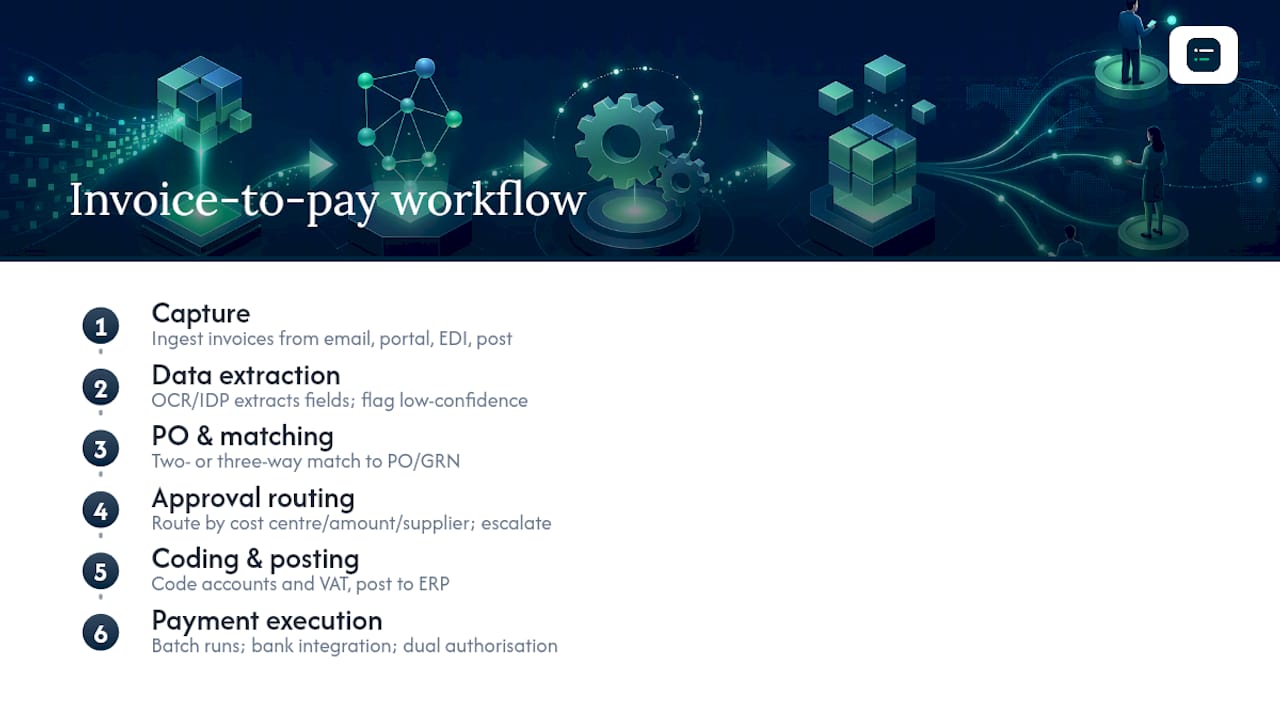
Stage 2: Data extraction via OCR and IDP. An AI extraction service reads the invoice and outputs structured fields: supplier name, invoice number, date, currency, line items, VAT number, and gross and net totals. Confidence scores flag low-certainty fields for human review before they move downstream.
Stage 3: PO and three-way matching. The extracted invoice is matched against the purchase order and, where applicable, the goods receipt note. A three-way match (invoice, PO, GRN) is the gold standard for goods-based purchases. Service invoices typically use a two-way match (invoice against PO).
Stage 4: Approval routing. Matched invoices route to the appropriate approver based on cost centre, amount band, or supplier category. Escalation rules fire if an approver does not act within a defined period. The RoboHen AP workflow example describes this as explicit approval routing with full audit records, which is the right design for any production environment.
Stage 5: Coding and posting to ERP. Approved invoices are coded to the correct nominal account, cost centre, and VAT treatment, then posted to the ERP automatically. This is where partial automation most commonly fails: teams that automate capture and matching but still re-key approved invoices into the ledger by hand lose most of the efficiency gain and introduce a new error point.
Stage 6: Payment execution. Approved and posted invoices are batched for payment. Payment runs can be scheduled automatically; BACS or faster payments are initiated via bank integration or a payment platform. Dual authorisation controls apply here regardless of automation level.
Stage 7: Reconciliation and archiving. Payment confirmations are matched back to invoice records. The invoice, PO, GRN, approval record, and payment confirmation are archived together as a complete audit package. For UK VAT purposes, the VAT invoice must be retained in a readable format for six years.
Common AP exceptions and how to handle them
| Exception type | Likely cause | Recommended handling |
|---|---|---|
| Missing or invalid VAT number | Supplier error or non-VAT-registered supplier | Route to AP team for supplier query; hold payment |
| Invoice total mismatch | Price change, quantity discrepancy, or currency rounding | Route to buyer and supplier; do not auto-approve |
| No matching PO | Invoice received without a prior order | Route to budget holder for retrospective PO or rejection |
| Duplicate invoice | Same invoice submitted twice | Auto-reject with notification to supplier |
| Missing GRN | Goods not yet receipted | Hold invoice; notify procurement to confirm receipt |
Pro Tip: Configure your exception queue so every held invoice has an owner, a due date, and an escalation path. An unmanaged exception queue is where AP automation projects quietly fail: invoices sit unresolved, suppliers chase payment, and the audit trail becomes incomplete. Treat exception handling as a first-class workflow, not an afterthought.
How do you decide what to automate first?
The most practical CFO approach, as Financial Executives International notes, is to focus on measurable pilots and continuous improvement rather than wholesale transformation. That means scoring candidate processes before committing budget.
Score each candidate process against six criteria, rated 1–3:
- Volume: How many transactions or instances per month? High volume amplifies every efficiency gain.
- Manual hours: How many staff hours does the process consume? This is your baseline for ROI calculation.
- Error rate: How often does the current process produce errors, rework, or audit findings?
- Regulatory or audit risk: Does a failure here create a VAT, HMRC, or Companies House exposure?
- Process complexity: How many decision points, exceptions, and system touchpoints does the process have? Higher complexity raises implementation cost.
- Integration readiness: Does your ERP or source system have an API or reliable data export? Poor integration readiness raises effort significantly.
Plot your scored processes on an effort-versus-impact grid:
| Quadrant | Characteristics | Action |
|---|---|---|
| High impact, low effort | High volume, good API access, simple rules | Pilot immediately |
| High impact, high effort | High volume but complex exceptions or poor integration | Plan carefully; phase the build |
| Low impact, low effort | Low volume but easy to automate | Quick win; useful for team confidence |
| Low impact, high effort | Low volume and complex | Deprioritise or skip |
AP, expense management, and bank reconciliation almost always land in the top-left quadrant for mid-size UK finance teams. Month-end close orchestration and multi-entity consolidation typically sit top-right: high value, but they need more design work before you build.
Pilot checklist
Run your first pilot against this list before you sign a vendor contract:
- Map the as-is process in full, including every exception path, not just the happy path.
- Confirm data readiness: are your supplier master data, chart of accounts, and cost-centre codes clean and consistent?
- Validate ERP integration: does the target system have a working API or a reliable structured export?
- Define success metrics upfront: processing time per invoice, exception rate, straight-through processing rate, and cost per transaction.
- Set a pilot scope: one invoice type, one entity, or one cost centre is enough to prove the concept.
- Agree a rollback plan: what happens if the pilot fails mid-month?
- Get stakeholder sign-off from finance, IT, compliance, and the process owner before go-live.
Pro Tip: Run your pilot during a quieter period, not at month-end or year-end. You want clean data and available reviewers, not a pressure-cooker environment where exceptions get waved through to hit a deadline.
What technology do you need to build finance automation?
Salesforce's finance automation platform overview groups the building blocks into workflow automation, RPA, and AI/ML services. In practice, a production finance automation stack has six layers, and gaps in any one of them create bottlenecks.
Core components:
- Ingestion layer: Receives invoices, bank files, expense submissions, and other inputs via email integration, supplier portals, EDI connections, or file drops. Without a reliable ingestion layer, the rest of the stack has nothing to process.
- Extraction and IDP engine: Reads unstructured documents (PDFs, scanned images, EDI files) and outputs structured data. OCR accuracy matters enormously here: a 95% field-level accuracy rate on a 10-field invoice still produces errors on roughly half of all invoices if fields are independent. Enterprise-grade IDP services target 99%+ on clean PDFs.
- Validation and rules engine: Applies business rules (VAT number format checks, duplicate detection, tolerance bands for matching) before data moves downstream. This is where HMRC's VAT invoice requirements and Making Tax Digital rules are enforced programmatically.
- Workflow and routing engine: Manages approval chains, escalations, and exception queues. This is the BPA layer: it orchestrates people and systems according to defined rules.
- ERP integration layer: Pushes validated, approved data into your ledger. The integration pattern matters: a real-time API push is preferable to a nightly batch file, which creates a 24-hour gap in your audit trail. Where no API exists, an RPA bot can handle the posting, but it is a fragility point.
- Reconciliation and archiving layer: Matches outputs (payment confirmations, bank statement lines) back to source records and stores the complete audit package. For UK purposes, GDPR and the Companies Act 2006 both impose retention obligations that the archiving layer must satisfy.
Integration patterns and common pitfalls
The most common integration failure is assuming your ERP has a usable API when it does not. Older on-premise ERP versions often expose only flat-file exports, which means nightly batch processing rather than real-time posting. Before selecting a vendor, confirm the exact integration method your ERP version supports.
Entry-level OCR platforms handle straightforward, high-volume invoice capture well but struggle with complex multi-line purchase orders or non-standard layouts. Enterprise workflow engines offer pre-built ERP connectors and configurable approval matrices but carry higher implementation costs. RPA bot platforms are the right choice when you need to automate a legacy system with no API, but they require active maintenance as system interfaces change. AI extraction and IDP services are the fastest-moving category: extraction accuracy and layout generalisation have improved substantially, and most now offer UK-specific VAT field recognition.
On data protection: if your automation platform processes personal data (employee expense claims, supplier contact details), it must comply with UK GDPR. Check where data is processed and stored. Cloud platforms with EU-only data residency may create complications post-Brexit; confirm UK data residency or an appropriate transfer mechanism is in place.
Which KPIs should you track, and what governance do you need?
Tracking the right metrics is what separates a finance automation programme that delivers sustained value from one that looks good in the first month and quietly degrades. The finance automation metrics guide on The AI Ledger blog covers benchmarking in depth; the core KPI set for most AP and workflow automation projects is:
- Invoice processing time: End-to-end, from receipt to posting. A useful baseline is your current average; a well-configured AP automation system should reduce this materially.
- Cost per invoice processed: Includes staff time, system costs, and exception handling. Tracking this quarterly shows whether automation is delivering its promised ROI.
- Straight-through processing (STP) rate: The percentage of invoices that complete the full workflow without human intervention. A low STP rate signals that your matching rules or supplier data quality need attention.
- Exception rate: The proportion of invoices that hit an exception queue. Rising exception rates often indicate a data quality problem upstream rather than an automation failure.
- Days payable outstanding (DPO): A finance-wide metric that automation should improve by reducing processing delays.
- Audit exceptions: The number of transactions flagged during internal or external audit as lacking a complete audit trail. This should trend toward zero.
Common pitfalls
The AccountingWEB AP workflow guide is direct about the most common failure mode: automating fragments. Teams that automate invoice capture but leave approvals running by email, or that automate matching but re-key approved invoices into the ERP by hand, do not get the efficiency or audit benefits they expected. Quixy's finance workflow automation analysis makes the same point: replacing spreadsheets and email approvals with governed digital workflows is the foundational step, not an optional enhancement.
Other pitfalls worth naming:
- Poor exception design: Exceptions that have no owner or no SLA become a backlog that undermines the whole programme.
- Weak change management: Finance teams that are not involved in process design resist the new workflow and find workarounds. See the common accounting workflow bottlenecks guide for practical fixes.
- Insufficient ownership: Automation programmes without a named process owner drift. Someone must own the exception queue, the KPI dashboard, and the vendor relationship.
Governance checklist
- Audit trail: Every transaction must carry a complete, tamper-evident log of who did what and when, including bot actions.
- Segregation of duties: The bot credential that posts invoices must not also be able to approve them. Apply the same controls to automated processes as to human ones.
- Access controls: Role-based access to the workflow platform, with regular access reviews.
- Change logs: Any change to matching rules, approval thresholds, or routing logic must be logged and approved through a change management process.
- UK VAT compliance: Automated VAT coding must apply the correct rate and treatment; the system must retain VAT invoices in a readable format for six years per HMRC requirements.
- UK GDPR: Personal data processed by the automation platform must be covered by a data processing agreement with the vendor, with UK-appropriate data residency or transfer mechanisms.
When presenting to finance leadership or the board, frame KPIs in terms of risk reduction and working capital impact, not just efficiency. A lower DPO and a cleaner audit trail are board-level outcomes; cost per invoice is an operational metric that supports them.
Implementation checklist and a sample 12-week timeline
A finance automation project that runs from process mapping to live rollout in 12 weeks is achievable for a well-scoped AP or expense management pilot. The key is keeping the scope tight: one process, one entity, one invoice type.
Step-by-step implementation checklist
- Process mapping: Document the as-is workflow, including every exception path, system touchpoint, and manual step. Use swim-lane diagrams so handoffs between teams are visible.
- Stakeholder alignment: Agree scope, success metrics, and governance with finance, IT, compliance, and the process owner before any vendor conversation.
- Data audit: Assess supplier master data, chart of accounts, and cost-centre codes for completeness and consistency. Clean data is the single biggest predictor of a smooth pilot.
- Vendor selection: Use your prioritisation scores and integration requirements to shortlist vendors. Run a structured proof of concept on a sample of real invoices, not vendor-supplied test data.
- Integration build: Confirm and build the ERP integration. Test with a full cycle of transactions, including exceptions, before go-live.
- Exception handling design: Configure exception queues, assign owners, set SLAs, and test escalation paths.
- User acceptance testing (UAT): Finance team members test the workflow end-to-end using real data. Document every issue and resolve before go-live.
- Training and change management: Train all users, including approvers who will interact with the workflow only occasionally. Explain what the automation does and does not do.
- Pilot go-live: Run the pilot in parallel with the existing process for the first two to four weeks. Compare outputs before switching off the manual process.
- Post-pilot review: Measure KPIs against baseline. Identify exceptions that recurred and fix root causes. Get sign-off from the process owner and compliance before full rollout.
- Full rollout: Extend to remaining invoice types, entities, or cost centres. Maintain the KPI dashboard and schedule a 90-day review.
Sample 12-week timeline
| Phase | Weeks | Key milestones |
|---|---|---|
| Discover | 1–2 | Process mapping complete; stakeholder sign-off on scope and success metrics |
| Design | 3–4 | Exception handling designed; ERP integration confirmed; vendor selected |
| Build | 5–7 | Integration built and tested; exception queues configured; UAT environment ready |
| Pilot | 8–10 | Parallel run with live data; KPIs tracked daily; issues logged and resolved |
| Review | 11 | Post-pilot KPI review; root-cause analysis of exceptions; compliance sign-off |
| Roll-out | 12 | Full go-live; KPI dashboard live; 90-day review scheduled |
Roles and responsibilities
| Role | Responsibilities |
|---|---|
| Process owner (finance) | Defines requirements; signs off on design; owns exception queue |
| Business analyst | Documents as-is and to-be processes; writes test scripts |
| IT/integration lead | Builds and maintains ERP integration; manages bot credentials |
| Vendor/implementation partner | Configures the platform; supports UAT; provides training |
| Compliance/internal audit | Reviews audit trail design; confirms segregation of duties |
| Approvers (budget holders, managers) | Participate in UAT; complete training; action approval requests |
Change management matters more than most teams expect. Finance staff who have processed invoices manually for years will have questions about what happens to exceptions, whether the bot can be trusted, and what their role looks like after automation. Involve them in UAT, explain the exception-handling design clearly, and make the escalation path obvious. Automation that finance teams trust gets used properly. Automation they distrust gets worked around.
What I would automate first if I led a UK finance team
If you are running a UK finance function and you have budget for one automation pilot, start with accounts payable. Not because it is the most exciting workflow, but because the ROI case is the clearest, the audit trail benefit is immediate, and the process is well-understood enough that you can scope a tight pilot without months of discovery work.
The AP workflow is also the one where partial automation does the most damage. Teams that automate invoice capture but leave approvals in email, or that match invoices automatically but re-key them into the ERP by hand, end up with a fragmented process that is harder to audit than the manual one it replaced. The lesson from the AccountingWEB research is straightforward: connect every stage, or the gains are mostly illusory.
Expense management is a close second, particularly for organisations with a large field-based or remote workforce. The policy enforcement benefit is tangible, the volume is high, and the change management challenge is manageable because employees interact with the workflow directly and can see the improvement.
What I would not do is start with month-end close orchestration or multi-entity consolidation, however tempting the efficiency prize looks. Those workflows have more exception paths, more stakeholders, and more system dependencies than AP. Get a clean AP win first, build the team's confidence in automation, and then tackle the complex workflows with a track record behind you.
One practical note on audit trails: whatever you automate, configure the audit log before go-live, not after. Retrofitting audit trail requirements onto a live automation system is painful and sometimes impossible without rebuilding the workflow. Treat it as a non-negotiable design requirement from day one.
Find the right finance automation tools with The AI Ledger
Shortlisting automation tools is where many finance teams lose weeks. Vendor marketing is optimistic, demo environments are pristine, and it is genuinely hard to know which platform will handle your invoice volumes, your ERP version, and your exception types without a structured comparison.

The AI Ledger is an independent directory of 100+ AI tools for accountants and bookkeepers, with editor scores that are never for sale and a last verified date on every listing. Side-by-side comparisons let you cut through vendor claims quickly, and the 30-second tool finder matches your specific tasks (AP automation, reconciliation, expense management, payroll) to the tools most likely to fit your practice or finance team. Every listing carries an honest verdict from an independent editorial review. The free weekly Friday newsletter covers new features, pricing changes, and AI accounting software updates in plain English, so you stay current without spending hours on vendor websites. Visit The AI Ledger directory to start shortlisting, or sign up for the newsletter to get the week's most relevant updates delivered on Friday morning.
Sources
- Finance automation | Salesforce
- What is finance automation? | IBM
- Finance workflow process: templates, best practices & AI | Datarails
- What is finance workflow automation? Unlock sustainable growth with 17 examples | Quixy