An invoice approval workflow is the rules-based path a vendor invoice follows from receipt to authorised payment, moving through validation, matching and sign-off before it posts to your accounting system. The best approach combines rule-based routing with upfront validation, clear escalation paths and a full audit trail, built around a documented approval matrix. Get those four elements right and stuck invoices become the exception, not the norm.
TL;DR:
- Implementing automated routing with clear escalation paths reduces approval delays caused by holidays, full inboxes, or approval bottlenecks.
- Keep approval tiers minimal, typically three, and scale amount thresholds to your business size to avoid unnecessary bureaucracy and delays.
- Use real-time ERP synchronization and multi-policy support to shorten cycle times and enable fast, flexible approval processes across multiple entities.
- Monitor KPIs such as touchless rate, approval time, exception rate, and duplicate detection to gauge workflow efficiency and identify bottlenecks.
- Automating invoice approval enhances control and compliance, particularly in preventing fraud via segregation of duties and secure vendor bank detail changes.
Table of Contents
- What is an invoice approval workflow in accounts payable?
- The step-by-step invoice approval workflow, from intake to posting
- How do you design an approval matrix and set thresholds?
- What automation features actually shorten approval cycles?
- How long does an invoice approval workflow rollout take?
- Which KPIs prove your invoice approval workflow is working?
- What causes stuck invoices, and how do you fix them fast?
- Why automating approval workflows pays off beyond speed
- What security and compliance risks does an approval workflow need to cover?
- How are AI and machine learning changing invoice approval?
- Using a tool directory to shortlist your next approval workflow
- Compare invoice approval tools without the demo marathon
- Sources
What is an invoice approval workflow in accounts payable?
Capture and approval are two different jobs, and conflating them is where most workflows break down. Capture is getting the invoice into your system with the right fields extracted. Approval is the rules-based routing that decides who signs off, in what order, and at what point an exception gets flagged before it reaches anyone's queue.
Invoices arrive from three main channels, and each has trade-offs worth knowing before you build routing logic around them:
- A single dedicated mailbox that every supplier is instructed to use, which keeps intake predictable and avoids invoices landing in someone's personal inbox.
- A supplier portal where vendors upload invoices directly, reducing manual entry and giving suppliers status visibility.
- EDI feeds for high-volume trading partners, where structured data arrives already coded to your systems.
Whichever channel you choose, enforce a single-entry rule: one invoice, one record, one traceable path. Duplicate entry points create duplicate payments, and reconciling that mess later costs far more time than standardising intake would have.
The step-by-step invoice approval workflow, from intake to posting
A canonical workflow has seven distinct stages, and skipping or merging any of them is usually what causes bottlenecks further down the line.
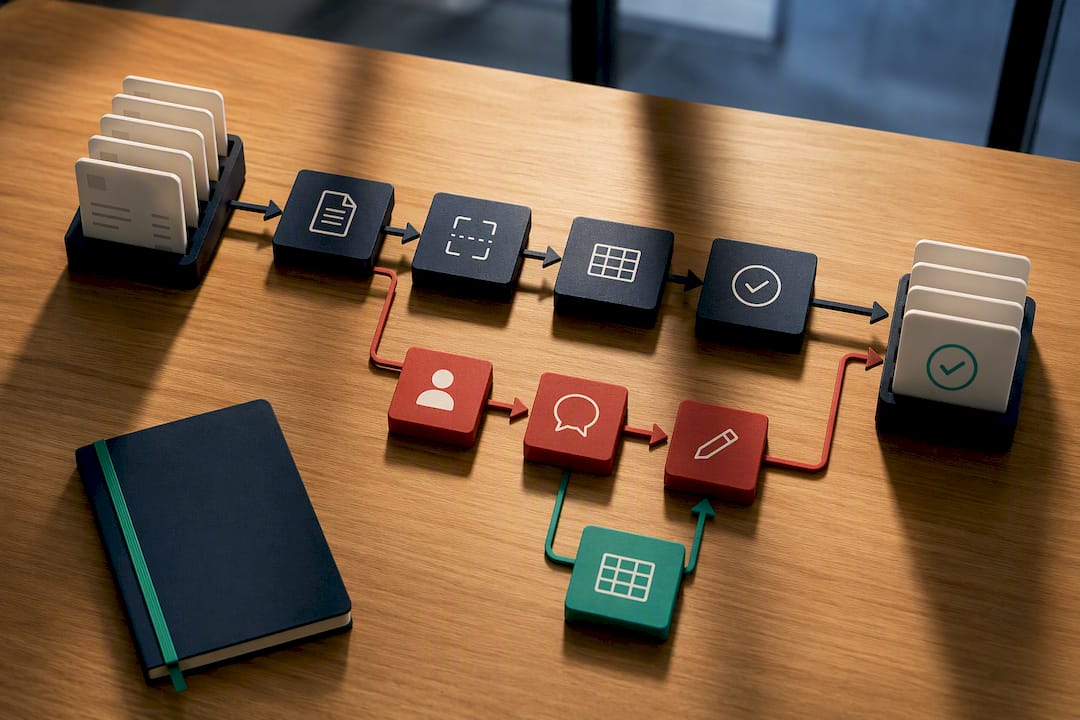
- Capture. The invoice enters through your chosen channel and automated field extraction pulls vendor name, invoice number, date, amount and line items.
- Identification. The system matches the invoice to a known vendor record and purchase order, or flags it as new for manual review.
- Validation and matching. Two-way matching checks the invoice against the purchase order; three-way matching adds the goods receipt. Set tolerance bands (say, 2 to 5 percent variance) so minor rounding differences do not trigger unnecessary holds.
- Routing. Rules send the invoice to the right approver based on amount, GL code, vendor and entity. Routing can run sequentially (one approver, then the next) or in parallel (multiple approvers reviewing simultaneously), and encoding these rules into automated routing is what stops invoices drifting into the wrong inbox.
- Sign-off. The approver authorises the invoice, and the system time-stamps the decision, building the audit trail as it goes.
- Exception handling. Anything that fails matching or breaches tolerance drops into a separate exception queue rather than an approver's main list.
- Posting. Approved invoices sync back to your ERP or accounting platform, updating vendor balances and payment status automatically.
Pro Tip: Build your exception queue as a genuinely separate view, not just a filter on the same list. Approvers who see exceptions mixed in with routine invoices start treating everything as urgent, which defeats the point of routing in the first place.
Timestamped approvals matter beyond compliance. When a supplier disputes a payment date or an auditor asks why an invoice took nine days to clear, a clean audit trail answers the question in seconds rather than triggering a week of email archaeology.
How do you design an approval matrix and set thresholds?
Picture your approval matrix as a lookup table: amount band down one side, required approver and delegation rules across the top. That single table should answer, for any invoice, exactly who needs to sign off and in what sequence.
- Keep tiers to a minimum. For most small and medium businesses, three tiers cover roughly 95% of invoices; a fourth or fifth tier usually adds bureaucracy rather than control.
- Scale amount bands to your business, not a template. A £500 threshold might suit a ten-person firm; a group with multiple entities may need bands running into five figures before a director needs to see anything.
- Separate the person who raises a purchase order from the person who approves the invoice. That segregation of duties is the single most effective fraud control available, even in a two-person finance team where compensating controls (a second review, a monthly spend report) can substitute for a full second signature.
- Reserve auto-approval for matched, low-value invoices only. If an invoice ties cleanly to a purchase order and goods receipt within tolerance, and sits under your lowest threshold, there is little value in routing it to a human at all.
What automation features actually shorten approval cycles?
When you sit through vendor demos, the feature list can blur together fast. Prioritise the capabilities that measurably reduce cycle time and risk, rather than the ones that look impressive on a slide.
- Rule-based routing with conditional logic, so an invoice from a new vendor or one that exceeds a tolerance automatically follows a different path than a routine, matched one.
- Multi-policy support, letting you run different approval matrices for different entities or cost centres without building separate systems.
- Auto-escalation and fallback approvers, so a holiday or a full inbox does not stall a payment for a week.
- Mobile and email approval options, because a finance director travelling between meetings will not log into a desktop portal to clear three invoices.
- Exception pre-filtering, catching mismatches before they land in an approver's queue at all.
- Real-time ERP sync, so an approved invoice updates payment status without a second manual entry.
Manual, per-invoice processing carries wide-ranging cost estimates depending on volume and error rates, but the direction of travel is consistent: automated accounts payable processing is genuinely achievable for most finance teams, and it reduces the manual steps that cause delays in the first place. User reviews of workflow tools on platforms like Capterra consistently rank faster approvals and visible audit trails among the features finance teams value most.
How long does an invoice approval workflow rollout take?
A four to six week pilot is enough to prove the model without overengineering it before you know what your actual exception rate looks like.
- Weeks 1 to 2: Map your current state end to end and write down the policy you actually want, not the one buried in an old procedures document nobody follows.
- Weeks 2 to 3: Consolidate intake into a single channel and configure your routing rules and approval matrix in the chosen tool.
- Week 4: Pilot with your top 20 suppliers by volume, since starting narrow lets you tune matching tolerances before rolling out to your full vendor list.
- Ongoing: Assign backup approvers, set escalation SLAs (48 hours is a common default), train approvers on the exception queue, and agree go or no-go criteria before extending the pilot further.
Change management matters more than the software here. A workflow with perfect routing logic still fails if nobody trained the backup approver on what to do when the primary one is out.
Which KPIs prove your invoice approval workflow is working?
Four metrics tell you almost everything you need to know about workflow health.
- Touchless rate: the percentage of invoices that clear without any human intervention.
- Average approval time: from routing to sign-off, tracked per tier so you can spot where invoices stall.
- Exception rate: the share of invoices failing matching or tolerance checks.
- Duplicates detected: a leading indicator of intake discipline, or the lack of it.
Pull these from approval timestamps and ERP export fields rather than manual logs. Best-practice invoice-to-pay automation research links these metrics directly to measurable gains in cycle time and vendor visibility, giving you a reasonable basis for setting internal targets once you have two or three months of baseline data.
What causes stuck invoices, and how do you fix them fast?
Most stalled invoices trace back to one of four fixable causes rather than anything structural.
- Scattered intake. Enforce a single mailbox or portal and put the instruction in every purchase order and supplier contract.
- No backup approver. Add one with the same authority level and an automatic escalation timer, typically 48 to 72 hours.
- Too many approval levels. Audit your matrix; if a tier rarely changes the outcome, remove it.
- Unvalidated invoices reaching approvers. Pre-filter mismatches into an exception queue, since catching problems before an approver sees them is what keeps queues clean and stalls rare.
Why automating approval workflows pays off beyond speed
Speed is the obvious benefit, and it is real: invoices that once sat in someone's inbox for a week now clear in days or hours. But the less-discussed benefit is control. A manual approval process relies on people remembering policy correctly every single time. An automated one enforces it by design, every time, without exception.
That distinction shows up clearly in fraud prevention. Segregation of duties, encoded directly into routing logic, closes off the classic scenario where one person raises a purchase order, receives the goods and approves the invoice, all without a second set of eyes. You cannot accidentally skip a control that the system will not let you skip.
Visibility is the third benefit, and it compounds over time. Once every invoice carries a timestamp and an audit trail, you can answer questions that used to require a phone call to three different people: which supplier is consistently slow to invoice correctly, which approver is the bottleneck, which department is running over budget before month end even closes.
Cost reduction follows from all three. Fewer duplicate payments, fewer late-payment penalties, fewer hours spent chasing signatures. None of these show up as a single dramatic saving, but they accumulate into a materially leaner accounts payable operation within a couple of quarters. Firms running structured automation programmes report gains in both cycle time and spend visibility as a direct result of designing the approval matrix, segregation of duties and ERP integration together, rather than bolting automation onto an unchanged process.
— Aaron
What security and compliance risks does an approval workflow need to cover?
An invoice approval workflow sits close to real money leaving the business, which makes it a genuine compliance surface, not just an operational nicety.
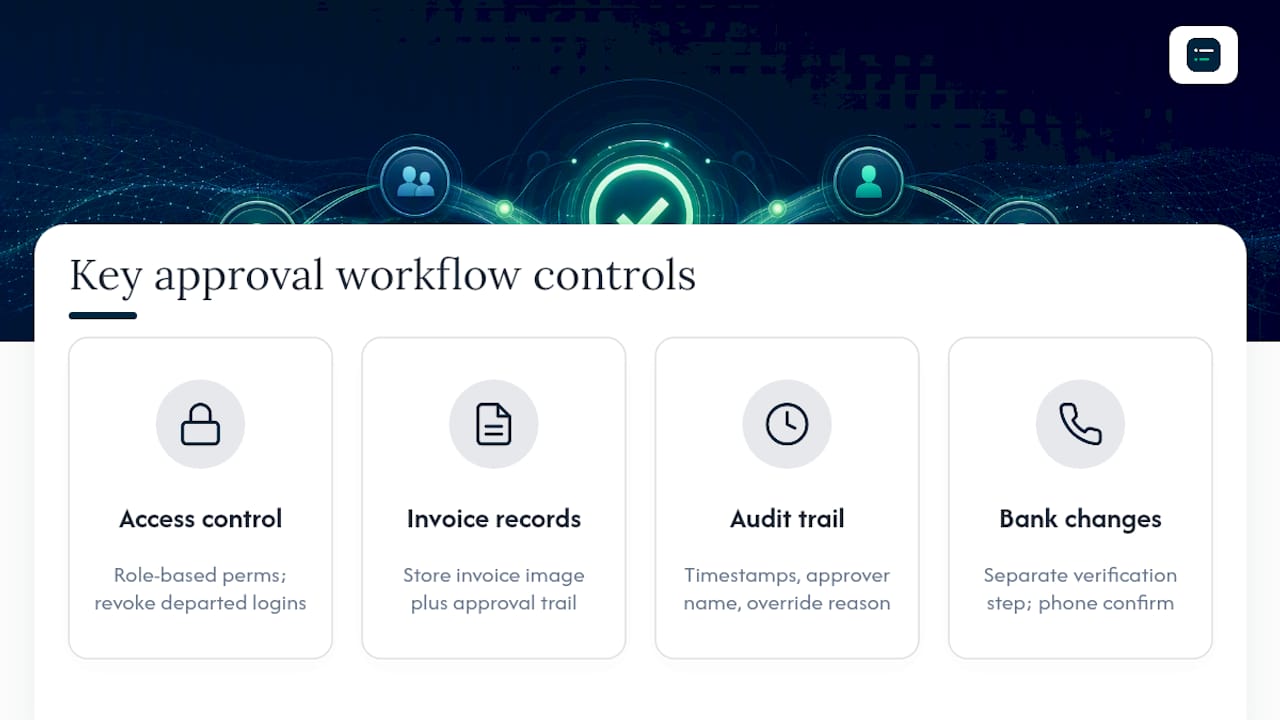
Access control comes first. Every user in the system should have permissions matched to their actual role, meaning a junior clerk cannot approve their own submitted invoice and a departed employee's login is revoked the day they leave, not the following month. Role-based permissions, checked periodically, close the gap between policy on paper and what people can actually do in the system.
Data retention matters for anyone under statutory record-keeping requirements. Most jurisdictions require invoice and payment records to be kept for several years, and a workflow tool should store the invoice image alongside the approval trail, not just the metadata, so a full record survives an audit years later.
Audit readiness is the practical payoff of everything else. When every approval carries a timestamp, an approver name and a reason for any override, producing an audit trail for an external auditor becomes a data export rather than a scramble through email threads. Segregation of duties, covered earlier as a fraud control, doubles as a compliance control too: most external auditors will specifically test whether the person who raised a purchase order can also approve its invoice.
Finally, treat vendor bank detail changes as a distinct, higher-scrutiny approval path. Business email compromise fraud typically targets exactly this step, asking finance to update payment details for an existing supplier. A workflow that routes bank detail changes through a separate verification step, ideally a phone call to a known contact, closes one of the most common fraud vectors in accounts payable.
How are AI and machine learning changing invoice approval?
The most immediate AI application in invoice approval is extraction accuracy: reading a scanned or PDF invoice and correctly pulling vendor name, amount, line items and GL coding without a human retyping any of it. This has moved well past simple optical character recognition into models that learn a specific vendor's invoice layout over time, reducing the manual correction rate with each cycle.
Anomaly detection is the second major shift. Rather than relying purely on fixed tolerance bands, machine learning models can flag an invoice that looks unusual for that vendor specifically, even if it technically falls within a standard tolerance, catching duplicate invoices with slightly altered invoice numbers or amounts that a rules engine alone would miss.
Predictive routing is emerging as a third capability, where the system learns which approver typically clears a certain invoice type fastest and routes accordingly, rather than following a rigid, unchanging sequence. This does not replace the approval matrix; it optimises the path within it.
None of this removes the need for human judgement on genuinely ambiguous invoices, and no serious finance leader should treat AI extraction as infallible on day one. The realistic framing is that AI handles the repetitive, pattern-based work of matching and flagging, freeing approvers to spend their attention on the exceptions that actually need it. That is a meaningfully different value proposition than software that simply digitises a paper process.
Using a tool directory to shortlist your next approval workflow
When you are comparing invoice approval software against your own approval matrix, a directory with independent editor scores is faster than a dozen separate demo calls. We built The AI Ledger to let you filter by ERP integration depth and routing capability before you book a single call. Check the last-verified date on any listing, and confirm integration depth directly in the demo rather than taking a feature list at face value.
Compare invoice approval tools without the demo marathon
There are other ways to shortlist software here, including asking peers for recommendations or working through vendor comparison spreadsheets by hand. Both take time you probably do not have this quarter. The AI Ledger is an independent directory of 100+ AI tools built specifically for accountants and bookkeepers, with side-by-side comparisons and a 30-second tool finder that narrows the field to options matching your routing and ERP needs, whether that is netsuite AP automation, xero AP automation, or another platform entirely.

Every listing carries an editor score that is never for sale, an honest verdict, and a last verified date so you know the review reflects the current product, not last year's feature set. Filter for approval workflow capability and ERP sync before you book a single demo, and subscribe to the free weekly Friday newsletter to catch feature and price changes as vendors roll them out. If you want implementation detail alongside the shortlist, InvoiceLabs' guide to invoice approval workflow covers adoption and notification design well.
Start with the tool directory and filter for the routing and integration features your approval matrix actually needs.
Sources
For deeper implementation detail, see Forrester's best practices on invoice-to-pay automation, Corpay's routing design guide, and The AI Ledger's guide to connecting your ERP to accounting software.
- Best practices: invoice-to-pay process automation | Forrester
- Is automation obtainable? it is in your accounts payable department | AIIM
- Invoice Approval Workflows: How to Design Routing That Stops Stuck Invoices | Corpay
- Supplier invoice approval workflow: 2026 design | ininvoice