Invoice reminder automation sends staged, rules-based nudges to customers before and after a due date, logs every action, and only pulls in a human when something needs judgement. Enable it as soon as your accounting ledger holds clean contact and payment-terms data.
- Turn on basic due-date reminders first, before building multi-stage escalation.
- Connect your ledger so invoice status stays the single source of truth.
- Pilot on one customer segment for two to three billing cycles before rolling out fully.
Quick benchmark: Stripe reports that 87% of its invoices get paid within 24 hours, and Smart Retries recover around 38% of failed payments on average, a useful yardstick when you set targets for your own rollout.
Key Takeaways
Invoice reminder automation works because it separates create, issue and send into distinct, auditable steps, letting finance teams scale collections without losing control over exceptions.
| Point | Details |
|---|---|
| Start with basic reminders | Enable due-date notices before building multi-stage escalation rules. |
| Keep your ledger as the source of truth | Sync status through your accounting platform to avoid version drift. |
| Separate create, issue and send | Use this distinction to decide where human review sits in the process. |
| Track five KPIs from day one | Measure DSO, days to pay, manual reminders, recovery rate and 24-hour pay share. |
| Shortlist with The AI Ledger | Use the 30-second tool finder to match your cadence and integration needs to a vetted tool. |
Table of Contents
- What does invoice reminder automation actually do?
- How does the reminder cadence actually run?
- Which features actually matter when you choose a tool?
- How do you set up invoice reminder automation step by step?
- Where does reminder automation actually live?
- What goes wrong, and how do you fix it?
- What impact should you actually expect?
- What do finance teams get wrong when they automate reminders?
- Ready to shortlist the right tool?
- Where to read more
- Frequently asked questions
- Sources
What does invoice reminder automation actually do?
At its core, it detects an invoice's due date and fires a pre-agreed sequence of messages: a courtesy nudge before the date, a notice on the day, then escalating follow-ups afterwards. Behind that sequence sits a distinction worth knowing: creating a reminder builds the record, issuing it finalises the content and numbering, and sending it dispatches the email or message to the customer. Most platforms separate these three actions so a finance lead can review before anything goes out.
The payoff is straightforward:
- Faster collection, because reminders never get forgotten in a busy week.
- Fewer manual touches on routine, non-disputed invoices.
- A consistent customer experience and a full audit trail of what was sent, when.
Track outcomes against a short list: days sales outstanding (DSO), average days to pay, and the number of manual reminders your team still sends per invoice.
How does the reminder cadence actually run?
Most systems move through the same three stages Microsoft's Business Central documentation lays out for its own reminder automation: create, which builds the reminder record and calculates fees or interest if applicable; issue, which locks the content and attaches the invoice PDF; and send, which dispatches it by email or another channel and logs the event.
Cadence can trigger off the invoice date, the due date, a broken promise-to-pay, or a custom job-queue schedule that runs daily or weekly. Recipient selection matters just as much as timing: most tools let you override the default billing contact per invoice, so an escalation after 30 days can route to an AP manager rather than the original recipient.
- Set the base cadence against your standard payment terms.
- Define escalation contacts for stages beyond the first notice.
- Confirm what attaches at each stage (invoice PDF, statement, nothing).
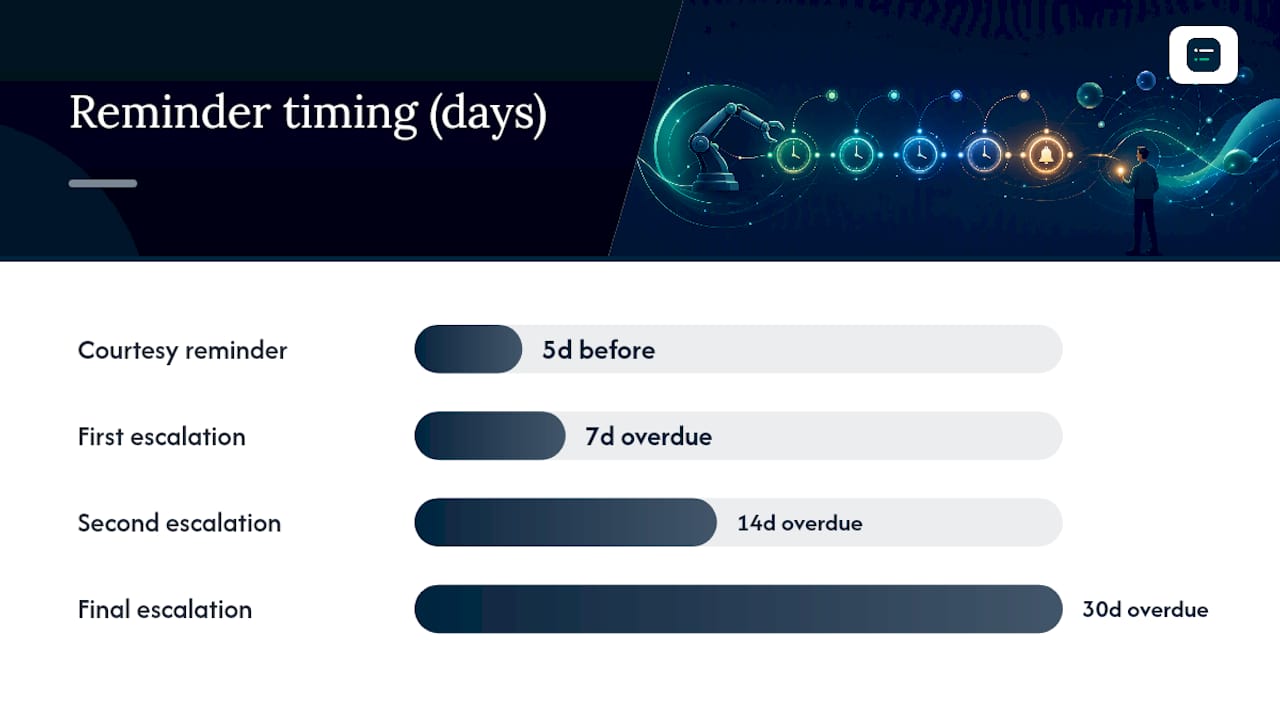
| Stage | Timing | Attachment |
|---|---|---|
| Courtesy reminder | 5 days before due date | Invoice PDF |
| Due-date notice | On due date | Invoice PDF |
| First escalation | 7 days overdue | Invoice PDF + statement |
| Second escalation | 14 days overdue | Statement |
| Final escalation | 30 days overdue | Statement, CC to AP manager |
Which features actually matter when you choose a tool?
Not every feature on a vendor's homepage changes your outcomes. These do:
- Recipient controls and overrides at both the invoice and customer level, so one difficult account doesn't get the standard cadence.
- Flexible, multi-stage escalation rules rather than a single fixed reminder.
- Template customisation and multi-channel sending (email plus SMS), with the invoice PDF attached automatically.
- Ledger integration as the source of truth, plus payment gateway links so the reminder itself carries a "pay now" button.
- Reporting, logs and an audit trail for every reminder issued, including promise-to-pay tracking.
Chargebee's positioning makes a useful point here: keeping reminder state on the billing record itself, rather than in a bolt-on tool, avoids the version drift that happens when two systems disagree about what's been paid.
Pro Tip: Set your default cadence conservatively (courtesy plus due-date notice only) and require human sign-off before enabling anything beyond a 30-day escalation. You can always tighten automation once you trust the data; loosening it after a customer complaint is much harder.
How do you set up invoice reminder automation step by step?
- Run a data quality check first. Confirm every customer has a billing contact, correct payment terms, and a unique identifier in your ledger.
- Connect your ledger and payment provider, and confirm which system is the single source of truth for invoice status.
- Build templates mapped to your contract terms. A Net 30 customer needs a different cadence to a Net 60 one.
- Pilot on one segment. Enable reminders for a small group, review the logs, and check tone and attachments before wider rollout.
- Roll out gradually with a monitoring plan and backstop rules: pause automatically on a logged dispute, and allow a manual hold on any account.
A workable starting schedule: courtesy reminder five days before the due date, a due-date notice, then escalations at 7, 14 and 30 days overdue. Refine cadence timing once you've measured a full billing cycle against it, an approach covered in more depth in building accounting workflow templates.
Where does reminder automation actually live?
Reminder automation generally comes from one of four places: built-in reminders inside your accounting platform, dunning tools bundled with a payments provider, specialised AR chasing software, or an automation layer that sits on top of your existing stack.
Before shortlisting anything, check for ledger sync, payment link generation, CRM context on the customer, and webhook support so reminder events can trigger other workflows. Here's what to expect from the platforms most finance teams already run:
- Xero and QuickBooks Online both offer built-in scheduled reminders tied to invoice status, adequate for simple Net 30 terms.
- Sage Business Cloud supports automated chase emails within its invoicing module.
- FreeAgent includes basic overdue reminder scheduling suited to smaller practices.
- Stripe Invoicing pairs reminders with payment collection and Smart Retries for failed card payments.
- Chaser and similar specialised tools add multi-stage escalation, tone customisation and detailed reminder analytics on top of whatever ledger you run.
Prefer whichever option keeps your ledger as the single source of truth. A standalone chasing tool with no ledger sync can drift out of step with what's actually been paid, exactly the version-drift risk Chargebee flags in its own product reasoning.
What goes wrong, and how do you fix it?
The usual failures are mundane: a missing billing contact, a due date pulled in wrong from a manual invoice, an email bouncing silently, or the same reminder firing twice because two automations overlap.
- Check the issued-reminder log first; it shows exactly what ran, when, and to whom.
- Set clear stop conditions: pause automatically on a logged dispute or a bounced address.
- Test any new cadence on a handful of invoices before enabling it account-wide.
Pro Tip: Keep a manual override switch visible on every invoice. When a customer calls to query a charge, someone needs to pause that thread in seconds, not hunt through settings.
What impact should you actually expect?
Track five numbers before and after rollout: DSO, average days to pay, manual reminders per invoice, recovery rate on failed payments, and the share of invoices paid within 24 hours of a reminder.
- Baseline these metrics for one full billing cycle before you switch anything on.
- Compare a pilot cohort against a control group running your old manual process.
- Use Stripe's own benchmark, 38% average recovery on failed payments via Smart Retries, as a rough ceiling for what payments-integrated retry logic can achieve.
What do finance teams get wrong when they automate reminders?
Ledger integration and data hygiene come before any clever escalation logic. An automation built on stale payment terms or missing contacts just chases the wrong person faster.

Don't hand a system full autonomy from day one. Specialist AR tools increasingly build in draft-and-approve modes and pause-on-dispute rules for good reason, and that human-in-the-loop layer catches the edge cases before they become customer complaints. Escalate to a human the moment a reply mentions a dispute, a query, or a promise to pay on a specific date; leave routine, undisputed overdue accounts to the automated schedule.
Pro Tip: Segment by invoice value and customer risk before you write cadence rules. A £200 invoice from a reliable customer can run on a light-touch schedule; a £20,000 invoice from a new account deserves earlier, more careful escalation.
Ready to shortlist the right tool?
You've now got the feature checklist. What you don't have time for is trawling six vendor websites to work out which one actually matches it. The AI Ledger is built for exactly that gap: an independent directory of 100+ AI tools for accountants and bookkeepers, each with an editor score, an honest verdict, and a last verified date so you're not reading stale marketing copy.

Run your requirements through the 30-second tool finder to get a shortlist matched to your ledger, your practice size, and the reminder features that matter to you. From there you'll find side-by-side comparisons and category guides covering payment reminder automation specifically, plus a free weekly Friday newsletter tracking new features and price changes across the sector. Start with the tool finder, compare your top two or three matches, and pilot the strongest fit on one customer segment before committing further.
Where to read more
- Business Central's reminder automation documentation for the create, issue, send flow and job-queue cadence.
- Stripe's Invoicing page for payments-integrated reminders and Smart Retries statistics.
- Chargebee Receivables for the case behind billing-native reminder state.
- JustPaid's AI reminder product for an example of prioritised queues and human-reviewed escalation.
Frequently asked questions
What is the difference between create, issue and send in invoice reminder automation? Creating builds the reminder record, issuing finalises its content and any attachments, and sending dispatches it to the customer. Most platforms let you review between issue and send.
How soon should I enable invoice reminder automation after connecting my ledger? Once your billing contacts, payment terms, and due dates are clean, start with a single due-date reminder before adding escalation stages.
Can I pause invoice reminder automation for a specific customer? Yes, most tools support per-invoice or per-customer overrides, which you should use whenever an account is in dispute or under active negotiation.
Does invoice reminder automation work with UK accounting platforms? Yes, Xero, QuickBooks Online, Sage Business Cloud and FreeAgent all support scheduled reminders, and specialised tools like Chaser layer additional escalation on top.
What KPI shows whether reminder automation is working? Days sales outstanding is the clearest headline metric, but track it alongside manual reminders per invoice to confirm the workload reduction is real.