Travel expense automation replaces manual capture and reporting with automated receipt capture, matching, policy enforcement and posting straight to your ledger, cutting the admin that eats up finance teams every month. The immediate payoff is faster reimbursements, fewer errors and real spend visibility. Your next step is straightforward: shortlist solutions by their integration depth and receipt capture accuracy before you look at anything else.
TL;DR:
- Accurate receipt capture is essential, as vendors that can't reliably read handwritten or faded receipts will require manual corrections, reducing automation benefits.
- Integration depth with existing accounting, ERP, and travel management systems is critical, with API connections preferred for continuous sync and proper expense categorization.
- Process automation can significantly cut expenses by reducing manual data entry and error correction, especially for mid-sized teams where volume justifies investment.
- Monitoring metrics such as processing time, error rate, policy compliance, and exception frequency help evaluate automation success and identify policy improvements.
- Starting with a small pilot, clearly defining policies, and gradually expanding ensures smoother implementation and better policy enforcement across all teams.
Table of Contents
- What is travel expense automation and how does it work?
- What core capabilities should finance teams expect?
- What ROI can finance teams realistically expect?
- How do you choose the right travel expense automation solution?
- How do you roll out travel expense automation without disrupting finance?
- How does travel expense automation connect to your accounting system?
- What metrics show whether automation is working?
- How The AI Ledger helps you choose the right tool
- A finance lead's honest view on getting started
- Your next step with The AI Ledger
- Sources
What is travel expense automation and how does it work?
Travel expense automation is the use of software, OCR and AI to handle the entire lifecycle of a business trip expense, from the moment a receipt lands in someone's inbox to the moment it posts, coded and approved, in your accounting system. The old way meant an employee kept paper receipts in an envelope, typed them into a spreadsheet weeks later, and a finance person keyed them into the ledger by hand. Automation removes nearly every one of those manual touchpoints.
A typical automated workflow runs through five stages: capture, extraction, matching, approval and posting. A traveller photographs a receipt or forwards an email confirmation; optical character recognition (OCR) pulls out the merchant, date, amount and tax; the system matches that data against a card transaction or bank feed; a policy engine checks it against spending rules and either approves it or flags it for review; then it posts to the correct cost centre and tax code in your accounting platform.
The technology stack behind this varies by vendor, but the building blocks are consistent:
- OCR and AI categorisation that read receipts and assign expense types automatically
- Bank and card feeds that pull transaction data directly, removing the need for manual entry
- Virtual cards that pre-authorise spend within set limits for a specific trip or supplier
- Mileage tracking apps that log business journeys via GPS rather than a driver's memory
- Rules engines that apply your travel policy in real time, before an expense reaches an approver
Where this sits in your finance stack matters. Card issuers, travel management companies (TMCs), standalone expense apps and your core ERP or accounting software all touch the same expense data at different points, and the vendors themselves increasingly talk about orchestrating all of it rather than just automating one slice. That framing is worth remembering when you evaluate options later in this guide.
What core capabilities should finance teams expect?
Not every tool billed as "automated" does the same job. The gap between a basic OCR scanner and a genuine end-to-end platform is wide, and it shows up most clearly in seven areas.
Receipt capture and OCR accuracy. The best systems read handwritten till receipts, foreign currency amounts and faded thermal paper without a human double check, as explained in Receipt Capture for Tradespeople That Saves Time | TradeTally. Weaker tools force staff to manually correct extracted data so often that the "automation" barely saves time. If a vendor won't show you accuracy figures on real receipt samples, treat that as a red flag.
Bank and card feed matching. Automatic reconciliation between a card transaction and the corresponding receipt is one of the more genuinely time-saving features on the market, and automating this matching step reduces the manual workload that previously fell on both travellers and finance staff.
Mileage and travel time tracking. A dedicated business mileage app that logs journeys automatically via GPS removes the guesswork (and the exaggeration) that comes with self-reported mileage claims, and some mileage tracking tools report meaningful time savings for teams that previously tracked drives by hand.
Virtual and corporate card controls. Pre-loaded virtual cards with spend limits tied to a specific trip, supplier or category stop overspending before it happens rather than catching it after the fact.
Policy enforcement and automated approvals. Rules based on role, trip type or spend category route low-risk claims straight to payment and only escalate genuine exceptions to a human approver.
Pre-trip approvals and per diems. Booking approval before travel happens, and automatic per diem calculation once it does, keeps spend predictable and cuts the awkward post-trip conversations about what should and shouldn't have been claimed.
Auditing, fraud detection and exception handling. Duplicate receipt detection, out-of-policy flagging and a full audit trail matter as much for compliance as for cost control.
- Receipt capture and OCR accuracy
- Bank/card feed matching and reconciliation
- Mileage and travel time tracking
- Virtual and corporate card controls
- Policy enforcement and automated approvals
- Pre-trip approvals and per diems
- Auditing, fraud detection and exception handling
Pro Tip: Ask any shortlisted vendor to process ten of your own messy, real-world receipts (crumpled, foreign currency, handwritten tips included) during a demo. That single test tells you more about OCR accuracy than any spec sheet.
What ROI can finance teams realistically expect?
The business case for travel expense automation rests on four measurable gains: time saved, fewer errors, faster reimbursement, and better control over the budget itself.
The hidden cost most finance leaders underestimate: processing an expense report carries a real internal cost well beyond the cash reimbursed. GBTA's research on expense report costs shows that manual processing, from chasing receipts to keying data to correcting errors, adds up to a genuine drain on finance team hours, not just a mild inconvenience.
Automation attacks that cost directly. Staff stop chasing paper receipts and correcting typos, month end closes faster because expense data is already coded and posted, and reimbursement cycles shrink because approvals happen automatically instead of sitting in someone's inbox. Error reduction follows the same logic: when a machine reads a receipt and matches it to a card transaction, there's no room for the transposed digit or the miscoded tax rate that a tired employee might introduce at 11pm before a deadline.
Spend visibility is the less obvious but arguably bigger win. Once every trip, receipt and card swipe flows through one system, finance can see travel spend by department, supplier or trip type in real time rather than reconstructing it from spreadsheets a month later. That visibility gives finance teams sharper control over budgets that would otherwise only be visible in hindsight.
Setting realistic expectations depends heavily on your size:
- Small teams (under 20 travellers) see the fastest relative time savings but the smallest absolute pound figure, because volume is low
- Mid-sized teams typically see the clearest ROI case, since manual processing costs scale with headcount faster than automation costs do
- Large or multi-entity organisations gain most from policy consistency and audit readiness, even if the per-report time saving looks similar to a mid-sized firm
Given the scale of global business travel spend, even a modest percentage improvement in processing efficiency compounds into a meaningful figure once you multiply it across a full year of trips.
How do you choose the right travel expense automation solution?
Picking a solution before you've defined what "good" looks like is the single most common procurement mistake finance teams make. Work through this checklist before you take a single demo call.
- Confirm integration requirements first. Check compatibility with your ERP, accounting software, card providers and any travel management company you already use. Industry guidance is consistent on this point: integration depth is the single most important selection criterion for finance teams, ahead of flashy front-end features.
- Test data capture accuracy against real receipt formats your travellers actually submit, including foreign currency and non-English text.
- Review policy configuration flexibility. Can you set different rules by role, region or trip type without needing a developer?
- Check controls and audit trail depth, including who can override an exception and whether that override is logged.
- Decide on deployment model, security and compliance requirements, particularly data residency if you operate across borders.
- Model total cost of ownership, not just the headline subscription price. Factor in implementation time, card fees and any per-transaction charges.
- Ask about vendor support, product roadmap and references from finance teams of a similar size to yours.
Vendor messaging in 2026 increasingly emphasises orchestration across booking, cards and expense reporting rather than standalone capture, and that shift is worth weighing heavily. A tool that only automates receipt scanning solves a smaller problem than one that connects booking, spend controls and ledger posting into a single workflow.
How do you roll out travel expense automation without disrupting finance?
A phased rollout beats a big-bang launch almost every time, because it lets you catch policy gaps and workflow mismatches while the stakes are still low.
- Design a pilot with one or two early adopter teams, ideally a mix of frequent travellers and occasional ones, so you test both high volume and edge cases.
- Define policy rules and exception workflows before go-live, not after. Decide in advance what happens when a receipt is missing, a spend limit is breached, or a claim looks duplicated.
- Communicate the change clearly and train staff on the new capture method, whether that's a mobile app, forwarded email receipts, or a card-linked feed.
- Map data flows against your existing month-end process so finance knows exactly when automated postings land and how they reconcile against the general ledger.
- Run parallel testing for at least one full expense cycle, checking automated outputs against what a manual process would have produced, before expanding beyond the pilot group.
Phased pilots with strong upfront policy configuration are a recurring theme in implementation guidance from industry sources, and for good reason: most failed rollouts trace back to unclear exception handling rather than the software itself.
Pro Tip: Give your pilot group a direct feedback channel, a Slack thread, a shared form, anything informal, rather than routing complaints through a formal ticket system. You'll catch policy gaps within days instead of discovering them at month end.
How does travel expense automation connect to your accounting system?
Integration is where the theory of automation either proves itself or falls apart. Three patterns dominate: direct API connections that sync data continuously, middleware platforms that translate between systems that can't talk to each other natively, and file exports (usually CSV) for older or heavily customised accounting setups.
Whichever pattern you use, the mapping logic matters more than the connection method. Expense categories need to map cleanly to your chart of accounts, tax codes need to apply correctly by jurisdiction and expense type, and cost centres need to route spend to the right department or project without manual intervention. Get this mapping wrong at setup and you'll spend more time fixing miscoded entries than you saved by automating capture in the first place.
Reconciling corporate card feeds against submitted expense claims is where most of the remaining manual effort tends to hide. A well-integrated system matches these automatically; a poorly integrated one leaves finance staff manually cross-referencing statements against claims each month, which defeats much of the purpose.
Multi-entity and intercompany travel adds another layer of complexity: a trip booked by one legal entity but charged to a subsidiary needs to post correctly across both, with the audit trail intact for each. Connecting your ERP to accounting software properly is the foundation this depends on, and it's worth getting right before you scale expense automation to a second or third entity.
Preserving source documents (the original receipt image, the approval record, the policy version applied at the time) is not optional for compliance. If your auditor asks why a claim was approved eighteen months ago, you need the original receipt and the policy rule that applied, not just a coded ledger entry.
- Direct API connections for continuous sync
- Middleware for systems that don't integrate natively
- File exports for legacy or highly customised setups
- Category, tax code and cost centre mapping done correctly at setup
- Card feed reconciliation automated rather than manual
- Source documents preserved alongside every posted entry
What metrics show whether automation is working?
The dashboards worth building track four things: how long an expense report takes to close, what it costs to process, how compliant claims are with policy, and how many exceptions crop up per batch of transactions.
- Time to close an expense report, from submission to final approval
- Cost per expense report processed, factoring in both software and staff time
- Policy compliance rate, the percentage of claims that pass without manual intervention
- Exceptions per 1,000 transactions, a useful proxy for how well your policy rules actually match real travel behaviour
Given that processing expense reports carries a real hidden cost well beyond the cash reimbursed, cost per report is arguably the single metric that best proves automation's business case to a sceptical finance director.
Build these into a shared dashboard that both finance and travel managers can see, rather than a report that only finance reviews at month end. When exception rates spike in a particular category, say, meal costs consistently breaching the daily limit, that's a signal to revisit the policy itself, not just chase down individual claims. The same data doubles as leverage in supplier negotiations once you can show exactly where and how travel spend concentrates. Tracking the right finance automation metrics matters well beyond travel expenses, and the discipline you build here tends to carry over to other automated workflows.
How The AI Ledger helps you choose the right tool
Choosing between travel expense automation platforms usually means wading through vendor sales pages that all claim the same thing: fast, accurate, seamless. The AI Ledger exists to cut through that noise for finance and accounting teams specifically.
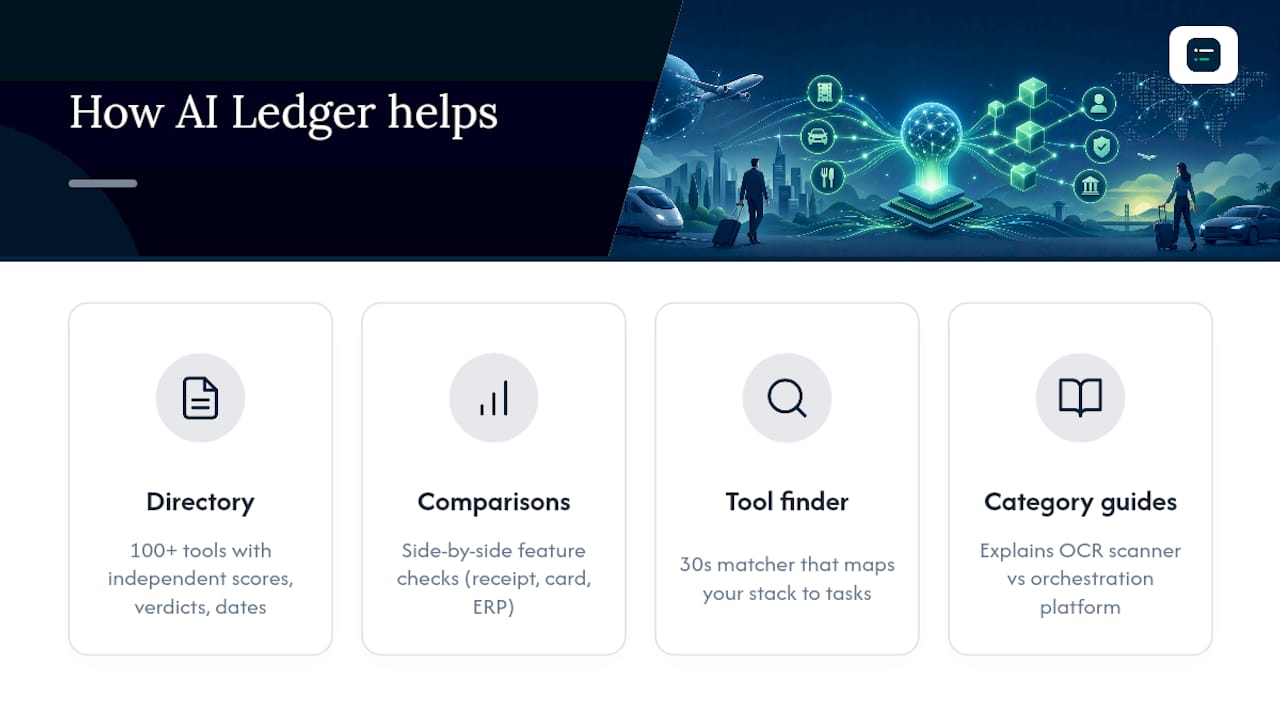
The directory covers 100+ AI tools relevant to accountants and bookkeepers, each carrying an independent editor score, an honest verdict and a last verified date, none of which are ever for sale. Side by side comparisons let you weigh features that matter to your workflow (receipt capture accuracy, card feed matching, ERP integration) without relying solely on marketing copy. The 30 second tool finder matches your accounting stack and task, whether that's expense capture, reconciliation or month-end close, to the tools genuinely built for it, and the category guides break down what separates a basic OCR scanner from a full orchestration platform.
Content on automation topics, including travel and expense workflows, is written to help finance teams see past vendor claims to what a tool actually does day to day.
A finance lead's honest view on getting started
Most implementation anxiety comes from imagining a big-bang rollout. Don't. Pilot with one team, define your exceptions upfront, and favour configuring an existing policy engine over building anything custom. Early wins (faster approvals, fewer chased receipts) build the trust you need before wider adoption.
— Aaron
Your next step with The AI Ledger
Comparing travel expense automation vendors on your own means dozens of demo calls, sales decks that all sound identical, and no easy way to check whether a "top rated" platform actually integrates with the accounting software you already run. The AI Ledger gives finance teams a faster route: independently reviewed listings with editor scores that can't be bought, checked against your existing stack before you ever book a call.

The 30 second tool finder narrows a crowded market down to a shortlist matched to your task, whether that's receipt capture, reconciliation or expense reporting, and your accounting software. Editorial reviews and editor scores surface the practical detail vendor pages leave out: how accurate the OCR really is, how painful the integration setup actually is, and where the pricing gets complicated once you're past the free trial. If you want the current state of AI accounting tools without the sales pitch, sign up for the free weekly Friday newsletter, or head straight to The AI Ledger's tool directory and run your stack through the finder.
Sources
- Global business travel industry data | Statista
- How much do expense reports really cost a company? | GBTA blog
- 5 Ways business travel expense automation improves business travel control | Booking.com business
- Automated travel expense reporting: the ultimate guide | Gett