An accountant AI tool comparison guide is a structured framework that helps finance professionals evaluate, select, and deploy AI software across their core workflows. The category covers everything from autonomous bookkeeping agents to tax research assistants and client communication tools. Choosing the wrong tool costs time and money. Choosing the right one can save an accounts payable analyst around 6 hours per week through automation alone. This guide cuts through the noise on categories, evaluation criteria, implementation steps, and common pitfalls so you can make a confident decision in 2026.
What are the main categories of AI tools for accountants?
Experts classify AI accounting tools into five categories: bookkeeping, tax, audit, client communication, and practice management. Each category targets a distinct part of your workflow, and conflating them leads to poor purchasing decisions.
Here is what each category actually does:
- Bookkeeping tools automate transaction coding, bank reconciliation, and month-end close. The best ones use multi-phase pipeline architectures rather than a single large language model, which means they handle edge cases like VAT, partial payments, and inter-company transfers far more reliably.
- Tax research tools draft returns, flag deductions, and surface relevant legislation. They work best as a first-pass layer that a qualified accountant then reviews and approves.
- Audit tools match invoices to ledger entries, flag anomalies, and generate audit trails. Integrations with Microsoft 365 Copilot have made these tools particularly useful for teams already working inside that ecosystem.
- Client communication tools handle email triage, meeting summaries, and automated follow-ups. They reduce the administrative load on partners and managers without removing the human relationship.
- Practice management tools cover scheduling, billing, document management, and workflow tracking. AI features here tend to focus on surfacing bottlenecks and predicting capacity issues.
The distinction between categories matters because AI tools augment human tasks rather than replace accountants. A bookkeeping tool will not help you manage client onboarding. A practice management platform will not reconcile your bank feeds. Buying the wrong category is the most common and most expensive mistake in this space.
Pro Tip: Before you evaluate any tool, write down the three workflow tasks that consume the most time in your practice. Match those tasks to a category first, then compare tools within that category.

How should accountants evaluate and select AI tools?
Selecting the right AI tool requires matching it to your firm's scale, tech stack, and client base. Finance teams should evaluate tools based on invoice volume, ERP system, and client servicing model before committing to a purchase. A solo bookkeeper running 50 clients on Xero has entirely different needs from a mid-size firm processing thousands of invoices monthly across QuickBooks Online and Sage.
Work through these evaluation steps in order:
- Map your ERP ecosystem. AI tools integrate variably with platforms like QuickBooks Online, Xero, Sage, and Pandle. Some tools are multi-platform. Others are locked to one ERP. If a tool does not natively connect to your ledger, the integration overhead will eat your efficiency gains.
- Assess pipeline architecture. Pipeline architecture matters more than the underlying AI model. Multi-phase pipelines handle transfers, VAT, and partial payments better than single-model tools. Ask vendors directly how their coding pipeline works before you sign anything.
- Clarify the autonomy level. There is a meaningful difference between a tool that suggests a transaction code and one that posts it autonomously. Distinguishing suggestion-only AI from true autonomous posting is vital for understanding how much human review your workflow will still require.
- Check pricing transparency. Pricing tiers range from $12 per month for freelancer tools up to $500 or more per month for custom enterprise platforms. Entry-level tools often charge per client or per transaction volume, which scales unpredictably. Enterprise platforms typically require a custom engagement before you even see a number.
- Evaluate lock-in risk. Many AI tools are optimised for a single ERP ecosystem, making platform lock-in a real risk if your client base or firm priorities change. Ask what data export options exist before you commit.
Pro Tip: Run a structured pilot on one client or one workflow segment before a full rollout. Define your success metrics upfront: coding accuracy rate, hours saved per week, and error rate at month-end close.
What are the key steps to implementing AI tools effectively?
Successful AI tool adoption follows a clear sequence. Skipping steps, particularly the training and pilot phases, is the primary reason implementations fail to deliver the expected returns.
Step 1: Assess your workflow bottlenecks. Identify where time is lost and where errors occur most frequently. Common targets include accounts payable automation, bank reconciliation, and month-end close. Data readiness matters here too. If your chart of accounts is inconsistent or your source documents are poorly organised, an AI tool will amplify those problems rather than fix them.
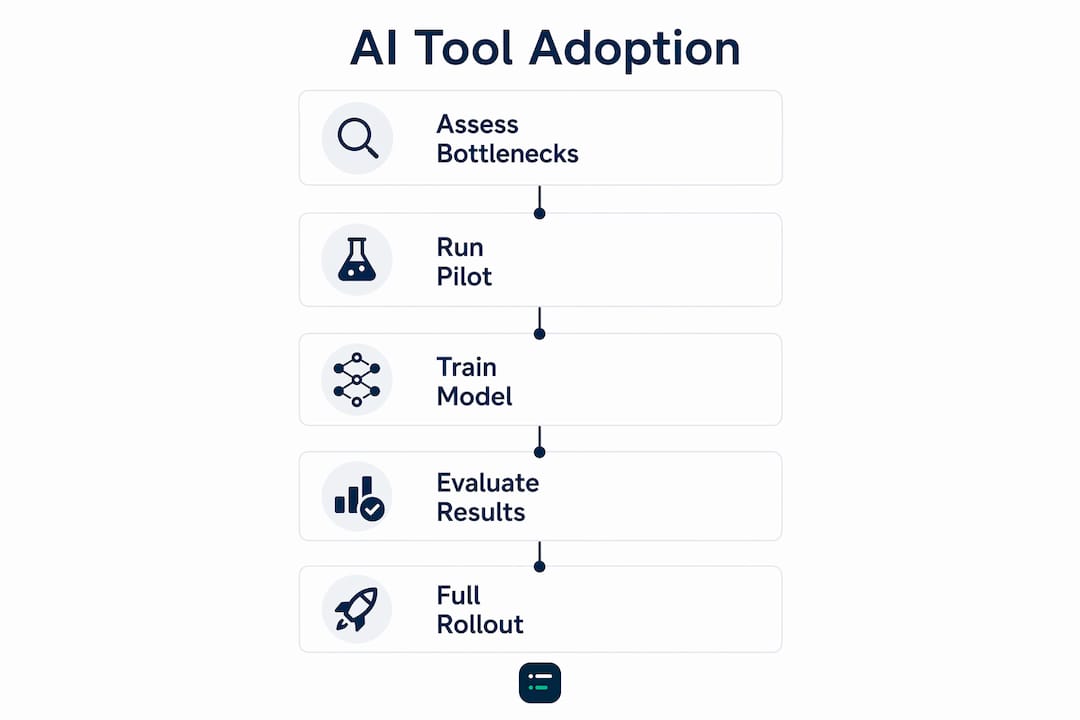
Step 2: Run a defined pilot. Choose one client or one process segment. Set measurable targets before you start: coding accuracy, time per task, and error frequency. A pilot without defined metrics tells you nothing useful.
Step 3: Train the model on your data. Upfront training investment is required when using autonomous AI bookkeeping agents to achieve reliable results. Feed the tool your client's chart of accounts, historical transactions, and any firm-specific coding rules. The more context you provide, the faster accuracy improves.
Step 4: Monitor and refine continuously. Review AI-coded transactions weekly during the first month. Flag errors, correct them inside the tool, and track whether the error rate falls over time. Most tools learn from corrections, but only if you make them consistently.
The human element is non-negotiable throughout this process. Staff need to understand what the tool does and does not do. Change management is not optional. Accountants who feel threatened by automation tend to under-use tools or override them unnecessarily, which destroys the efficiency case entirely.
- Communicate clearly why the tool is being introduced and what it will handle
- Identify a champion in the team who owns the tool and monitors its performance
- Build a review cadence into your month-end workflow from day one
What common mistakes should accountants avoid when choosing AI tools?
The most expensive mistakes in AI tool selection are structural, not technical. They happen before a single transaction is coded.
- Ignoring pipeline architecture. A tool powered by a single large language model will struggle with complex transactions. VAT edge cases, partial payments, and inter-company transfers all require multi-phase coding pipelines to handle reliably. Ask vendors for specifics on how their pipeline processes these scenarios.
- Buying enterprise tools for small firms. Enterprise platforms are built for high-volume, multi-entity environments. A sole practitioner or small firm will pay for complexity they will never use, and the onboarding overhead alone can take months.
- Overlooking lock-in risk. Switching ERP systems mid-growth is common. If your AI tool only works with one platform, you face a costly migration or a forced tool change at the worst possible time.
- Removing human review too early. AI bookkeeping tools are not infallible. Professional judgement remains the final check on every coded transaction, particularly for clients in complex industries or with unusual transaction patterns.
- Misaligning tool capabilities with firm workflows. The most effective AI applications focus on narrow, predictable workflows such as AP automation, email triage, audit linking, and tax draft preparation. Buying a broad platform when you only need one of those functions wastes budget and creates unnecessary complexity.
"The firms that get the best results from AI tools are the ones that start narrow. They pick one high-volume, repetitive workflow, automate it well, and then expand. The firms that struggle try to automate everything at once and end up with a system nobody trusts."
Pro Tip: Before signing any contract, ask the vendor for a reference client of similar size and ERP setup to yours. A vendor who cannot provide one is a vendor worth avoiding.
Key takeaways
The best AI tool selection starts with workflow mapping, not vendor comparison. Match category to task, assess pipeline architecture, and pilot before committing.
| Point | Details |
|---|---|
| Match category to task | Identify your highest-volume workflow first, then select a tool built for that specific category. |
| Pipeline architecture matters | Multi-phase pipelines outperform single-model tools on complex transactions like VAT and partial payments. |
| Pilot with defined metrics | Set coding accuracy and time-saved targets before rollout to measure real performance. |
| Check ERP integration depth | Tools locked to one platform create migration risk if your tech stack changes. |
| Keep human review in place | AI tools augment professional judgement; they do not replace the final human check on coded transactions. |
Why I think most accountants are comparing AI tools in the wrong order
Most comparison guides lead with pricing. I think that is backwards. Pricing is the last thing you should look at, not the first.
The accountants I see getting genuine value from AI tools start with a single question: "Which workflow in my practice is the most repetitive and the most error-prone?" That question leads them to a category. The category leads them to a shortlist. The shortlist leads them to a pilot. Pricing only becomes relevant once a tool has proved it works in your specific environment.
The other thing I have noticed is that AI in bookkeeping is still widely misunderstood as a binary choice between "full automation" and "no automation." The reality is a spectrum. Most firms land somewhere in the middle, using AI to handle the grunt work on high-volume, predictable transactions while keeping qualified staff focused on judgement-heavy tasks. That middle ground is where the real efficiency gains live.
My honest advice: resist the urge to buy the most feature-rich tool on the market. Buy the tool that solves your specific problem well. A narrow tool used consistently beats a broad platform used badly every single time. The firms that will be ahead in 2026 are not the ones with the most AI. They are the ones with the right AI, deployed in the right place.
— Aaron
How Ailedger helps you find the right AI tools
Ailedger publishes curated comparisons and practical resources built specifically for accounting professionals who are actively evaluating AI tools. The directory covers tools across every major category, from bookkeeping agents to practice management platforms, with clear notes on ERP compatibility, pricing tiers, and autonomy levels.

If you are ready to move from research to action, the CPA Pilot tool on Ailedger helps you match your workflow requirements to the right AI solution without the guesswork. For firms focused on practice management and data workflows, the Mesh tool covers AI-assisted integration and optimisation across your existing tech stack. Both tools are free to explore and built for practices of every size.
FAQ
What is an accountant AI tool comparison guide?
An accountant AI tool comparison guide is a structured framework for evaluating AI software across accounting workflows. It covers tool categories, integration requirements, pricing tiers, and autonomy levels to help finance professionals make informed purchasing decisions.
Which AI tool categories matter most for accountants in 2026?
The five core categories are bookkeeping, tax, audit, client communication, and practice management. Bookkeeping and AP automation tools currently deliver the most measurable efficiency gains for most practices.
How do I know if an AI bookkeeping tool is truly autonomous?
Ask the vendor whether the tool suggests transaction codes or posts them autonomously. True autonomous tools use multi-phase pipeline architectures and require an upfront training period on your client data and chart of accounts.
What ERP integrations should I check before buying?
Verify native integration with your current platform, whether QuickBooks Online, Xero, Sage, or another ledger. Tools locked to a single ERP create migration risk if your client base or firm priorities change.
How much do AI accounting tools cost in 2026?
Pricing ranges from around $12 per month for freelancer-grade tools to $500 or more per month for enterprise platforms. Mid-market tools typically charge per client or per transaction volume, so model your expected usage before committing to a tier.