Start with a certified pre-built connector wherever your ERP and accounting software both support one. If neither vendor offers a native option, move to an iPaaS platform before you even consider a custom build. This ordering gives you the fastest deployment, the least ongoing maintenance burden, and support you can actually call when something breaks.
Custom API work or middleware only earns its cost when your data flows are genuinely unusual, multi-entity, or high-volume enough that off-the-shelf tools can't cope.
A connector or iPaaS handles the plumbing. Your job is to get the Chart of Accounts and master data right before a single field gets mapped, because no integration method fixes bad data underneath it.
Three actions to hand to IT or a vendor this week:
- Owner: name one finance lead and one technical lead accountable for the project, not a committee.
- Scope: pick the two or three data flows costing you the most manual rework right now, typically order-to-cash and procure-to-pay, as ERP integration research confirms is the usual starting point.
- Priority: agree which flows go live first and which can wait, so testing doesn't sprawl across the whole ledger at once.
Key Takeaways
Connecting ERP to accounting software works best when you start with a certified native connector or iPaaS and only build custom when your data flows are genuinely unique.
| Point | Details |
|---|---|
| Start simple | Use a certified pre-built connector or iPaaS before considering custom API or middleware builds. |
| Fix the Chart of Accounts first | Align a unified Chart of Accounts before mapping any fields, or reconciliation stays inconsistent after go-live. |
| Prioritise order-to-cash and procure-to-pay | These flows typically remove the most manual rework and deliver the fastest payback. |
| Test reconciliation, not just connectivity | Build tolerance rules for timing drift and rehearse your rollback plan before go-live. |
| Use a tool finder to shortlist software | The AI Ledger's 30-second tool finder helps you compare accounting platforms before you brief a vendor. |
Table of Contents
- How do you connect ERP to accounting software?
- What are the benefits of connecting ERP and accounting software?
- A step-by-step guide to integrating your ERP with accounting software
- How do you choose the right integration approach?
- What are the common pitfalls in ERP to accounting integration?
- Which vendors do businesses commonly connect, and how?
- What security and testing checks belong on your go-live checklist?
- How does the technical connection actually work?
- What should you expect from a real integration project?
- Build your shortlist before you brief a vendor
- Frequently asked questions
- Sources
How do you connect ERP to accounting software?
There are four routes, and picking the wrong one is the single most common reason integration projects overrun. Each trades speed against control.
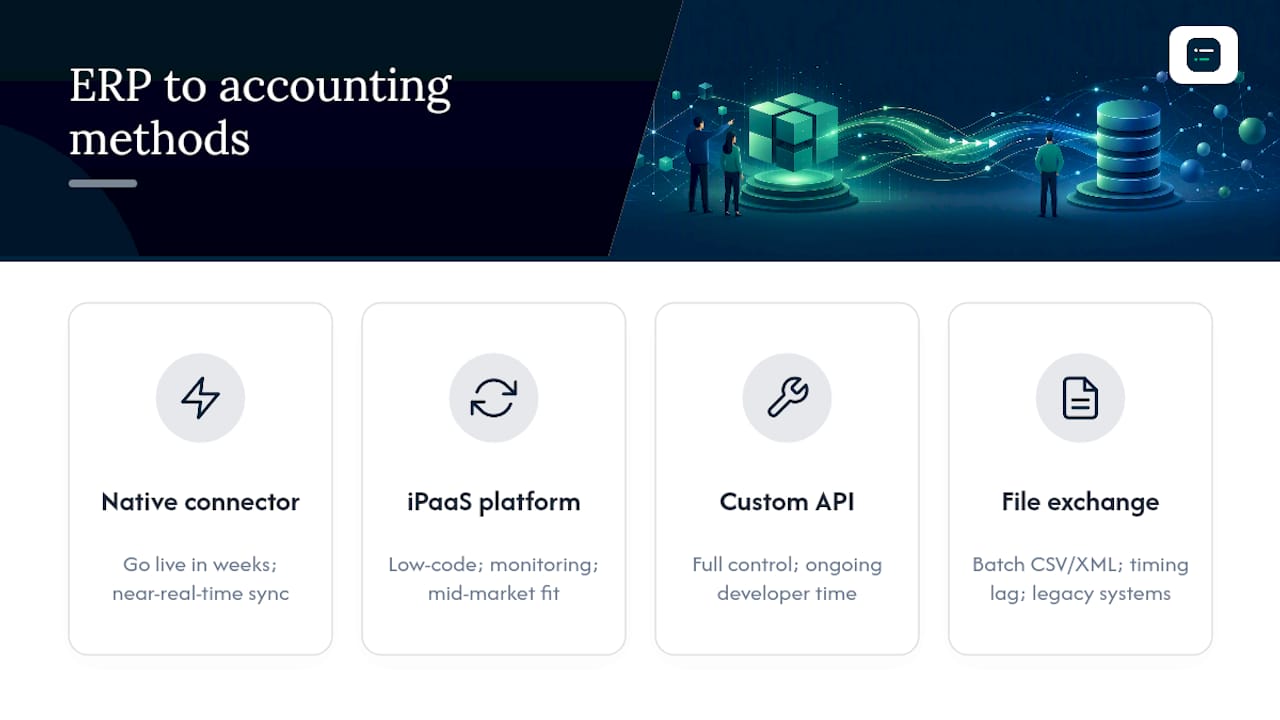
Native or pre-built connectors are ready-made links between named systems, configured through settings rather than code. They suit small and mid-sized businesses that want to go live in weeks, not months. Pre-built Xero connectors, for instance, offer two-way, near real-time sync with OAuth 2.0 security built in from day one.

iPaaS (integration platform as a service) platforms sit between systems and use visual, low-code mapping tools plus built-in monitoring and retry logic. They fit mid-market firms with several systems to connect and no in-house developer team, and can cut deployment from quarters to weeks.
Custom API integration gives you full control over logic and data handling, at the cost of ongoing developer time. Reserve it for genuinely unique processes.
File or middleware exchanges (batch CSV or XML transfers) remain common for legacy systems or infrequent data flows, though they introduce timing lag.
Pro Tip: Most successful projects mix methods. Use a native connector for your core AR/AP flow and a simple file export for a low-volume, quarterly reporting feed nobody wants to pay to automate properly.
What are the benefits of connecting ERP and accounting software?
Once the two systems talk to each other, the manual rekeying that eats up your team's week largely disappears. Invoices raised in the ERP post directly as journals in your accounting software. Payments received update accounts receivable without anyone touching a spreadsheet.
That has a direct effect on how fast you can close the books:
- Automated AR/AP posting removes duplicate data entry and the errors that come with it.
- Near real-time visibility into cash position and inventory levels replaces end-of-month guesswork.
- Reconciliation becomes faster because both ledgers already agree on most transactions before you start.
Real-time bidirectional sync between operational and financial systems means month-end close work shrinks considerably, because records match daily activity rather than a batch export run once a month. That single change is often the business case that gets a project approved.
A step-by-step guide to integrating your ERP with accounting software
Phase 0: Define scope and sponsor. Get an executive sponsor, agree objectives in writing, and prioritise order-to-cash and procure-to-pay, since vendor-neutral guidance consistently points to these as delivering the fastest payback.
Phase 1: Write the BRD and align the Chart of Accounts. A shared Chart of Accounts across both systems, agreed before any code is written, is the single biggest predictor of a smooth go-live. One mid-market manufacturing project cut its projected build time by nearly 40% simply by locking this down first.
Phase 2: Map the data. Decide field by field how ERP customer records map to accounting contacts, how item codes map to nominal codes, and who owns master data going forward.
- Build unit tests for individual field mappings.
- Run integration tests across full transaction cycles.
- Run user acceptance testing (UAT) with real finance staff, not just IT.
- Set reconciliation rules and a documented fallback if the sync fails.
Phase 3: Go live. Take a full backup, agree a cutover window, define rollback criteria, and monitor the first week closely.
Pro Tip: Budget more time for data cleansing than for the technical build itself. Messy supplier records are the most common time sink teams underestimate.
How do you choose the right integration approach?
Match the method to your actual transaction volume and complexity, not to what sounds impressive in a vendor pitch.
| Evaluation dimension | Native connector | iPaaS | Custom API / middleware |
|---|---|---|---|
| Best for | SMB, single-entity | Mid-market, multiple systems | Enterprise, unique processes |
| Sync type | Real-time | Near real-time | Real-time or batch |
| Complexity & maintenance | Low | Moderate | High |
| Cost & timeline | Low cost, weeks | Moderate cost, weeks to months | High cost, months |
| Data types supported | Invoices, AR/AP, payments | Invoices, AR/AP, inventory, projects | Any, including bespoke fields |
| Vendor support & SLAs | Vendor-managed | Platform-managed | Internally managed |
High transaction volumes, multiple entities with different Charts of Accounts, or industry-specific reporting rules all push you towards iPaaS or custom builds. Watch for these red flags before committing to any method:
- Neither system publishes documented APIs.
- Your entities run on genuinely different Charts of Accounts with no mapping plan.
- Master data (customers, suppliers, items) is duplicated or inconsistent across systems already.
What are the common pitfalls in ERP to accounting integration?
Mismatched Chart of Accounts tops the list. Normalise the mapping before go-live rather than patching it in production.
Duplicate customer or supplier records creep in when both systems allow free-text entry. Run a de-duplication pass before the first sync, not after.
Timing differences between systems cause reconciliation drift, where balances briefly disagree because one system posts before the other. Build explicit reconciliation rules and a tolerance window rather than chasing every penny in real time.
Permission misconfigurations are the quiet cause of most failed syncs. Audit role-based access before launch, and monitor for silent authentication failures afterwards.
Pro Tip: A one-day reconciliation drift is normal in the first weeks of a new sync. A drift that keeps growing week on week signals a mapping error, not a timing quirk.
Which vendors do businesses commonly connect, and how?
Recognising your own stack in a real scenario helps you pick the right method faster.
- Small business, cloud-first stack: a firm on Xero connecting to a cloud ERP or ecommerce platform typically uses a native connector. Timeline: two to four weeks. Main cost driver: configuration, not development.
- Mid-market, multiple systems: a business running Sage 200, Sage Business Cloud, QuickBooks, or Microsoft Dynamics 365 Business Central usually chooses an iPaaS to connect CRM, warehouse and payroll data alongside the ledger. Timeline: two to four months. Main cost driver: mapping and testing effort.
- Enterprise, complex reporting: a business on NetSuite with multiple entities, or a firm needing German compliance through DATEV, tends to use middleware or custom API integration. Timeline: four to nine months. Main cost driver: custom development and UAT cycles.
Tools such as Zynk sit in the iPaaS and middleware space specifically for accounting automation, and developer resources on Zynk's public repositories show common adapter patterns worth reviewing before you scope a custom build.
Pro Tip: If your stack matches one of these scenarios closely, ask your vendor directly whether a certified connector already exists for that exact pairing before assuming you need custom work.
What security and testing checks belong on your go-live checklist?
Sign off on these before any live financial data flows through the connection.
- Confirm authentication uses OAuth 2.0 or secure API keys, not shared static credentials.
- Verify role-based access control (RBAC) restricts who can view or post transactions.
- Confirm data is encrypted in transit and at rest, with audit logging enabled and a retention policy set.
- Run performance testing at peak transaction volumes, not just typical daily loads.
Beyond the standard test cycle, run a full backup and recovery drill and confirm reconciliation testing catches out-of-balance conditions automatically.
- Set alerting for failed syncs within minutes, not hours.
- Flag any transaction that posts to accounting but not ERP, or vice versa.
Pro Tip: Test your rollback plan before go-live, not during an incident. A rollback you've never rehearsed rarely works cleanly under pressure.
How does the technical connection actually work?
Modern ERPs expose RESTful APIs or, in older systems, XML gateways, allowing operational events to trigger accounting entries automatically as bidirectional synchronisation rather than a one-way export.
Behind that sits data transformation: mapping ERP field formats to accounting field formats, and building idempotency into every write so a retried API call never posts the same invoice twice.
Before development starts, get written answers to these questions from your vendor or developer:
- What are the API rate limits, and what happens if we exceed them?
- How are errors surfaced, and can we subscribe to failure alerts?
- How is the API versioned, and what's the deprecation notice period?
Pro Tip: Ask specifically about monitoring endpoints. A connector without a health check dashboard leaves you finding out about failures from an angry customer, not a system alert.
What should you expect from a real integration project?
Ambition kills more integration projects than budget does. Teams want every system talking to every other system on day one, when the honest move is picking two flows, getting the Chart of Accounts genuinely aligned, and proving it works before expanding.
Getting master data right first pays off for years; skipping it costs you every month after go-live. If you're still deciding which accounting software or automation tool actually fits your stack, The AI Ledger's 30-second tool finder is designed specifically for that decision.
Build your shortlist before you brief a vendor
Before you brief IT or an implementation partner, it helps to know which accounting tools actually support the connector or iPaaS pairing you need, and which ones will leave you paying for custom development. That's a research problem, and it's the one The AI Ledger exists to solve: a directory of 100+ AI accounting tools with independent reviews, so you're not relying on a vendor's own sales page to tell you what their connector genuinely does.

The 30-second tool finder matches your stack and task to relevant options in less time than it takes to read a vendor brochure, whether you're checking accounting workflow automation options or comparing platforms outright. Every listing carries an editor score and a last verified date, and none of those scores are for sale. Start a shortlist now and take it into your next vendor call.
Frequently asked questions
Does ERP software already include accounting? Most ERPs include a general ledger module, but dedicated accounting software often offers deeper compliance features, tax handling, or reporting that finance teams prefer to keep separate. That's exactly why the connection between the two matters.
How do you integrate invoicing between ERP and accounting software? Map invoice fields (customer, line items, tax codes, due dates) between systems using your chosen connector or iPaaS, then test that invoices raised in the ERP post correctly as accounting entries before going live.
How long does a typical ERP to accounting integration take? A native connector deployment often takes a few weeks; an iPaaS project for a mid-market business typically runs a few months; custom builds for enterprise or multi-entity setups can take several months.
What is the biggest cause of failed ERP integrations? Mismatched Charts of Accounts and poor master data hygiene cause more failures than any technical fault, which is why aligning both before development starts matters so much.
Sources
For deeper technical detail on integration methods and prioritisation, see Itransition's 2026 guide and ERP Research's vendor-neutral overview. Vendor-specific connector documentation, including field-level mapping guides, is usually published on each provider's own developer portal, such as Xero's or Microsoft's API documentation sites, and on community repositories like Zynk's GitHub pages.
- ERP integration: methods, tools, and best practices for 2026 | Itransition
- ERP integration: methods, tools, and best practices | ERP Research
- Accounting software integration with ERP | APPSeCONNECT
- Unify your connected operations with Xero API integration | Taxilla