What is accounting software integration?
Accounting software integration is the programmatic connection between your accounting platform and other business applications, enabling automated, bidirectional data flow without manual intervention. Invoices, payments, expenses, bank transactions, and customer records move between systems on a defined schedule or in real time, keeping your books current without anyone having to re-key a single figure.
Integration with other business applications is becoming essential infrastructure rather than a luxury investment. If your accounting system sits in isolation from your CRM, payroll tool, or e-commerce platform, your finance team becomes the integration layer, manually carrying data between systems that should be talking to each other automatically.

The UK platforms at the centre of most of these connections are Xero, QuickBooks, Sage, and FreeAgent. Each exposes an API that third-party tools and middleware can connect to, and each has a native app marketplace where many common integrations are already pre-built.
At its core, a well-designed integration automates the following data exchanges:
- Invoices generated in a billing or CRM system appearing automatically in your accounting software
- Payments recorded in one platform updating the ledger in the other
- Expenses submitted by staff flowing directly to the correct general ledger codes
- Bank transactions reconciling automatically via live bank feeds
- Customer and vendor records staying consistent across all connected systems
Common examples of accounting software integration in practice
The clearest way to understand how software integration works is to look at what it replaces. Without integration, a sales order closed in your CRM requires someone to manually create an invoice in Xero or QuickBooks. With integration, that invoice appears automatically, matched to the correct customer record, with the right tax codes applied.
Here are the most common integration scenarios UK accounting professionals encounter:
- CRM to accounting: Customer data, sales orders, and invoices sync between platforms like Salesforce or HubSpot and your accounting system, removing duplicate entry and accelerating the order-to-cash cycle.
- Payroll to general ledger: Payroll software posts salary costs, employer National Insurance contributions, and pension entries directly to the ledger after each pay run, rather than requiring a manual journal.
- Bank feeds: Live connections to UK current accounts pull transactions into Xero, QuickBooks, Sage, or FreeAgent daily, dramatically reducing the time spent on bank reconciliation.
- E-commerce platforms: Shopify or WooCommerce sales sync automatically to accounting software, with each order, refund, and payment fee posted without manual export or import.
- Expense management: Tools like Expensify capture receipts, extract line-item data, and push categorised expenses directly to the accounting platform.
- Analytics and reporting: Sage connects natively to Microsoft Power BI, allowing finance teams to build dashboards that pull live transactional data without any manual export.
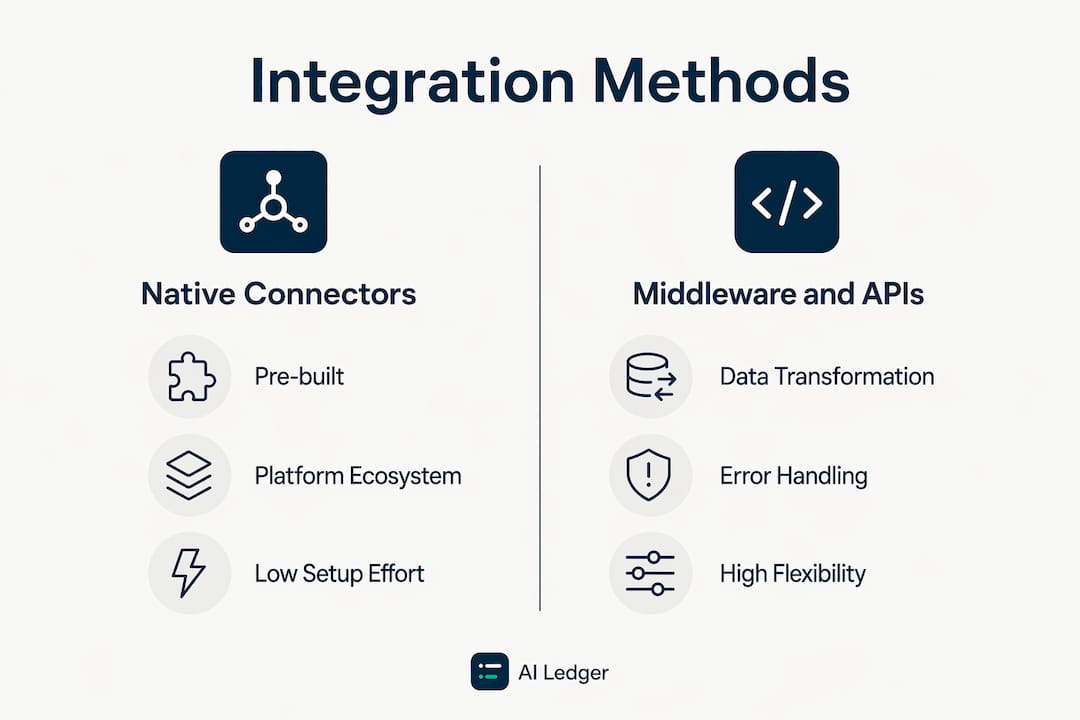
The architecture behind these connections varies. Native connectors, built into platforms like Xero or QuickBooks, are the fastest route when the workflow is common and the data mapping is straightforward. Custom API builds give you more control but require ongoing maintenance. Middleware platforms like Boomi sit in the middle, acting as a central hub that manages connections between multiple systems simultaneously. QuickBooks users, for example, can use Boomi to synchronise data with e-commerce platforms, inventory systems, or bespoke internal applications.
Pro Tip: Bank feeds are often the first integration a small business sets up, and for good reason. They are low-risk, pre-built, and immediately reduce reconciliation time. Start there, prove the value, then layer in CRM and payroll connections once your team is comfortable with the concept.

Why integration matters: the real benefits for UK businesses
The headline benefit is time. Manual data entry across disconnected systems is one of the most persistent workflow bottlenecks in accounting practices of every size. Integration removes that grunt work entirely, freeing your team to focus on review, analysis, and client advice rather than re-keying figures that already exist somewhere else.
The benefits go further than saved hours, though:
- Fewer errors: People mistype names, apply the wrong tax code, or create duplicate records. A configured integration repeats the same correct mapping every time, removing that variability.
- Near real-time financial visibility: Managers can see current revenue, outstanding invoices, and liabilities without waiting for a manual batch upload at the end of the week. That speed changes how decisions get made.
- Compliance and audit readiness: Consistent, traceable data across all systems reduces the risk of discrepancies appearing in VAT returns or year-end accounts. Auditors can follow a clear trail from source transaction to ledger entry.
- Scalability without extra headcount: A practice or business that doubles its transaction volume does not need to double its data-entry resource. The integration handles the increase automatically.
"When those systems are isolated, staff have to carry information across manually. When they're integrated, the data travels through a controlled pathway." — Recurrr, Accounting Software Integration: Your 2026 Automation Guide
The importance of financial integration is also reflected in how buyers make purchasing decisions. A large majority of businesses (over 80% according to industry surveys) say integrations are critical when evaluating software, and those with multiple integrations tend to invest more in core products.
For UK accounting professionals advising clients on software choices, that figure is worth keeping front of mind. Integration capability is no longer a bonus feature; it is a procurement criterion.
How does software integration work? Architecture models and trade-offs
Understanding the architecture behind accounting software integration helps you make better decisions about which approach fits your practice or client's needs. There are three main models, each with genuine trade-offs.
Native (direct) vendor integrations
These are the pre-built connections you find inside Xero's app marketplace, QuickBooks' ecosystem, or Sage's partner directory. They are fast to set up, require no custom development, and cover the most common workflows. The limitation is flexibility: you get what the vendor has built, and if your data mapping requirements differ from the standard template, you may hit a wall quickly.
Middleware and iPaaS platforms
Middleware platforms like Boomi sit between your systems and handle the connection logic, data transformation, error handling, and scheduling. They are particularly useful when you need to connect three or more systems simultaneously, or when the data models between platforms do not align neatly. The iPaaS market grew 23.4% in 2024 according to Gartner, reflecting how widely this approach has been adopted. The trade-off is cost and complexity: middleware platforms require configuration expertise and ongoing maintenance as APIs evolve.
Unified API solutions
A unified API abstracts multiple accounting platforms behind a single normalised layer. You build one integration against a standard schema covering invoices, payments, contacts, and ledger accounts, and the provider handles per-platform translation, authentication, and connector maintenance. This is the most efficient approach when you need to support Xero, QuickBooks, Sage, and FreeAgent simultaneously, as many UK practices do. The dependency on a third-party vendor is the main risk to weigh.
| Approach | Setup effort | Flexibility | Ongoing maintenance | Best fit |
|---|---|---|---|---|
| Native connectors | Low | Limited | Low | Common, standard workflows |
| Middleware / iPaaS | Medium | High | Medium | Multi-system, complex mappings |
| Unified API | Low to medium | Medium | Low (vendor-managed) | Supporting multiple accounting platforms |
| Custom direct API | High | Very high | High | Bespoke requirements, full control |
Beyond choosing an architecture, there are technical realities every integration must handle. Effective integration requires not just an API connection but an orchestration layer managing data transformation, error handling, retries, scheduling, and multi-tenant security isolation. Real-time data syncing via webhooks is optimal for responsiveness, but older platforms often require polling, which introduces unavoidable latency. For practices managing multiple client accounts, multi-tenant credential isolation using OAuth 2.0 is critical: each client's authentication tokens must be stored and refreshed independently to prevent data crossing between accounts.
These are not edge cases. They are the difference between an integration that works reliably in production and one that breaks quietly at month-end.
Future-proofing your integration strategy in the UK
Integration is not a one-off project. APIs change, software vendors release breaking updates, and your client base grows. The practices and businesses that treat integration as ongoing infrastructure rather than a completed task are the ones that avoid costly surprises.
A few principles worth building around:
- Choose maintainability over cleverness. A bespoke one-off integration that only one developer understands is a liability. Pre-built connectors or a unified API layer are easier to hand over, update, and audit.
- Plan for credential management from day one. If you are managing integrations across multiple clients, OAuth 2.0 token lifecycle handling needs to be part of your architecture from the start, not retrofitted later.
- Keep humans in the review loop for high-stakes postings. Payroll hitting the general ledger, for example, benefits from a review step before the data commits. Automation handles the movement; your team handles the judgement.
- Monitor actively. Silent failures are the most dangerous kind. An integration that stops syncing without alerting anyone can leave your books weeks out of date before anyone notices.
UK-specific considerations add another layer. HMRC's Making Tax Digital requirements mean that financial data must be accurate, traceable, and available on demand. An integration that introduces inconsistencies between your CRM, payroll, and accounting platform creates compliance risk, not just operational inconvenience. Choosing software with strong audit trail capabilities and clear data lineage is part of meeting that standard.
The 2026 SaaS Management Index from Zylo reports that the average company now manages 305 SaaS applications, with large enterprises averaging 473. Every one of those applications is a potential integration point. That scale makes architectural discipline non-optional: without a clear strategy, technical debt accumulates faster than any team can manage it.
For UK accounting professionals evaluating software, Ailedger's accounting software evaluation checklist covers integration capability as a core criterion alongside pricing, support, and compliance features. Understanding what digital integration means at an infrastructure level also helps when advising clients on technology decisions that will affect their books for years.
Pre-built integrations also have a direct commercial impact. Offering pre-built accounting integrations improves customer retention and enhances deal close rates for SaaS providers and accounting practices alike. If your practice recommends or implements software for clients, the quality of its integration ecosystem directly affects how sticky that recommendation turns out to be.
Pro Tip: When reviewing a new accounting tool for your practice or a client, ask the vendor specifically which data objects sync bidirectionally and which are read-only. Many "integrations" only push data one way, which means reconciliation work still falls on your team.
Try Ailedger's free AI tool directory

Ailedger tracks 45+ AI accounting tools, updated weekly, covering everything from automated data entry to invoice chasing and reconciliation. Whether you run Xero, QuickBooks, Sage, or FreeAgent, the free directory lets you filter by task, platform, and practice size in under a minute. No subscription required.
Key takeaways
Accounting software integration is the single most effective way to turn your accounting platform from an isolated record into the operational centre of your business.
| Point | Details |
|---|---|
| Integration is infrastructure | By 2026, connecting accounting platforms to CRM, payroll, and e-commerce is a baseline requirement, not an optional add-on. |
| Three main architecture models | Native connectors, middleware/iPaaS (such as Boomi), and unified APIs each suit different complexity levels and maintenance budgets. |
| Compliance depends on data consistency | Traceable, consistent records across integrated systems directly support VAT returns, audit trails, and Making Tax Digital requirements. |
| Silent failures are the real risk | Integrations that stop syncing without alerting anyone create bigger problems than no integration at all; active monitoring is non-negotiable. |
| Buyer behaviour reflects integration's value | Over 80% of businesses say integrations are critical when evaluating software. |