If you are a UK sole trader or landlord with qualifying income, yes, you must use Making Tax Digital compatible software from 6 April 2026. HMRC requires you to keep digital records and send quarterly updates through recognised software. There is no paper or spreadsheet-only workaround that meets the legal standard on its own.
Your immediate next steps are straightforward:
- Check your scope. Confirm whether your income level puts you in the first wave (details in the next section).
- Choose software first. Pick a product before you sign up, and verify it supports all your income sources.
- Sign up with HMRC. Use the official sign-up guidance once your software is ready.
Key takeaways
From 6 April 2026, UK sole traders and landlords with qualifying income must use HMRC-recognised Making Tax Digital software to keep digital records and submit quarterly updates and a final declaration.
| Point | Details |
|---|---|
| April 2026 is the start date | Sole traders and landlords above the qualifying income threshold must comply from 6 April 2026. |
| Software must meet HMRC minimums | Your chosen product must create digital records, send quarterly updates, and support a final declaration via HMRC's API. |
| Choose software before signing up | Selecting and testing your product before sign-up avoids authorisation delays and last-minute gaps. |
| Quarterly updates are not tax returns | Quarterly submissions are income and expense summaries; your actual tax liability is only settled at the final declaration. |
| HMRC recognition is a floor, not a recommendation | Use independent editorial scores and verified reviews alongside the HMRC recognised list to assess real suitability. |
Table of Contents
- Who needs to use MTD for Income Tax and when?
- What your MTD software must be able to do
- What types of MTD software are available in the UK?
- How to choose the right MTD software for your situation
- What does MTD software cost and do you have to buy it?
- Step-by-step: signing up and making your first submissions
- Independent resources to help you evaluate and shortlist software
- Exemptions, penalties and where to get help
- The honest truth about MTD for small users
- Sources
Who needs to use MTD for Income Tax and when?
From 6 April 2026, sole traders and landlords with qualifying income above the relevant threshold must comply with Making Tax Digital for Income Tax Self Assessment (MTD for ITSA). The rollout is phased, so the threshold that applies to you determines your start date.
Key dates to plan around: The first phase from 6 April 2026 covers those with the highest qualifying income. Subsequent phases will bring in more taxpayers in later tax years. HMRC's official guidance sets out the exact thresholds and phasing, so check the MTD for Income Tax collection page to confirm your position before the deadline.
Qualifying income includes self-employment income and property income. If you have both, HMRC combines them when assessing whether you meet the threshold. That catches a significant number of landlords who also do some freelance or contracting work and may not realise they are in scope.
Quarterly reporting runs on a schedule tied to your accounting period, not the calendar quarter. You submit four periodic summaries per year, then a final declaration after the tax year ends. Missing a submission window is not just an admin inconvenience; it carries penalty risk, which is covered in the exemptions section below.
What your MTD software must be able to do
HMRC sets a clear functional floor for any product you use. According to HMRC's software guidance, MTD-compatible software must:
- Create, store and correct digital records of your self-employment and property income and expenses.
- Send quarterly updates (periodic summaries) directly to HMRC via the API.
- Submit the end-of-period declaration (the final declaration that calculates your actual tax liability).
- Support all your income sources relevant to your tax return, not just the primary one.
- Maintain digital links between records and any other software in your workflow, such as a separate bridging tool.
That last point matters more than most people realise. If you use more than one product, the data must flow between them digitally. Copying figures by hand from one spreadsheet into another, then uploading, breaks the digital link requirement and puts you outside compliance.
Pro Tip: Set up a simple folder structure or tagging system in your software from day one. HMRC can request records going back several years, and a clear audit trail saves significant time if you are ever queried.
Quarterly updates are summaries of income and expenses, not tax returns. Your actual tax liability is only calculated once you submit the final declaration at the end of the tax year. Many users conflate the two, which leads to unnecessary anxiety about quarterly deadlines. The quarterly submission is a progress report; the final declaration is the settlement.
What types of MTD software are available in the UK?
HMRC's campaign guidance describes two principal approaches, and understanding the difference saves you from buying the wrong product.
Full accounting apps (record-creating software)
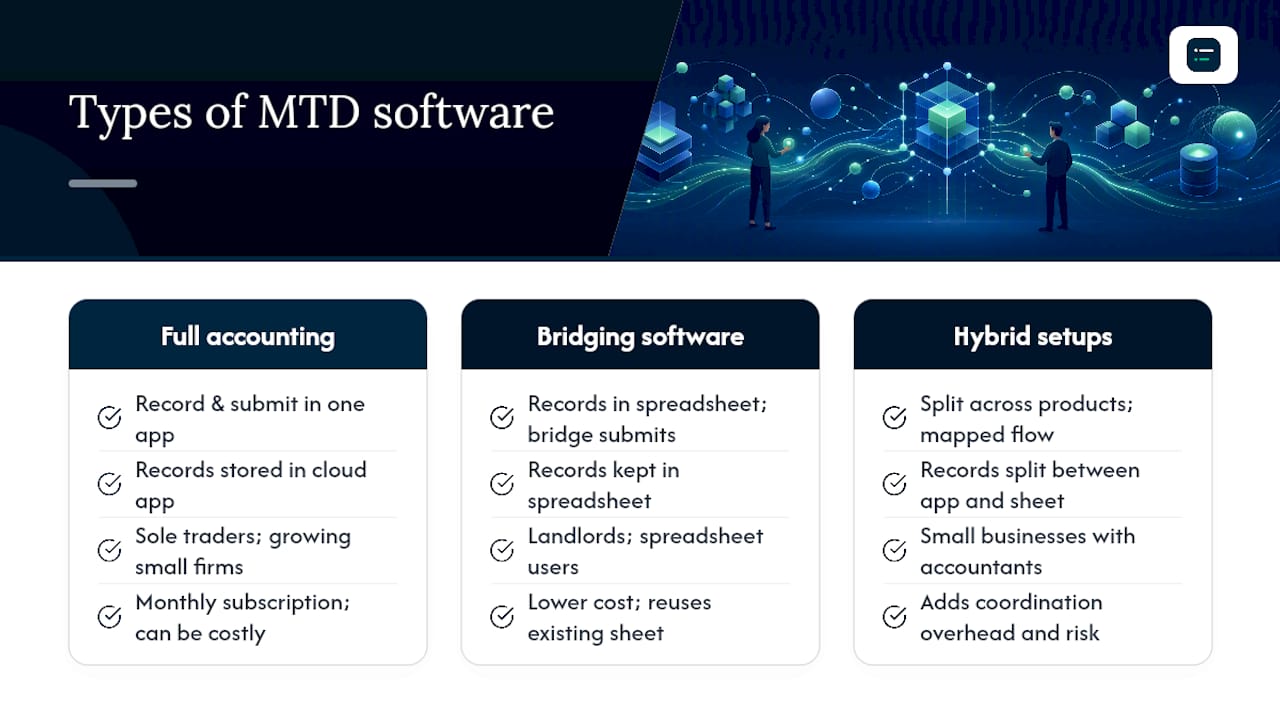
These are cloud-based platforms such as Xero, QuickBooks, Sage, and FreeAgent that handle the entire workflow: you record income and expenses inside the app, connect a bank feed, reconcile transactions, and submit directly to HMRC. Everything stays in one place. For most sole traders with regular invoicing or a growing client base, this is the most practical option because the record-keeping and submission functions are tightly integrated.
The trade-off is cost. Most full accounting apps charge a monthly subscription, and the entry-level tiers do not always cover all income streams. Check that the tier you are buying supports property income if you are also a landlord, not just self-employment.
Bridging software
Bridging tools sit between your existing spreadsheet and HMRC's API. You maintain your records in a spreadsheet (Excel or Google Sheets, for example), and the bridging software reads that data and submits it to HMRC. Products in this category include tools specifically built for MTD bridging.
This approach suits landlords or sole traders who already have a well-organised spreadsheet and do not want to rebuild their records in a new app. The critical requirement is that the connection between the spreadsheet and the bridging tool must be a genuine digital link, not a manual re-entry. A formula pulling data from a named cell range qualifies; typing the same number into a second file does not.
Hybrid setups
You can use more than one product, but HMRC's guidance is clear: only one product may handle each separate submission, and the products must work together to cover all required submissions. A common hybrid is a spreadsheet for record-keeping, a bridging connector for quarterly updates, and an agent's software for the final declaration. This works, but it adds coordination overhead and more points of failure. If you go this route, map out the full data flow before you commit.
Matching product type to user
A sole trader with straightforward invoicing and a single bank account will generally find a full accounting app the cleanest solution. A landlord with property-only income and an existing spreadsheet may find a bridging tool sufficient, provided the spreadsheet is maintained as a proper digital record. A small business with payroll, multiple income streams, and an accountant will usually benefit from a full app with accountant access built in.
One warning worth stating plainly: unofficial connectors, browser-based workarounds, and manual copy-paste workflows are not compliant. If a vendor cannot show you HMRC API recognition, treat that as a red flag.
How to choose the right MTD software for your situation
HMRC advises choosing your software before you sign up, and checking it supports all your income sources and accounting period settings. That sequencing matters because switching products after sign-up creates re-authorisation work and potential gaps in your submission history.
Must-have checklist before you buy:
- HMRC recognition and API connectivity (not just "MTD-ready" marketing language)
- Support for every income stream on your tax return (self-employment, property, or both)
- Digital record creation and storage within the product
- Quarterly update submission and final declaration support
- Accountant or agent access if you use a professional
Feature dimensions to compare:
| Feature dimension | What to look for | Red flags |
|---|---|---|
| HMRC compatibility | Listed on HMRC's recognised software finder | "MTD-ready" with no API confirmation |
| Income streams covered | Self-employment, property, or combined | Only covers one stream if you have both |
| Bank feed / integrations | Direct open banking or Yodlee/TrueLayer feeds | Manual CSV import only |
| Accountant access | Multi-user login, agent permissions | Single-user only, no agent portal |
| Automation level | Auto-categorisation, receipt capture, reconciliation | All entries require manual input |
| Pricing model | Clear monthly or annual tiers, no hidden submission fees | Pay-per-submission or opaque add-on charges |
| Onboarding time | Guided setup, data import tools, migration support | No import function, blank-slate setup only |
| Support and updates | HMRC API update commitment, live chat or phone | No update history, email-only support |
When you speak to a vendor or watch a demo, ask specifically: "Does your product support both self-employment and property income in the same submission?" and "How do you handle HMRC API updates?" A vendor who cannot answer the second question cleanly is one to approach with caution.
For guidance on evaluating accounting software integrations and bank feed connectivity, The AI Ledger's integration guide covers the technical dimensions worth checking before you commit to a product.
What does MTD software cost and do you have to buy it?
You do need software. HMRC's requirement to keep digital records and submit via API means there is no compliant paper or manual route for taxpayers in scope. The practical question is what you pay.
Pricing shapes vary considerably across the market:
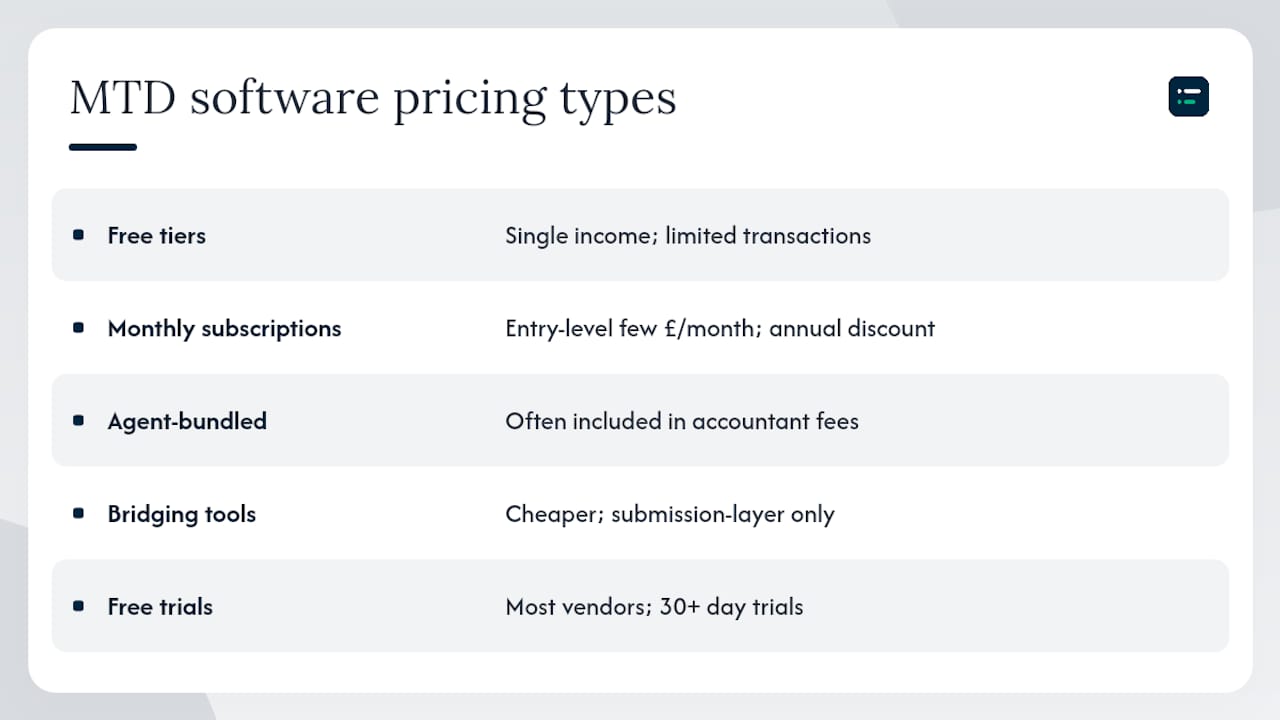
Free tiers and low-cost options. Some providers offer a free tier for very simple affairs, typically covering a single income stream with limited transaction volume. These are worth checking if your records are genuinely straightforward, but read the tier limits carefully. A free tier that caps monthly transactions at a low number may force an upgrade mid-year.
Monthly subscriptions. The most common model for full accounting apps. Entry-level plans for sole traders typically start at a few pounds per month, with mid-range plans covering additional users, payroll, and multiple income streams sitting higher. Annual billing usually offers a discount over monthly.
Agent-handled pricing. If your accountant or bookkeeper manages your MTD submissions, the software cost may be bundled into their fee. This is worth asking about before you buy a separate licence, because paying twice for the same submission capability is a common and avoidable waste.
Bridging tools. These tend to be cheaper than full accounting apps, sometimes significantly so, because they do less. If you already have a well-maintained spreadsheet and only need the submission layer, a bridging product can be a cost-effective choice.
Most vendors offer a free trial of 30 days or more. Use it to run a full test cycle: import or enter a month of real transactions, check the categorisation, and attempt a test quarterly update if the trial environment allows. Discovering a product does not support your accounting period settings during a trial is far better than discovering it after sign-up.
Step-by-step: signing up and making your first submissions
Getting from software selection to your first quarterly update involves a short but specific sequence. Rushing any step, particularly the HMRC authorisation, is where most delays happen.
-
Choose and set up your software. Pick a product from HMRC's recognised list, create your account, and configure your income sources and accounting period. Allow up to a week if you are migrating existing records. For practical advice on moving to a paperless digital setup, The AI Ledger's paperless accounting guide covers the migration steps in detail.
-
Gather your HMRC credentials. You will need your Government Gateway user ID and password, your Unique Taxpayer Reference (UTR), and your National Insurance number. If you do not have a Government Gateway account, create one before you start the sign-up process.
-
Sign up for MTD for Income Tax. Follow HMRC's sign-up guidance to register your business. This step authorises your software to communicate with HMRC on your behalf. Allow up to 72 hours for HMRC to process the authorisation; do not attempt your first submission until you receive confirmation.
-
Connect your bank feed. Most full accounting apps support open banking connections. Set this up immediately after sign-up so transactions begin flowing automatically. Bank feed setup typically takes 10–15 minutes but may require re-authentication after a few months depending on your bank's open banking policy.
-
Enter or import your opening records. If you are mid-year when you sign up, you will need to enter or import transactions from the start of your accounting period. Use your software's CSV import function where available rather than manual entry.
-
Send your first quarterly update. Your software will prompt you when the first submission window opens. Review the income and expense summary, correct any miscategorised transactions, and submit. The process takes minutes once your records are in order.
-
Submit the final declaration. After the tax year ends, review any additional income sources (savings interest, dividends, and so on), confirm your totals, and submit the final declaration. This is the step that calculates your actual tax liability.
A common delay at step three is discovering that the software you chose does not support your specific accounting period or a secondary income stream. That is why HMRC's own guidance recommends choosing and testing software before you sign up, not after.
Independent resources to help you evaluate and shortlist software
HMRC provides a recognised software finder and maintains a list of products that have passed its recognition process. That list is a compliance filter, not a product recommendation. HMRC explicitly does not endorse specific products, which means passing recognition tells you a product meets the technical minimum but says nothing about usability, pricing fairness, or how well it handles your specific income mix.
That gap is where independent editorial evaluation matters. The AI Ledger's directory covers 100+ AI-assisted accounting and bookkeeping tools, each with an independent editor score, an honest verdict, and a last verified date. Editor scores are never for sale. The 30-second tool finder lets you filter by task (tax prep, data entry, reconciliation, and others) and by the software you already use, so you can shortlist products that fit your existing workflow rather than starting from a blank list.
When you use any review resource, including HMRC's list, verify three things independently: that the product's HMRC recognition is current (recognition can lapse if a vendor stops maintaining their API integration), that the tier you are buying covers your income streams, and that the vendor has a clear policy for handling HMRC API updates. Marketing pages rarely answer all three questions directly; the product's own help documentation usually does.
The AI in accounting guide on The AI Ledger's blog covers how automation features such as receipt capture and bank reconciliation are being built into accounting apps, which is useful context when evaluating whether a product's automation claims are substantive or just marketing.
Exemptions, penalties and where to get help
Not everyone in scope must comply. HMRC allows exemptions in specific circumstances, and applying for one is worth doing if you genuinely qualify rather than attempting to comply with software that does not fit your situation.
Grounds for exemption typically include:
- Religious objection to using computers or the internet.
- Disability or health condition that makes digital record-keeping unreasonably difficult.
- Living in an area with no reliable internet access.
- Age or other personal circumstances that make digital compliance impractical.
Exemptions are not automatic. You must apply to HMRC and provide supporting evidence. If your circumstances change after an exemption is granted, you are expected to notify HMRC.
Penalty risk for non-compliance:
HMRC's points-based penalty system applies to late or missing MTD submissions. Each missed quarterly update accrues a penalty point, and once you reach the threshold for your submission frequency, a financial penalty follows. The penalty regime is designed to be proportionate for occasional errors but escalates for persistent non-compliance. Deliberately ignoring MTD obligations carries more serious consequences.
Getting help:
- Your accountant or tax agent can sign up on your behalf and manage submissions through agent software. If you already have an agent, ask them now whether they are set up for MTD for ITSA.
- HMRC's helpline and webchat cover MTD queries. The MTD overview page links to current support options.
- HMRC's own MTD for Income Tax guidance pages are updated as the programme develops, so bookmark them rather than relying on third-party summaries that may not reflect the latest rules.
The honest truth about MTD for small users
The compliance requirement is real, but the practical burden for a sole trader or landlord with straightforward records is smaller than the volume of coverage suggests. Most of the anxiety around MTD for Income Tax comes from two sources: uncertainty about which product to choose, and a mistaken belief that quarterly updates are quarterly tax returns.
Pick one product that covers your income streams, run the free trial properly, and get your bank feed connected before the first submission window. That is genuinely most of the work. The quarterly update itself, once your records are tidy, takes minutes.
Where small users consistently go wrong is leaving the software decision until the last month before their first submission deadline. Authorisation delays, data migration time, and the learning curve of a new product all compress into a stressful few weeks that could have been spread over several months. The AI Ledger tool finder is a practical starting point for shortlisting options this week rather than next quarter.
One more thing worth saying plainly: the HMRC recognised list tells you a product is technically compliant. It does not tell you whether the product will still be actively maintained in two years, whether the pricing is fair, or whether the support team responds within a reasonable time. Independent editorial scores and verified last-updated dates exist precisely because those questions matter and marketing copy does not answer them.
Sources
A short list of the HMRC pages referenced throughout this article. Check the "last updated" date on each page before acting on the detail, as MTD guidance is updated regularly as the programme develops.
This article is general information, not a substitute for advice from a qualified financial advisor. Consult a qualified financial professional about your own circumstances before acting on anything here.