For most mid-market organisations connecting multiple systems, a hub-style iPaaS or hybrid hub-and-spoke architecture is the pragmatic default. It scales better than a web of point-to-point links, reduces maintenance as your application count grows, and suits the cloud-first estates that most UK businesses now run. That said, two common exceptions change the calculus:
- Heavy on-premises estates with complex protocol translation often favour an enterprise service bus (ESB), which handles legacy messaging formats and orchestration that cloud iPaaS platforms handle less gracefully.
- Compliance-heavy supply chain relationships with trading partners who require structured document standards (EDI, EDIFACT, ANSI X12) still rely on file-based or EDI channels, even when the rest of your stack is API-driven.
GDPR and HMRC obligations add a third dimension: any integration that moves personal data or payroll feeds must have a lawful basis, a data processing agreement with your vendor, and an auditable trail. Those requirements influence which approach you select and which vendors you can realistically shortlist.
Key takeaways
For most mid-market organisations, a hub-style iPaaS or hybrid hub-and-spoke architecture is the most practical ERP integration approach, balancing scalability, maintainability, and time-to-value against the alternatives.
| Point | Details |
|---|---|
| Default to iPaaS for multi-system environments | Hub-and-spoke iPaaS scales better than point-to-point and reduces maintenance as your application count grows. |
| Match the method to the data type | Use real-time event-driven flows for orders and inventory; use scheduled batch for catalogues, payroll, and large backfills. |
| Decide data ownership in discovery | Map which system is the source of record for each data type before development starts to prevent sync conflicts. |
| Score by total cost of ownership | Evaluate options over three years; maintenance dominates long-run spend and often reverses the initial cost advantage of cheaper approaches. |
| Address UK compliance before vendor selection | Confirm data residency, obtain a data processing agreement, and verify HMRC-approved channels for payroll before signing any integration contract. |
Table of Contents
- What are the main ERP integration approaches you need to know?
- A closer look at each ERP integration method
- How do you choose the right ERP integration approach?
- How to plan your ERP integration: phases, timelines, and cost drivers
- Which systems do organisations typically integrate with their ERP?
- What are the biggest risks in ERP integration projects and how do you mitigate them?
- UK governance and compliance considerations for ERP integrations
- How to keep ERP integrations running reliably after go-live
- The part of ERP integration planning most teams get wrong
- Sources
What are the main ERP integration approaches you need to know?
Before scoring options against your own situation, it helps to see all the methods side by side. The table below maps each approach against the dimensions that matter most to a buyer: use case fit, real-time capability, complexity, scalability, cost shape, and deployment suitability.
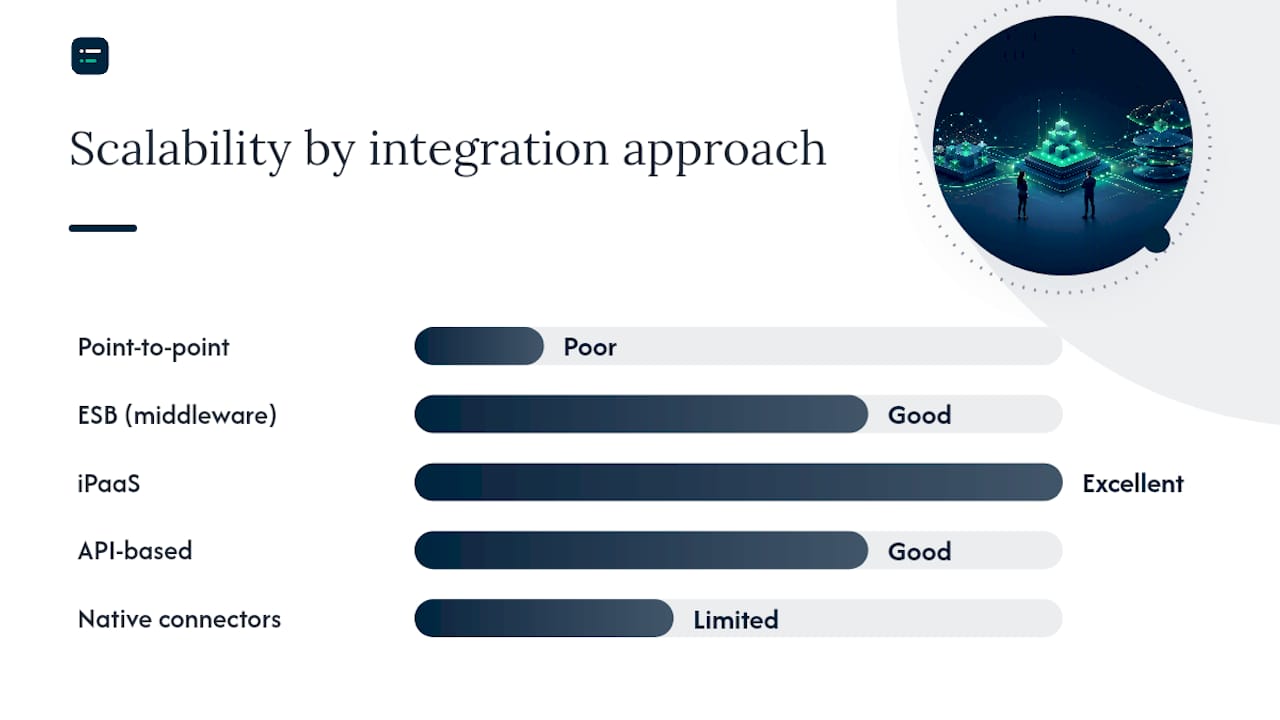
| Approach | Best for / typical use cases | Real-time vs batch | Implementation complexity | Scalability | Cost drivers | Cloud vs on-prem | Time to implement | Maintenance effort |
|---|---|---|---|---|---|---|---|---|
| Point-to-point | Single, stable system pair; low volume | Both, but usually batch | Low initially | Poor at scale | Build cost low; maintenance multiplies | Either | Days to weeks | High as connections grow |
| ESB (middleware) | Large on-prem estates; protocol translation | Both | High | Good for on-prem | Licensing, specialist skills | On-prem preferred | Months | High; needs dedicated team |
| iPaaS | Multi-SaaS; mid-market; cloud-first | Both; strong real-time | Medium | Excellent | Subscription; connector fees | Cloud | Weeks to months | Low to medium |
| API-based (custom) | Bespoke logic; niche legacy; full control | Real-time | High | Good if designed well | Build and ongoing dev cost | Either | Weeks to months | High; you own it |
| Native/prebuilt connectors | Standard SaaS pairs; quick wins | Both | Low | Limited to supported pairs | Subscription included or add-on | Cloud | Days to weeks | Low |
| File-based / EDI | Trading partners; legacy; regulatory docs | Batch | Low to medium | Moderate | EDI translator; mapping | Either | Weeks | Medium |
| Hybrid / custom middleware | Mixed estates; specialist + mainstream | Both | High | Excellent | Varies by component | Either | Months to quarters | Medium to high |
Hub-and-spoke architectures such as a central middleware or iPaaS generally scale better than many point-to-point links and are recommended for multi-system environments. API-based integration is dominant for modern, cloud-native applications, while file-based transfers and EDI remain important for legacy or trading-partner scenarios where real-time APIs are unavailable or regulatory document standards are required.
When organisations select a method, the pattern usually follows one of these triggers:
- Point-to-point when there is only one integration to build and the two systems are unlikely to change.
- ESB when the IT estate is predominantly on-premises, uses multiple messaging protocols, and has a team capable of running the middleware.
- iPaaS when the organisation is cloud-first, needs to connect five or more systems, and wants prebuilt connectors with managed updates.
- API-based custom when the business logic is too specific for a connector and the team has the engineering capacity to own the code.
- Native connectors when the ERP vendor ships a certified integration for the target application and the standard field mapping covers the use case.
- File-based / EDI when a trading partner mandates it or when a legacy system cannot expose an API.
- Hybrid when the estate is mixed and no single method covers every system adequately.
A closer look at each ERP integration method
Point-to-point
Point-to-point connects two systems directly, typically via a custom script, scheduled job, or lightweight API call. The initial build is fast and cheap. The problem is arithmetic: connecting ten systems point-to-point can require up to 45 individual links, each of which needs its own error handling, monitoring, and update cycle when either system changes. Maintenance cost compounds quickly, and a single API change in one system can cascade across multiple connections simultaneously.
Best-case scenarios are narrow: a single, stable data feed between two systems that rarely change, such as a payroll export to a statutory reporting tool. Outside that scenario, point-to-point tends to become technical debt faster than teams anticipate.
ESB (enterprise service bus)
An ESB sits between systems as a central broker, handling message routing, protocol translation, transformation, and orchestration. It is well suited to large on-premises estates where systems speak different protocols (SOAP, JMS, MQ, FTP) and where the organisation needs fine-grained control over message sequencing and error handling.
ESB suits complex, on-premises estates with heavy protocol translation needs but typically requires more ongoing IT resource than cloud-centred approaches such as iPaaS. That resource requirement is the main constraint: ESB platforms such as MuleSoft (on-prem deployment), IBM App Connect, or TIBCO BusinessWorks need dedicated integration engineers to configure, monitor, and maintain them. For organisations already running these platforms, the incremental cost of adding ERP connections is manageable. For those starting fresh, the overhead is rarely justified unless the on-prem estate is genuinely complex.
iPaaS (integration platform as a service)
iPaaS platforms provide a cloud-hosted integration layer with a library of prebuilt connectors, a visual workflow builder, and managed infrastructure. Providers handle connector updates when upstream APIs change, which removes a significant maintenance burden from your team. For mid-market organisations connecting ERP with CRM, e-commerce, WMS, and BI tools, iPaaS offers faster time-to-value than bespoke builds and lower long-run maintenance than ESB.
The trade-off is provider dependency. If the iPaaS platform experiences downtime, integrations stop. Production runbooks should describe how critical processes proceed during an outage, including manual fallback procedures for order processing and payroll feeds. Prebuilt connectors also do not eliminate custom work: non-standard fields, bespoke pricing logic, or unusual workflow sequences still require configuration that can take as long as a custom build for complex scenarios.
API-based custom integration
Building directly against an ERP's REST or SOAP API gives you complete control over data shape, transformation logic, and timing. It is the right choice when the business logic is genuinely unique, when no connector covers the use case, or when latency requirements are strict enough that a middleware hop adds unacceptable delay.
The cost of that control is ownership. Your team writes the error handling, retry logic, authentication refresh, and monitoring. When the ERP vendor releases a breaking API change, your team fixes it. For a single, well-scoped integration this is manageable. Across a portfolio of custom integrations, it becomes a significant ongoing engineering commitment. See accounting software integration for a practical overview of how REST and SOAP interfaces typically work in accounting system contexts.
Native and prebuilt connectors
Most major ERP vendors ship certified connectors for their most popular integration targets. SAP offers prebuilt integrations via SAP Integration Suite; Oracle NetSuite publishes SuiteApp connectors; Microsoft Dynamics 365 connects natively to the Power Platform and a range of third-party tools. When the connector covers your use case and the standard field mapping matches your data model, this is the fastest and lowest-risk path.
The caveat: connectors are built for standard implementations. Never assume a connector is plug-and-play for non-standard business data.
File-based integration and EDI
Scheduled file transfers (CSV, XML, flat file) and EDI (EDIFACT, ANSI X12, TRADACOMS) remain the backbone of many supply chain and trading-partner integrations. Retailers, distributors, and manufacturers often have no choice: their partners mandate EDI for purchase orders, advance ship notices, and invoices. Legacy systems that predate modern APIs also rely on file-based exports as their only integration channel.
The limitation is latency. File-based transfers are inherently batch, which means inventory levels and order statuses are only as current as the last scheduled run. For internal integrations where real-time data matters, file-based approaches are a last resort rather than a design choice.
Pro Tip: Map data ownership before you map data fields. Decide which system is the source of record for inventory quantity, price, customer master, and invoice status before writing a single connector. Conflicts between systems almost always trace back to two systems both believing they own the same field.
Hybrid and custom middleware
In practice, most production ERP environments use a combination of methods. A typical pattern: iPaaS handles the mainstream SaaS connections (CRM, e-commerce, BI), a custom API integration covers a specialist manufacturing system with unique data requirements, and EDI handles the trading-partner feeds. This hybrid approach matches the method to the data type and system criticality rather than forcing one architecture across the whole estate.

A worked example of a hub-and-spoke order flow: an e-commerce platform fires a webhook on order creation; the iPaaS hub receives it, transforms the payload, checks inventory availability via an ERP API call, writes the confirmed order to the ERP, and publishes a confirmation event back to the e-commerce platform and the WMS. Inventory is updated in near-real-time; catalogue and pricing data flows on a nightly batch schedule. Most production environments use both real-time event-driven flows for orders and inventory and scheduled batch loads for catalogues and backfills.
How do you choose the right ERP integration approach?
The right ERP integration strategy starts with a structured assessment of your situation, not a vendor shortlist. Work through these criteria before you open any RFP.
Selection criteria checklist:
- Number of systems to connect: fewer than three systems with stable interfaces may suit point-to-point or native connectors; five or more almost always justifies iPaaS or a hub pattern.
- Change frequency: systems that release API updates frequently need a managed connector layer so your team is not constantly patching.
- Latency requirements: order management and inventory need near-real-time; payroll and catalogue updates tolerate batch.
- In-house engineering capacity: ESB and custom API builds require dedicated integration engineers; iPaaS reduces but does not eliminate that need.
- Timeline: a prebuilt connector or iPaaS flow can go live in weeks; a custom ESB implementation typically takes months.
- Total cost of ownership: score options over three years, not just initial build cost. Maintenance dominates long-run spend, and a cheap point-to-point build often costs more over time than a well-configured iPaaS subscription.
- Security and compliance: GDPR, data residency, and HMRC auditability requirements constrain which vendors and architectures are viable. See the UK compliance section below.
An ERP integration strategy should map business needs, identify which system owns each data type, and choose the appropriate integration method per application. Governance and security must be considered up front, not retrofitted.
NetSuite also draws a useful distinction between integrated ERP (native modules within the ERP platform) and ERP integration (connecting third-party tools). Choosing the method per application rather than applying one architecture across the board is consistently the more practical outcome.
Questions to ask potential integration vendors or partners:
- How many live ERP integrations of this type have you delivered in the last 12 months, and can you provide references?
- What is your SLA for updating connectors when the ERP or target application releases a breaking API change?
- How do you monitor integration health, and what does your alerting and incident response process look like?
- Where is data processed and stored? Can you provide UK or EEA data residency?
- What does your disaster recovery plan cover, and what is the recovery time objective for a full platform outage?
- Will you provide a data processing agreement and a list of subprocessors before contract signature?
- What does the handover model look like: do you provide runbooks, and what ongoing support tiers are available post-go-live?
Use the accounting software evaluation checklist as a complementary reference when scoring vendors against these criteria.
How to plan your ERP integration: phases, timelines, and cost drivers
ERP integration projects follow a consistent set of phases regardless of the method chosen. The durations below are indicative; complexity, data quality, and stakeholder availability are the main variables.
| Phase | Typical duration | Key deliverables |
|---|---|---|
| Discovery and landscape mapping | 2–4 weeks | System inventory, integration requirements, data ownership map |
| Data mapping and governance | 2–3 weeks | Field-level mapping, transformation rules, source-of-truth decisions |
| Prototype / proof of concept | 1–3 weeks | Working end-to-end flow for one integration; validated approach |
| Development and configuration | 4–12 weeks | All integrations built, connectors configured, error handling in place |
| Testing (unit, integration, UAT) | 2–4 weeks | Test scripts, defect log, sign-off from business owners |
| Cutover and rollback plan | 1–2 weeks | Go-live checklist, rollback procedure, hypercare rota |
| Post-live support | 4 weeks | Incident response, tuning, handover to operations |
Small programmes connecting a few systems via native connectors or a simple iPaaS flow can complete quickly. Mid-sized programmes covering several systems typically take several months. Complex multi-system programmes involving ESB, custom APIs, and EDI channels usually last longer.
Early discovery and mapping work stops many downstream delays. Scoping and mapping are significant cost and time drivers in ERP projects, and teams that skip or compress the discovery phase consistently encounter expensive rework during testing.
Main cost drivers to budget for:
- Connector complexity and the number of custom transformations required.
- Data quality remediation before migration or sync (dirty data in the source system is always more expensive to fix mid-project than pre-project).
- Custom business logic that falls outside standard connector capability.
- Security controls: encryption in transit and at rest, secrets management, access control reviews.
- Testing effort, particularly for edge cases in order and inventory flows.
- Ongoing support tier and SLA from the integration vendor.
- Internal resource time for business analysts, data owners, and UAT participants.
For multi-entity or group accounting environments, the mapping complexity increases significantly. The automation tools for multi-entity accounting guide covers the specific ownership and mapping challenges that arise when multiple legal entities share a single ERP instance.
Which systems do organisations typically integrate with their ERP?
The most common ERP integration targets, and the data flows that matter for each:
- CRM (e.g. Salesforce, HubSpot, Microsoft Dynamics 365 Sales): customer master, quotes, orders, invoices, and payment status. Real-time sync for order creation; batch for account updates. The ERP is typically the system of record for invoice and payment; the CRM owns the opportunity and contact.
- E-commerce (e.g. Shopify, Magento, WooCommerce): orders, inventory levels, product catalogue, pricing, and fulfilment status. Orders flow in real-time; catalogue and pricing updates run on a scheduled batch. Inventory ownership must be resolved explicitly: the ERP usually holds the authoritative stock count, and the e-commerce platform reads from it.
- WMS (warehouse management system): goods receipts, pick and despatch confirmations, stock adjustments, and location data. Near-real-time for despatch events; batch for stock reconciliation.
- BI and reporting tools (e.g. Power BI, Tableau, Looker): financial transactions, cost centre data, and operational metrics. Typically batch or near-real-time read-only feeds from the ERP.
- HR and payroll (e.g. Sage HR, BrightPay, Moorepay): employee master, cost centre assignments, and payroll journals. Batch, with strict auditability requirements for HMRC submissions.
- PLM (product lifecycle management): product master, bill of materials, and engineering change orders. Batch, triggered by approval workflows.
- DMS (document management): invoice images, contracts, and compliance documents linked to ERP transactions. Event-driven on document creation or approval.
- TMS (transport management system): shipment bookings, carrier rates, and delivery confirmations. Near-real-time for booking events; batch for cost allocation.
- EAM (enterprise asset management): asset registers, maintenance work orders, and depreciation schedules. Batch, aligned to accounting periods.
- Tax and reporting tools (e.g. Avalara, Vertex, HMRC Making Tax Digital APIs): transaction-level tax data, VAT returns, and statutory submissions. Event-driven for transaction posting; batch for period-end submissions.
Accounting workflow automation examples illustrate how several of these flows connect in practice, particularly for month-end close and payroll cycles.
The e-commerce-to-ERP order flow deserves a specific note. When an order arrives from an e-commerce platform, the integration must resolve: which price list applies, whether stock is available in the correct location, which VAT rate applies to the customer's delivery address, and which legal entity owns the sale. Each of these is a data ownership question, not a technical one. Resolving them during discovery prevents the most common category of production incidents.
What are the biggest risks in ERP integration projects and how do you mitigate them?
Most ERP integration failures are predictable. The risks below appear repeatedly across projects of every size and method.
- Poor data mapping and governance: fields that look equivalent across systems often carry different business meanings (e.g. "ship date" in the ERP vs "despatch date" in the WMS). Mitigate by producing a field-level mapping document with business owner sign-off before development starts.
- API drift and breaking changes: ERP and SaaS vendors release API updates that can silently break integrations. Mitigate with versioned API calls, contract tests that run on every deployment, and a schema evolution policy agreed with your vendor.
- Vendor lock-in: deep dependency on a single iPaaS or ESB platform can make migration expensive. Mitigate by keeping transformation logic documented and portable, and by negotiating data export rights in your contract.
- Security lapses: integrations create new attack surfaces. Mitigate with OAuth 2.0 or API key rotation, encryption in transit (TLS 1.2 minimum), secrets management (not hardcoded credentials), and regular access reviews.
- Data quality and duplicate records: integrations amplify existing data quality problems. A duplicate customer record in the CRM becomes a duplicate in the ERP. Mitigate with a pre-go-live data cleanse and a deduplication rule set agreed before cutover.
- Insufficient testing: unit tests alone do not catch integration failures. Mitigate with end-to-end integration tests covering happy path and error scenarios, and user acceptance testing with real business data volumes.
- Inadequate monitoring: integrations fail silently when there is no alerting. Mitigate with health dashboards, error queue monitoring, and automated alerts for message failures, latency spikes, and authentication errors.
Pro Tip: Set up automated end-to-end tests that run against a staging environment on a daily schedule, not just at release time. API drift from upstream vendors is the most common cause of silent integration failures in production, and a daily synthetic test catches it before your operations team does.
UK governance and compliance considerations for ERP integrations
UK data protection law, derived from the UK GDPR and the Data Protection Act 2018, applies to any integration that processes personal data. For ERP projects, that covers customer records, employee data, payroll feeds, and supplier contacts.
Key principles to check during planning:
- Lawful basis: confirm the lawful basis for processing personal data in each integration flow. Contract performance covers most customer and supplier data; legitimate interests or legal obligation typically covers employee data.
- Data minimisation: only transfer the fields the receiving system genuinely needs. An e-commerce integration that sends full customer payment card data to the ERP when only the last four digits are needed for reconciliation is a compliance risk.
- Purpose limitation: data collected for one purpose cannot be repurposed without a fresh lawful basis. If the ERP integration feeds a marketing analytics tool, that secondary use needs its own basis.
- DPIAs: high-risk processing flows, such as large-scale employee monitoring data or sensitive financial profiling, require a Data Protection Impact Assessment before go-live.
- Data subject rights: integrations must not create orphaned records that prevent you from honouring deletion or access requests. Document which systems hold personal data and ensure deletion propagates across all of them.
Pro Tip: Request the data processing agreement and the full subprocessor list from your integration vendor before you sign the contract, not after. UK GDPR Article 28 requires a written DPA with any processor handling personal data on your behalf, and subprocessors must meet the same standard.
On data transfers: if your iPaaS or ESB platform processes data in data centres outside the UK or EEA, you need a transfer mechanism. The UK's International Data Transfer Agreement (IDTA) or an addendum to the EU Standard Contractual Clauses covers most commercial scenarios. Ask vendors for their UK data residency option and confirm it in writing.
For payroll and HMRC integrations, the additional requirements are auditability and secure transport. Payroll feeds to HMRC's PAYE Real Time Information (RTI) system must use HMRC-approved software and secure channels. The integration must produce timestamped, immutable logs of every submission so you can demonstrate compliance during an HMRC audit. Ensure your ERP's payroll module or your payroll software's API integration meets the current HMRC technical specifications before go-live.
How to keep ERP integrations running reliably after go-live
Go-live is not the end of an integration project. Integrations degrade over time as APIs change, data volumes grow, and business logic evolves. The operational model you put in place at go-live determines whether integrations remain an asset or become a liability.
Operational checklist:
- Dedicated ownership: assign a named owner for each integration. Ownerless integrations accumulate technical debt silently.
- Error queues and retry policies: every integration should have a dead-letter queue for failed messages, a retry policy with exponential back-off, and a process for reviewing and reprocessing failed records.
- Logging and observability: log every message at entry, transformation, and delivery. Structured logs enable fast root-cause analysis when something goes wrong.
- SLA targets: define acceptable latency and error rate thresholds for each integration, and review them quarterly.
- Health dashboards: a single dashboard showing message throughput, error rates, and latency for all integrations lets operations teams spot problems before they escalate.
- Incident process: document escalation paths, on-call contacts, and the steps to isolate a failing integration without taking down dependent systems.
- Runbook for common incidents: include steps for reprocessing a failed batch, rotating an expired API key, handling a vendor outage, and rolling back a bad deployment.
Pro Tip: Your runbook for an iPaaS outage should describe exactly how each critical process (order creation, payroll submission, inventory sync) proceeds manually until the platform recovers. A runbook that says "wait for the vendor to restore service" is not a runbook.
Treating integrations as a continuous capability rather than a one-off project is the single biggest shift that separates teams with reliable estates from those constantly firefighting. Common accounting workflow bottlenecks often trace directly to integrations that were built and then left unmonitored.
The AI Ledger directory covers 100+ independently reviewed AI tools for accountants and bookkeepers, including tools relevant to integration monitoring, automation, and connector evaluation. Every listing carries an editor score, an honest verdict, and a last verified date. The 30-second tool finder can match your practice or IT team to the right tool for a specific task in under a minute.
The part of ERP integration planning most teams get wrong
Most ERP integration projects I see treated as a one-off delivery: build the connectors, go live, hand over to operations, close the project. Six months later, a vendor releases a breaking API change, the integration silently fails, and the operations team discovers the problem when a customer complains about a missing order.
The teams that avoid this pattern do one thing differently: they score every integration approach by total cost of ownership over three years, not by initial build cost. A point-to-point build might cost a fraction of an iPaaS subscription in month one. By month 18, when you are maintaining eight separate connections and patching them every time a vendor updates their API, the economics have reversed. The iPaaS subscription looks expensive until you account for the engineering time it replaces.
The second planning mistake is skipping the data ownership conversation. You can configure the most sophisticated iPaaS platform available and still end up with duplicate customer records and conflicting inventory counts if no one decided, before development started, which system owns each data type. That decision is a business conversation, not a technical one, and it belongs in week two of discovery, not week eight of development.
Sources
- ERP Integration: Methods, Architecture & Best Practices | APPSeCONNECT