
The right time tracking tool depends on your firm's size and billing model. Solo practitioners and small practices should start with Clockify or Toggl Track, both of which integrate with Xero and carry a free or low-cost entry tier. Mid-size firms that need automatic capture and WIP reporting will get more from Timely or Harvest. Larger or multi-partner practices should look at Productive.io, Laurel, or TPS Software, where resource planning and practice management sit alongside time capture.
- Primary reason to act: Firms consistently undercount billable hours through manual, end-of-day timesheets. Recovering even one hour per fee-earner per week compounds into meaningful revenue at the end of a quarter.
- Secondary reason: Tracked time gives partners visibility into utilisation, WIP age, and which clients or services are eating disproportionate staff time, making staffing and repricing decisions evidence-based rather than guesswork.
Start with a seven-day pilot on two or three active client engagements before committing to a full rollout.
Table of Contents
- Which time tracking tools do accountants actually compare?
- What features do accountants genuinely need from a time tracker?
- How to introduce time tracking in your practice without disrupting month-end
- How to model the ROI of time tracking for your firm
- Operational practices that raise productivity beyond the software
- Final recommendation and your seven-day decision checklist
- Key takeaways
- What firms get wrong when they adopt time tracking
- The AI Ledger helps you shortlist the right tool faster
- Useful sources and further reading
Which time tracking tools do accountants actually compare?
The table below covers the twelve tools that appear most frequently in UK practice shortlists, mapped against the dimensions that matter for billing accuracy and accountant workflow optimisation.
| Tool | Best for | Pricing shape | Integrations | Time capture | Reporting | GDPR / security |
|---|---|---|---|---|---|---|
| The AI Ledger | Practices matching needs to vetted tools fast | Free directory and tool finder | Covers Xero, QuickBooks, Sage tools | N/A (directory) | Side-by-side comparisons, editor scores | Independent editorial; UK-focused |
| Clockify | Small to mid-size firms, low cost | Free tier; paid from ~£3.99/user/mo | Xero, QuickBooks exports | Stopwatch, manual, bulk entry | Billable/non-billable, utilisation | GDPR-compliant; EU data centres |
| Harvest | Firms wanting invoicing built in | Free (1 user); paid ~£10.80/user/mo | Xero, QuickBooks, Stripe | Stopwatch, manual | Project budgets, invoice flow | GDPR; SOC 2 |
| Uku | Firms wanting billing automation | Per-user subscription | Xero, QuickBooks | Stopwatch, manual, bulk | Billing automation, utilisation | GDPR |
| Toggl Track | Solo practitioners, ease of use | Free tier; paid from ~£9/user/mo | Xero, QuickBooks, 100+ via Zapier | Stopwatch, manual | Simple reports, client breakdown | GDPR; SOC 2 |
| QuickBooks Time | Firms already on QuickBooks | Add-on to QuickBooks subscription | Native QuickBooks; payroll handoff | Stopwatch, manual, GPS | Payroll, utilisation | GDPR; SOC 2 |
| Timely | Background capture, privacy-first | Per-user subscription | Xero, QuickBooks, Sage | Automatic (memory timeline), manual | Billable capture, allocation | GDPR; privacy-aware design |
| DeskTime | Staff productivity analysis | Free tier; paid per user | Limited accounting integrations | Automatic activity/app tracking | App and document-level logs | GDPR |
| Laurel | Mid-size firms, project profitability | Per-user subscription | Accounting exports | Automatic, manual | Project profitability, multi-rate | GDPR |
| Productive.io | Larger firms, resource planning | Per-user subscription | Xero, QuickBooks | Stopwatch, manual | Resource planning, utilisation | GDPR; SOC 2 |
| Bill4Time | Flexible billing arrangements | Per-user subscription | QuickBooks; invoice export | Stopwatch, manual | Billing templates, retainer billing | GDPR |
| TPS Software | Practice management plus time capture | Practice-management pricing | Accounting practice integrations | Manual, bulk | Practice management reports | UK-focused; GDPR |
Three factors will decide your purchase more than any other. First, integration depth: a tool that exports a CSV to Xero is not the same as one with a verified, bi-directional connector. Verify on the Xero App Store or QuickBooks App Store before signing. Second, automatic versus manual-first capture: automatic background capture recovers small, fragmented tasks that end-of-day timesheets miss, which matters most during month-end and tax season. Third, pricing model: per-user monthly costs scale quickly in larger teams, so model the total cost at your current headcount plus 20% growth before committing.
Before you sign up, check these vendor trust signals:
- A free trial of at least seven days, ideally fourteen, with no credit card required
- A transparent pricing page that shows per-user costs at your team size
- A verified integration listing on the Xero App Store, QuickBooks App Store, or Sage Marketplace
- A published GDPR or data-processing agreement, not just a privacy policy
- A customer case study or reference from an accounting or professional services firm
What features do accountants genuinely need from a time tracker?
Granular coding and multi-rate support
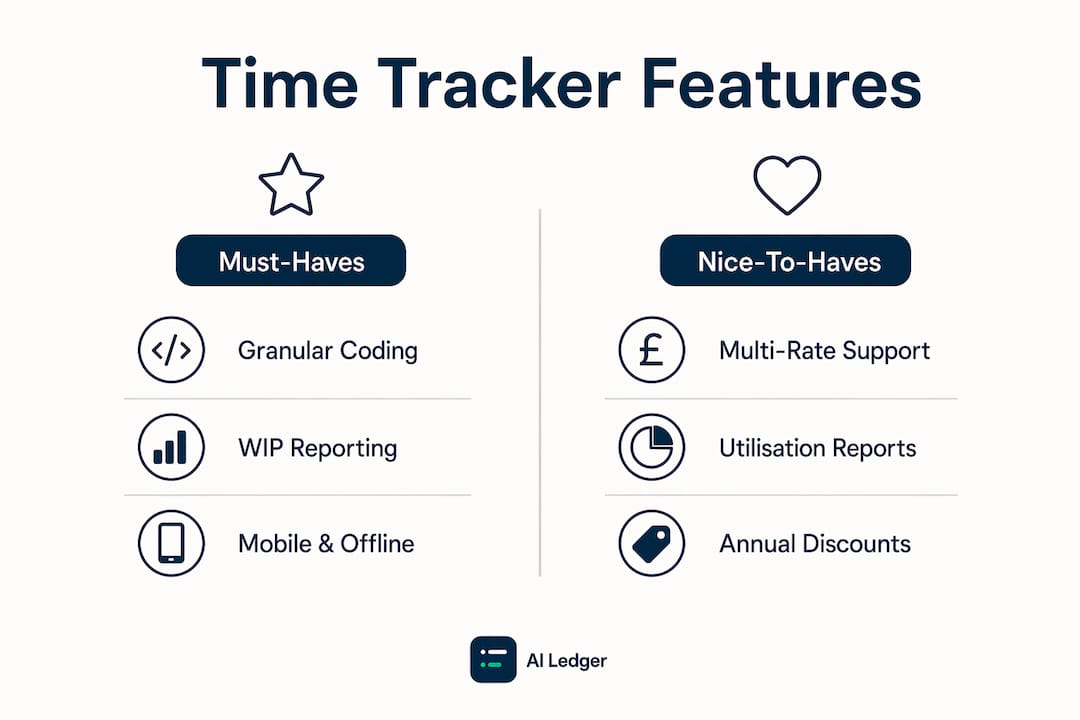
Granular client and task coding is the foundation of useful time data. Every entry should attach to a client, an engagement, a phase (such as planning, fieldwork, or review), and a task. Without that structure, reports show total hours but cannot tell you which service line is over-running or which client is consuming disproportionate senior time. Multi-rate support matters because partners, managers, and juniors bill at different rates; a tool that carries rates through to invoicing removes a manual reconciliation step.
WIP and realisation reporting
WIP visibility is what separates a time tracker from a billing tool. Recorded time should flow into a WIP ledger so partners can see unbilled value by client and by age. Old unbilled time that lingers outside billing cycles is a cash-flow problem, not just an admin one. Realisation reports, which compare billed revenue to recorded time at standard rates, show where the firm is discounting by default rather than by decision.
Capture methods and when to use each
- Stopwatch/timer: Best for focused, single-client work. Low friction when the task is clear before it starts.
- Manual entry: Suits end-of-day or end-of-week reconstruction. Prone to undercount on fragmented days.
- Bulk entry: Useful for recurring fixed-fee work where time is allocated across multiple clients at once.
- Automatic/background capture: Recovers fragmented tasks that manual entry misses. Timely and DeskTime both use this approach; Timely's memory timeline keeps privacy controls in the user's hands.
Operational must-haves
Offline capture matters for client site visits. Mobile and desktop parity means staff are not forced to a desktop to submit timesheets. An audit trail with notes protects the firm during billing disputes. Role-based permissions let managers approve timesheets before they flow to invoicing. Bulk edit and correction tools reduce the admin burden when entries need reclassification.

Feature choices affect firm KPIs directly. A tool with strong utilisation reporting lets partners spot under-deployed staff before it shows up in revenue. Realisation data supports repricing conversations. WIP age reporting shortens billing cycles.
Pro Tip: Before you draft a vendor shortlist, write a one-page feature brief that lists your top five must-haves and two deal-breakers. Share it with the team who will use the tool daily. Their input will surface practical objections early and prevent scope creep during implementation.
How to introduce time tracking in your practice without disrupting month-end
A phased rollout reduces the risk of a failed adoption. Technology alone will not fix poor process; operational discipline must accompany the tool.
- Pilot week (days 1–7): Select two or three active client engagements and two or three staff members across different roles. Run the chosen tool in parallel with your existing process. Do not change billing yet. Test the integration with Xero or QuickBooks by exporting a sample WIP report.
- 30-day evaluation: Expand to five to ten clients. Measure timesheet completion rates, billable hour capture versus the prior period, and any integration errors. Collect written feedback from staff on friction points.
- 60-day wider rollout: Onboard the full team. Set a firm-wide coding standard (client, engagement, phase, task). Activate approvals so managers review timesheets before billing. Run the first live invoice from tracked time.
- 90-day optimisation: Review utilisation and realisation reports. Identify clients or service lines where recorded time consistently exceeds budget. Use that data to reprice or renegotiate scope. Adjust the coding structure if categories are being misused.
For change management, set expectations with partners before launch. Explain that the goal is billing accuracy and WIP visibility, not surveillance. Staff who understand the "why" comply at higher rates. Handle late entries with a weekly missing-timesheet alert rather than ad hoc chasing; most tools support automated reminders. For governance, assign one named owner for timesheet approvals and one for WIP review. Use time data to inform delegation decisions: if a senior is consistently doing junior-level work, the data makes that visible and defensible.
Pro Tip: Build month-end close as a recurring project with checklist phases and time budgets derived from your first 60 days of tracked data. Firms that treat month-end as a surprise consistently underestimate effort and lose profitability.
How to model the ROI of time tracking for your firm
Pricing models explained
Most tools follow one of four shapes: a free tier with limited users or features (Clockify, Toggl Track, Harvest for one user); per-user per-month pricing that scales with headcount; per-seat pricing with feature tiers where higher tiers unlock WIP reporting or integrations; and enterprise pricing negotiated annually. Usage-based add-ons, such as payroll handoff in QuickBooks Time, can add meaningful cost at scale.
The pricing elements that matter most for accounting firms are WIP valuation (does the tool produce a WIP report, or do you build it manually?), billable hour recovery (how much time is currently going unrecorded?), hidden admin costs (how many hours per week does someone spend chasing timesheets or reconciling exports?), and integration fees (some Xero connectors are free; others require a paid plan tier).
A simple ROI model
| Variable | Example value | Your firm |
|---|---|---|
| Fee-earners in scope | 8 | |
| Estimated unrecorded hours per fee-earner per week | One and a half | |
| Working weeks per year | 46 |
The worked example uses conservative assumptions. One and a half unrecorded hours per fee-earner per week is a modest estimate; firms moving from paper timesheets or end-of-day manual entry often recover more in the first quarter. Even at half that recovery rate, the tool cost is covered within weeks.
- Pull your average charge-out rate from your billing system.
- Estimate unrecorded hours by asking fee-earners to log everything for one week without changing their billing behaviour.
- Multiply recovered hours by charge-out rate by 46 working weeks.
- Subtract annual tool cost.
- If the net figure exceeds £5,000, the ROI case is straightforward for partner sign-off.
On negotiation: most vendors will offer a multi-year discount of 10–20% if you commit annually rather than monthly. Seat bundling (buying a block of seats rather than exact headcount) sometimes unlocks a lower per-seat rate. Always ask for migration support and a data export guarantee before signing.
Operational practices that raise productivity beyond the software
The tool captures time; the practice determines whether that data changes behaviour. Task-batching and time-blocking reduce cognitive switching costs, which are particularly high in accounting where a single interruption during a reconciliation can cost ten to fifteen minutes of re-orientation. Block payroll runs, bank reconciliations, and VAT returns into dedicated calendar slots rather than fitting them around ad hoc client calls.

Treat month-end close as a recurring project with defined phases, assigned owners, and historical time budgets. Firms that plan month-end as a project rather than a reactive scramble consistently close faster and with fewer errors. Your tracked time data from the first quarter becomes the budget for the second.
Separating billable from non-billable time is not optional. Tracking only invoiceable hours hides the true cost of internal meetings, training, and business development. When non-billable time is visible, partners can make informed decisions about staffing ratios and overhead allocation.
AI and automation complement time tracking rather than replace it. Generative AI adoption in accounting reallocates roughly 8.5% of accountant time from data entry to higher-value tasks and reduces monthly close time by around 7.5 days in adopting firms. That freed time is only captured as billable or advisory capacity if the firm has a time tracking system in place to record it. Experienced accountants extract larger gains from AI tools because they can interpret confidence scores and apply judgement where automation falls short. For a deeper look at AI adoption drivers in UK practices, the pattern is consistent: AI amplifies good process, it does not substitute for it.
Statistic callout: Generative AI reduces monthly close time by around 7.5 days in firms that have adopted it, according to MIT Sloan research. Pair that with a time tracking system and the recovered capacity shows up in your utilisation reports rather than disappearing into unrecorded overhead.
Pro Tip: For managers: run a monthly 30-minute WIP review using your time tracking reports. Flag any engagement where recorded time exceeds budget by more than 20% and decide whether to write off, bill, or reprice before the time ages out of the billing cycle.
Final recommendation and your seven-day decision checklist
Solo practitioners and small practices (one to five fee-earners) should start with Clockify or Toggl Track. Both have free tiers, Xero integrations, and low learning curves. Firms of five to twenty fee-earners that need invoicing built in should evaluate Harvest or Uku. Mid-size practices that want automatic capture should pilot Timely. Larger or multi-partner firms with resource planning needs should look at Productive.io or Laurel. Firms that need practice management alongside time capture should speak to TPS Software. If your billing arrangements are complex or retainer-based, Bill4Time is worth a look. QuickBooks Time is the natural choice if your firm is already on QuickBooks and wants payroll handoff without a separate integration.
Seven-day decision checklist:
- Sign up for free trials of your top two shortlisted tools on day one.
- Run both tools on the same two or three client engagements for the full seven days.
- On day three, export a WIP snapshot from each tool and compare the output to your current billing records.
- On day four, ask the vendor to demonstrate the Xero, QuickBooks, or Sage integration live, not via a screenshot.
- On day five, request the vendor's data-processing agreement and confirm UK data residency or GDPR compliance.
- On day six, collect written feedback from the two or three staff members who used the tool.
- On day seven, score each tool against your five must-haves from your feature brief. If one tool scores four or five out of five and the pilot feedback is positive, escalate to partner sign-off with the ROI model from this article.
If the pilot meets your success metrics, present the ROI model and pilot results to the relevant partner or procurement lead. A net annual uplift figure and a completed GDPR checklist will address the two most common objections at sign-off.
Key takeaways
Firms that track both billable and non-billable time, use granular client and task coding, and treat month-end as a recurring project recover more revenue and close faster than those that track invoiceable hours alone.
| Point | Details |
|---|---|
| Shortlist by firm size | Solo and small practices: Clockify or Toggl Track. Mid-size: Harvest, Uku, or Timely. Larger firms: Productive.io, Laurel, or TPS Software. |
| Must-have features | Granular coding (client, engagement, phase, task), multi-rate support, WIP reporting, and a verified Xero/QuickBooks/Sage integration. |
| Simple ROI trigger | Recovering one and a half unrecorded hours per fee-earner per week across 8 fee-earners yields over £65,000 in gross recoverable revenue annually. |
| Rollout approach | Run a seven-day pilot on two or three engagements before full rollout; use 30-60-90 day phases with clear ownership and success metrics. |
| The AI Ledger | Use the 30-second tool finder at ailedger.uk to match your practice size and task needs to independently reviewed tools, with editor scores and last verified dates. |
What firms get wrong when they adopt time tracking
The most common mistake is treating time tracking as a software problem. Partners spend weeks evaluating feature lists, comparing dashboards, and negotiating pricing, then launch the tool without addressing the underlying process. Within three months, timesheet completion rates drop, WIP reports are unreliable, and the tool gets blamed for a failure that was always a change management problem.
The second mistake is tracking only invoiceable hours. It feels efficient: you capture what you bill, you bill what you capture. But it means you have no data on internal meetings, training, business development, or the time spent fixing errors. Without that visibility, staffing decisions are made on instinct. When a firm is under-resourced, the data will not show it because the pressure is absorbed into non-billable time that was never recorded.
The third mistake is skipping the coding structure. A tool that lets fee-earners log "client work" as a single category produces hours but not insight. The granular coding that makes time data useful, attaching entries to client, engagement, phase, and task, takes ten minutes to set up and saves hours of manual analysis every month.
The corrective actions are straightforward. Always track non-billable time in a separate category from day one. Build historical time budgets from your first quarter of data and use them to set expectations for the second. Assign partner-level governance to WIP review so it happens weekly, not at billing time. And resist the urge to buy the most feature-rich tool on the market if your team is not yet tracking consistently. A simple tool used well beats a complex one used badly.
The AI Ledger helps you shortlist the right tool faster
Picking a time tracker from a list of twelve is one thing. Knowing which of those twelve has a verified Xero integration, an up-to-date GDPR statement, and an editor score based on independent review is another. The AI Ledger is an independent directory of 100+ AI tools for accountants and bookkeepers, with every listing carrying an editor score, an honest verdict, and a last verified date. No paid placements, no sponsored rankings.

The 30-second tool finder at ailedger.uk matches your practice size, your existing software stack, and the tasks you want to automate to a shortlisted set of tools you can compare side by side. The free weekly Friday newsletter covers new features, price changes, and integration updates in plain English, so you are not caught out by a tool that changed its pricing model after you signed up. If you are at the shortlist stage now, the tool finder is the fastest way to narrow it down. Visit ailedger.uk and run the finder before your next vendor call.
Useful sources and further reading
The claims in this article draw on the following primary sources. Where integration details are concerned, always verify directly on the Xero App Store, QuickBooks App Store, or Sage Marketplace, as connector availability and feature scope change without notice.
- How generative AI can make accountants more productive — MIT Sloan Management Review. Source for the 8.5% time reallocation and 7.5-day close reduction figures.
- Time management for accountants: month-end, client juggling, and utilisation — MinuteDock Academy. Covers WIP management, month-end as a project, and coding discipline.
- Time tracker for accountants — Everhour. Details on billable vs non-billable separation and WIP age controls.
- Mastering time management: a guide for accountants — Accounting Weekly. Task-batching and time-blocking recommendations.
- Time tracking software for accountants — ManicTime. Automatic background capture and fragmented-day recovery.
- 5 time management tips for accountants and CPAs — Thomson Reuters Tax. Practical prioritisation frameworks including the Eisenhower Matrix and Pomodoro Technique.
Before committing to any vendor, request their data-processing agreement, confirm whether data is stored on UK or EU servers, and check their trial terms for data export on cancellation. These three checks take under an hour and prevent the most common post-purchase regrets.