AI document classification for accounting automatically identifies and tags financial documents so your practice can route, extract, and post entries with less manual work. The classifier reads each incoming file, assigns a document type (invoice, bank statement, purchase order), attaches a confidence score, and hands it to the right downstream process. The result is faster throughput, a traceable audit trail, and tighter integration with your accounting software.
In this guide:
- How AI document classification works and how it differs from full Intelligent Document Processing
- The document types and accounting use cases where it delivers the clearest payback
- A vendor evaluation checklist and the questions to ask on demos
- A step-by-step pilot plan for UK practices, including integration with Xero, Sage, QuickBooks, and FreeAgent
Table of Contents
- What is AI document classification in accounting?
- How does the classification pipeline actually work?
- Which classification approach suits your document types?
- Where does classification deliver the biggest payback in accounting?
- How do you implement AI document classification in your practice?
- What should UK accountants look for when choosing a solution?
- How do you measure success and maintain governance?
- Where can you find and evaluate tools?
- Key takeaways
- The part most guides skip
- Find the right classification tool in 30 seconds
- Useful sources
What is AI document classification in accounting?
AI document classification is the process of automatically assigning a type label and a confidence score to an incoming financial document. Feed the system a PDF and it returns something like: Invoice, 0.97. That label then acts as the gate for everything that follows: which data extractor runs, which approval workflow fires, which ledger account gets updated.
It is worth being precise about where classification ends and Intelligent Document Processing (IDP) begins. Classification is one stage inside a broader IDP pipeline. IDP covers the full journey: ingest, classify, extract field values, validate against rules, and post to your ERP or accounting software. You can deploy a classifier as a standalone improvement to your document intake without committing to a full IDP project, and for many smaller practices that is the right starting point.
For accounting specifically, classification also enriches files with structured metadata such as date, amount, supplier, and document number. That metadata is what makes records traceable and auditable, which matters when HMRC or an external auditor asks you to reconstruct a transaction trail.
Key distinctions to keep in mind:
- Classification identifies document type and confidence; it does not extract line items or post entries.
- IDP is end-to-end: classify, extract, validate, route, post.
- Precision and recall are the standard accuracy metrics; confidence thresholds control when a document goes to human review rather than straight-through processing.
- UK financial record-keeping expectations mean an immutable audit trail is not optional; classification metadata supports that trail from the moment a document arrives.
Pro Tip: If your main pain point is documents landing in the wrong inbox or triggering the wrong extractor, a standalone classifier often solves 80% of the problem without the cost and complexity of a full IDP deployment.
How does the classification pipeline actually work?
LlamaIndex's practical classification guide describes six stages that map neatly onto an accounting intake workflow. Here is how each step plays out in practice.
- Ingestion and OCR. Documents arrive by email, upload portal, or API. Optical character recognition converts scanned images and PDFs into machine-readable text. Quality here sets the ceiling for everything downstream.
- Pre-processing. The system cleans the text: removes headers and footers, normalises whitespace, corrects common OCR errors, and parses layout zones (header block, line-item table, footer totals).
- Feature extraction. The model pulls text features (keywords, amounts, VAT numbers), layout features (position of date fields, table structures), and visual cues (logos, stamps, signature blocks). Multimodal models analyse visual layout and textual content simultaneously, which is why they outperform older text-only approaches on semi-structured finance documents like invoices and remittance advices.
- Model inference and class assignment. The model scores the document against each class in its taxonomy (invoice, credit note, bank statement, purchase order, expense receipt, contract, and so on) and assigns the highest-scoring label.
- Confidence scoring and routing. Every classification comes with a confidence score. If the score exceeds the class threshold, the document routes automatically to the correct extractor or workflow. If it falls below the threshold, it moves to a human review queue. This is the safety net that keeps misroutes out of your ledger.
- Tagging and downstream handoff. Confirmed documents are tagged with metadata and passed to the next stage: a field extractor, an approval workflow, or direct API posting to Xero, Sage, or QuickBooks.
Model approaches at a glance:
| Approach | How it works | Best fit for accounting |
|---|---|---|
| Supervised (custom) | Trained on labelled examples from your own document set | High-volume, consistent document types; best accuracy when you have 200+ labelled samples per class |
| Pre-trained (fine-tuned) | General model fine-tuned on finance documents | Good starting point; faster to deploy than building from scratch |
| Zero-shot | Classifies without task-specific training data | Useful for rare document types or early pilots with limited labelled data |
| Rules/hybrid | Keyword and layout rules combined with ML scoring | Reliable for highly structured documents like standard bank statements |

Pro Tip: Set confidence thresholds per class, not globally. An invoice threshold of 0.92 and a contract threshold of 0.85 will perform better than a single 0.90 cut-off across all document types.
Which classification approach suits your document types?
Not all financial documents are the same shape, and the classification technique you choose should reflect that. There are three broad approaches to how a model reads a document.
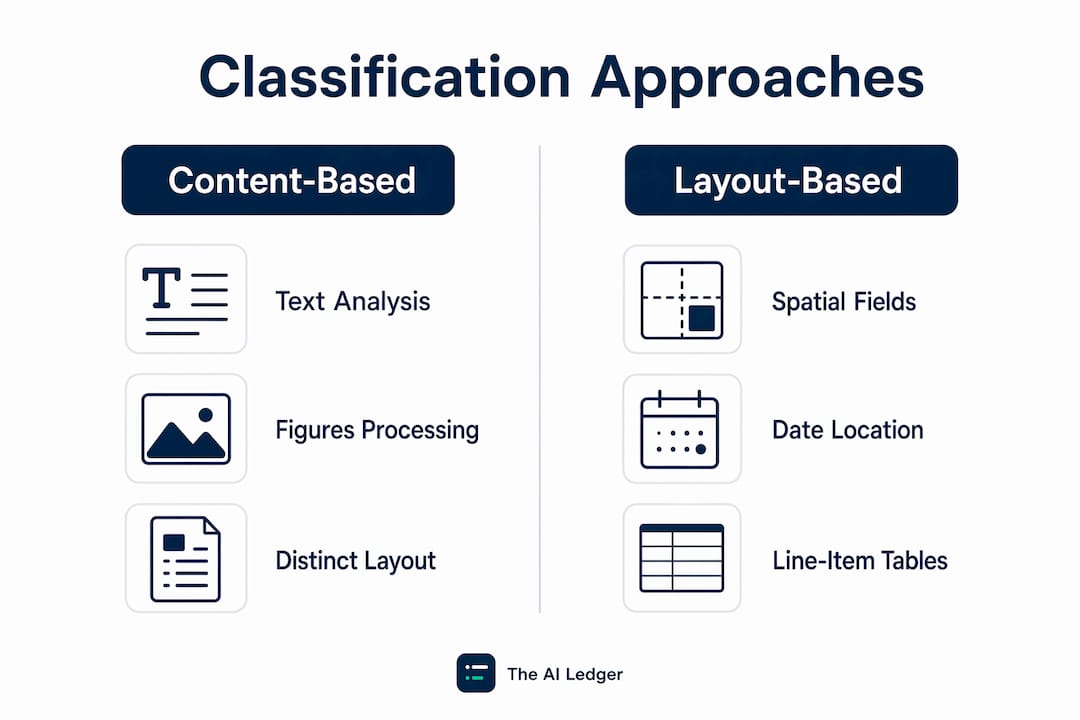
Content-based classification looks at the words and figures in the text. It works well for documents with distinctive language, such as contracts or board minutes, where the vocabulary itself signals the type.
Layout-based classification uses the spatial arrangement of fields: where the date sits, whether there is a line-item table, where the total appears. Invoices and purchase orders are natural fits here because their structure is more diagnostic than their wording.

Multimodal classification combines both. Most modern accounting classifiers are multimodal because finance documents are semi-structured: they share layout conventions but vary in wording across suppliers and clients.
Single-label vs multi-label classification is a practical decision. Single-label assigns one type per document, which is sufficient for most routing tasks. Multi-label is needed when a document legitimately belongs to more than one category. A supplier document that is simultaneously a credit note and an expense claim is a real example; forcing it into one bucket causes downstream errors.
- Supervised custom models need labelled training data, typically 200 or more examples per class. V7 Labs provides annotation and training tooling that teams use to build and label these datasets for custom classifiers.
- Pre-trained models from vendors like ABBYY, which offers purpose-built classification and splitting for high-volume document sorting, reduce the labelling burden considerably.
- Zero-shot models are useful for rare document types or when you are piloting before committing to a labelling project.
- Rules/hybrid approaches remain competitive for highly standardised documents and are often the most auditable option for regulated environments.
For a deeper primer on model choices, The AI Ledger's guide to machine learning accounting basics covers the trade-offs in plain English.
Where does classification deliver the biggest payback in accounting?
The highest-return use cases share a common trait: high document volume, repetitive routing decisions, and a clear downstream action that classification can trigger automatically.
- Accounts payable (invoices and credit notes). Classifying invoices with AI is the most common entry point. The classifier identifies the document type, routes it to the field extractor, and triggers a three-way match against the purchase order and goods receipt before posting. Vendor case studies show that centralised classification reduces manual sorting and frees teams to focus on exceptions and analysis rather than keying in source documents.
- Expense processing. Receipts arrive in every format imaginable: photos, PDFs, forwarded emails. A classifier normalises the intake, separates receipts from invoices, and routes each to the correct expense category extractor.
- Bank statement routing. Statements from multiple banks and in multiple formats need to reach the right reconciliation workflow. Classification handles the sorting automatically, which matters for practices managing multiple client entities.
- Purchase orders and three-way matching. Classifying POs separately from invoices is the prerequisite for automated matching. Without it, the matching logic has no reliable way to know which document is which.
- Contract triage for lease accounting. AI can classify incoming contracts and route lease agreements to a specialist extractor that pulls clause data for IFRS 16 schedules. Nominal's research shows that IDP can generate lease schedules directly from extracted clause data, which cuts the manual effort in lease accounting significantly.
- Client document onboarding for bookkeeping. When a new client sends a bundle of historical records, a classifier sorts them by type in seconds rather than minutes per document.
Statistic callout: Vendor case studies in both public sector and private practice contexts report that automated classification reduces document sorting time and improves audit access, with teams redirecting effort from manual triage to higher-value analysis.
For more on how classification fits into the month-end cycle, see The AI Ledger's guide to AI tools for the financial close process.
How do you implement AI document classification in your practice?
The most common reason classification projects stall is not the model; it is poor document intake. Standardising incoming formats before you deploy AI reduces false positives and cuts the human-in-the-loop burden from the start.
Pilot checklist
- Define the scope. Pick two or three document types with the highest volume: typically invoices, receipts, and bank statements. Set a target touchless rate (for example, 85% straight-through processing) and a maximum acceptable misclassification rate.
- Standardise intake. Request digital PDFs from suppliers and clients rather than photos or scanned images. Enforce a consistent naming convention for uploaded files. This single step often improves classifier accuracy before any model work begins.
- Gather and label training data. Collect at least 200 examples per class from your real document history. Use a labelling tool (V7 Labs is one option for teams building custom classifiers) to annotate document types consistently.
- Train or configure the model. For a small practice, a pre-trained vendor model fine-tuned on your document set is usually faster and cheaper than building from scratch. For a mid-sized firm with unusual document types, a custom supervised model may be worth the investment.
- Set confidence thresholds per class. Route documents below the threshold to a human review queue rather than auto-posting.
- Run a parallel pilot. Process a sample of real documents through the classifier alongside your existing manual process. Compare outputs, measure precision and recall, and identify the classes with the highest error rates.
- Build the feedback loop. Human corrections in the review queue should feed back into the model as new labelled examples. This is the mechanism that prevents model drift over time.
- Integrate with your accounting software. Map classifier metadata fields to your chart of accounts and connect via API or middleware.
Integration options for UK accounting stacks
- Xero and QuickBooks: Both offer open APIs. Most IDP vendors provide direct connectors or publish integration guides. Middleware platforms can bridge gaps where native connectors do not exist.
- Sage: Sage's API ecosystem supports custom integrations; some IDP vendors offer pre-built Sage connectors.
- FreeAgent: API access is available for developers; check vendor documentation for pre-built support.
- ERP systems: For mid-sized firms on Microsoft Dynamics or SAP, SAP Document AI offers enterprise-grade classification with explicit data governance controls, including a policy that no customer data is used for model retraining without consent.
For practical automation patterns, The AI Ledger's accounting workflow automation examples shows how classification connects to downstream posting routines.
Timeline and effort estimates
- Small practice (1–5 staff, 2–3 document types): 4–8 weeks from intake standardisation to a working pilot. Budget primarily for labelling time and vendor setup fees.
- Mid-sized firm (10–50 staff, 5+ document types, ERP integration): 3–6 months to production, including integration testing and staff training.
Pro Tip: Treat the classifier as an integration project from day one. Map metadata fields to your accounting software's API objects before you write a line of configuration. A classifier that cannot post to your ledger is just a sorting tool.
What should UK accountants look for when choosing a solution?
The evaluation criteria below apply whether you are assessing a standalone classifier or a full IDP platform with classification built in.
| Evaluation dimension | What to look for |
|---|---|
| Primary use case and document types | Does the vendor have pre-trained models for invoices, receipts, bank statements, and contracts? |
| Model approach | Pre-trained, custom supervised, zero-shot, or hybrid? Can you add custom classes? |
| Integration options | Native connectors for Xero, Sage, QuickBooks, FreeAgent, or your ERP? REST API available? |
| Deployment and data residency | Cloud, on-premises, or hybrid? Where is data stored? Is UK or EU data residency available? |
| Accuracy and monitoring | Can you see per-class precision and recall? Are confidence scores exportable? |
| Human-in-the-loop support | Is there a built-in review queue? Can corrections feed back into retraining? |
| Pricing and timeline to production | Is pricing per document, per user, or flat fee? What is the realistic time to a working pilot? |
Questions to ask on vendor demos:
- What is your average precision and recall on invoices and receipts out of the box?
- Can I export confidence scores and classification decisions for audit purposes?
- Where is my data stored, and is UK or EU data residency available?
- What is your retraining policy? Can I trigger retraining from human corrections?
- Do you have native connectors for Xero, Sage, or QuickBooks?
- What does your human review queue look like, and how do corrections feed back into the model?
Red flags to watch for:
- No audit trail or no ability to export classification decisions with timestamps
- Confidence scores not visible or not exportable
- Vague or absent GDPR and data residency statements
- No retraining mechanism or opaque retraining policy
- Integration limited to file export rather than API posting
For smaller practices, ease of use and a fast time to value usually outweigh deep customisability. For mid-sized firms with complex document types or ERP requirements, the ability to train custom classes and integrate via API becomes the deciding factor. If you need hands-on implementation support, Cloud 9's AI automation services work with established UK businesses on exactly this kind of integration project.
How do you measure success and maintain governance?
Good governance starts with the right metrics. Track these per class, not just as an aggregate.
| Metric | What it measures | Target guidance |
|---|---|---|
| Precision (per class) | Of documents classified as type X, how many actually are X? | — |
| Recall (per class) | Of all actual type X documents, how many did the model catch? | — |
| F1 score (per class) | Harmonic mean of precision and recall | Use to compare classes fairly |
| Touchless rate | % of documents processed without human intervention | Track as your primary business KPI |
| Exception rate | % of documents routed to human review | Should fall over time as the model improves |
| Cycle time | Average time from document receipt to ledger posting | Baseline before go-live; track weekly |
Confidence thresholds are the primary governance lever. Set them per class based on the cost of a misclassification: a wrongly routed invoice that auto-posts is more damaging than a contract that goes to the review queue. Review thresholds quarterly and adjust based on observed exception rates.
For UK financial records, an immutable audit trail is a regulatory expectation, not a nice feature. Every classification decision should be logged with a timestamp, the assigned class, the confidence score, and the identity of any human reviewer who overrode the model. This log is what you hand to an auditor. The AI Ledger's guide on why AI reduces accounting errors covers how structured metadata capture supports traceability in practice.
GDPR and data residency: Under UK GDPR, financial documents containing personal data (supplier names, employee expense receipts) must be processed lawfully and stored securely. Confirm that your vendor offers UK or EU data residency, has a clear data processing agreement, and does not use your documents to train shared models without explicit consent. SAP Document AI, for example, states explicitly that no customer data is used for retraining without approval, which is the standard you should hold all vendors to.
Pro Tip: Run a monthly sampling audit: pull 50 randomly selected classified documents, verify the labels manually, and log the results. This creates an evidence trail for auditors and gives you an early warning of model drift before it affects your touchless rate.
Where can you find and evaluate tools?
The AI Ledger is an independent directory of 100+ AI tools for accountants and bookkeepers. Every listing carries an independent editor score, an honest verdict, and a last verified date. Scores are never for sale. The 30 second tool finder matches your practice to tools by task, software stack, and practice size, and side-by-side comparisons let you evaluate options without trawling vendor websites.
For classification and IDP specifically, the tools worth knowing about include:
- ABBYY: A long-established IDP vendor with purpose-built classification and splitting capabilities, high-volume document sorting, and metadata enrichment. Strong enterprise track record.
- LlamaIndex: A developer-focused framework that covers the full classification pipeline from ingestion to routing. Useful for teams building custom solutions or integrating classification into existing Python-based workflows.
- V7 Labs: Annotation and training tooling for teams building custom classifiers on their own document datasets. Particularly relevant if you need to label a proprietary training set before fine-tuning a model.
For technical depth, the following public resources are worth bookmarking:
- Nanonets' guide to document classification covers multimodal model approaches in accessible detail.
- Nominal's blog on AI document processing explains how classification connects to ERP-native record creation.
- DocuWare's IDP explainer is one of the clearest public definitions of the classification-versus-IDP distinction.
Pro Tip: When reviewing vendor pages, look for published precision and recall figures on accounting document types specifically. A vendor that only quotes overall accuracy without per-class breakdowns is hiding where the model struggles.
Key takeaways
AI document classification is the fastest single improvement most UK accounting practices can make to their document intake, and the audit trail it creates is what makes the rest of your AI stack defensible to regulators and clients.
| Point | Details |
|---|---|
| Start with a focused pilot | Pick two or three high-volume document types and set a clear touchless rate target before you go live. |
| Standardise intake first | Requesting digital PDFs and enforcing naming conventions improves classifier accuracy before any model work begins. |
| Require an audit trail | Every classification decision must be logged with a timestamp, confidence score, and reviewer identity for UK compliance. |
| Measure touchless rate | Track the percentage of documents processed without human intervention as your primary business KPI. |
| Use The AI Ledger to shortlist | The AI Ledger's directory of 100+ independently reviewed tools and 30 second tool finder cuts vendor research time significantly. |
The part most guides skip
The conversation around AI document classification tends to focus on accuracy metrics and integration checklists, which are genuinely important. But the thing that actually determines whether a project succeeds is whether the practice treats it as a data quality project first and a technology project second.
Every classifier I have seen struggle in production was fighting bad intake: photos of crumpled receipts, PDFs generated from Word documents with inconsistent layouts, supplier invoices that look nothing like the training data. The model is not the bottleneck. The bottleneck is the 40% of documents that arrive in a format the model has never seen. Fixing that before you deploy is unglamorous work, but it is the difference between an 85% touchless rate and a 55% one.
The other thing worth saying plainly: human-in-the-loop is not a failure mode. It is the mechanism by which your classifier gets better over time. Practices that treat the review queue as a sign that the AI is not working miss the point entirely. Those corrections are training data. A well-designed feedback loop means your exception rate should fall quarter on quarter, and that trajectory is what you show your partners when they ask whether the investment was worth it.
For practices just starting out, The AI Ledger's guide on why accountants adopt AI tools is a useful read on the adoption patterns that actually stick.
Find the right classification tool in 30 seconds
Cutting through the vendor noise on AI document classification is genuinely hard. There are dozens of tools, and most of them look identical on a features page.

The AI Ledger's free directory covers 100+ independently reviewed AI tools for accountants and bookkeepers, with editor scores that are never for sale and a last verified date on every entry. The 30 second tool finder matches your practice to the right classification or IDP tool by task, software stack, and practice size. No sales calls required to get a shortlist.
Sign up for the free weekly Friday newsletter at The AI Ledger and get plain-English coverage of new tools, feature updates, and price changes every week. Or go straight to the tool finder and have a shortlist in under a minute.
Useful sources
- DocuWare: What Is Intelligent Document Classification? — best for defining classification vs IDP and sourcing confidence threshold guidance
- Dina-ia: Classification of accounting documents — business-case statistics and auditability use cases
- Nominal: AI Document Processing — practical implementation guidance and ERP integration examples
- Nanonets: A guide to document classification — technical explainer on multimodal models and OCR
- SAP Document AI — enterprise data governance and deployment model reference
- LlamaIndex: AI Document Classification — developer-focused pipeline stages reference
- ABBYY: AI Document Classification and Splitting — established IDP vendor capability reference
"Practitioners should distinguish classification from IDP: classification identifies the document and confidence, IDP executes extraction, validation and posting." Source: DocuWare IDP explainer.
This article is general information for UK accounting professionals, not legal, tax, or regulatory advice. Confirm current GDPR obligations and data residency requirements with a qualified adviser or the ICO for your specific situation.